
The modern home is filled with an invisible web of electromagnetic energy. We stream ultra high definition movies on televisions, download immense data archives on workstations, and engage in fast paced online gaming matches on smartphones. All of this incredible connectivity happens through the air, without a single physical wire keeping us anchored to a wall. However, this invisible convenience frequently leads to frustrating tech problems like sudden slowdowns, buffering loops, and dropped connections.
The secret to mastering your home network lies in understanding wireless frequency bands. These invisible radio channels serve as the actual roads that your data travels on. If you do not choose the correct highway for your specific gadget, your digital traffic will grind to a painful halt.
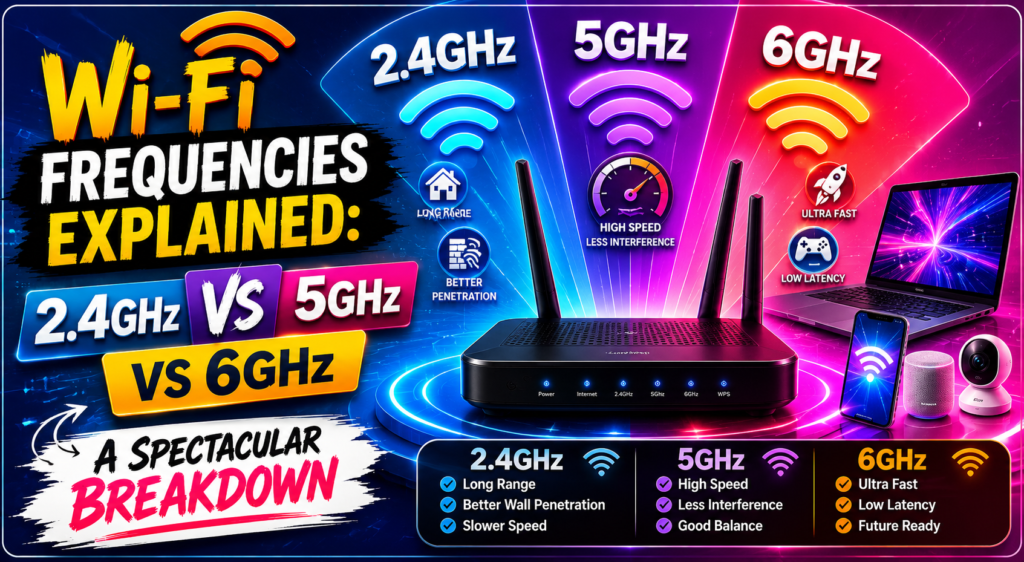
When you look at your home router settings, you are typically confronted with a choice between three distinct options: 2.4 GHz, 5 GHz, and the newly liberated 6 GHz spectrum. Gaining a complete grasp of how these wireless frequency bands operate will completely change how you configure your hardware. This definitive guide breaks down the science behind wireless spectrum differences, analyzes the 2.4 GHz vs 5 GHz range capabilities, and highlights how to choose the absolute best pathway for every single device in your smart home.
The Physics of Radio Waves: Understanding Gigahertz and Wavelengths
To truly understand how different radio channels operate, we have to look briefly at the core physics of wireless communication. The term gigahertz (GHz) refers to billions of cycles per second. This metric defines the speed at which an electromagnetic wave oscillates through the air.
There is a fundamental rule in physics that dictates all wireless data transmission: the higher the frequency, the shorter the wavelength. Conversely, a lower frequency results in a much longer wavelength.
Low Frequency (2.4 GHz)  ──► Longer Wavelength ──► Passes through obstacles easily
High Frequency (5 / 6 GHz) ──► Shorter Wavelength ──► Blocked by obstacles easily
This structural rule creates a massive trade-off between speed and physical distance. A longer wavelength can travel long distances and pass through thick walls, solid furniture, and heavy doors without losing much energy. A shorter wavelength vibrates at a hyper-fast rate, meaning it can carry vastly more information over a short distance, but it loses energy rapidly when it hits a physical object. This loss of signal strength through obstacles is known as attenuation, and it is the primary reason why different frequencies behave so differently inside your living room.
The Workhorse Lane: The 2.4 GHz Spectrum (1997 – 2009)
The 2.4 GHz band is the historic foundation of commercial wireless networking. When the very first consumer routers hit the retail market in the late 1990s, they operated almost exclusively on this specific block of the radio spectrum.
Unmatched Physical Range
The defining advantage of the 2.4 GHz channel is its incredible physical coverage footprint. Because its waves are relatively long, it excels at wall penetration Wi-Fi performance. If you need an internet connection to travel from a router in your downstairs living room, pass through a plaster ceiling, and reach a bedroom laptop at the far end of the hallway, 2.4 GHz is historically the channel that makes it happen.
The Congestion Crisis
However, because this band has been around for decades, it has become an absolute nightmare of network congestion. The 2.4 GHz block is incredibly narrow, providing very little total bandwidth. It is divided into just 11 channels in North America, and only three of those channels (1, 6, and 11) do not suffer from overlapping channels interference.
To make matters worse, computers are not the only things using this space. Baby monitors, Bluetooth speakers, wireless garage door openers, microwave ovens, and your neighbors’ overlapping home networks all dump radio noise into this exact same lane. This immense noise creates severe signal degradation, leading to frequent packet loss and sluggish speeds.
The Speed Demon: The 5 GHz Spectrum (2009 – 2020)
As the internet evolution advanced into the 2010s, the tech industry faced a crisis. Millions of new smartphones and tablets were completely choking the narrow 2.4 GHz highway. The engineering solution arrived with the widespread rollout of dual-band vs tri-band routers that utilized the 5 GHz spectrum.
Blinding Throughput
The 5 GHz band operates on a much wider block of space. It provides up to 24 non-overlapping channels, meaning your router can easily find a clean path free from neighborly interference. Because the waves vibrate at a much faster rate, the total data throughput is vastly superior to the older standard. It allows for seamless high-definition video streaming and rapid cloud data transfers.
The Range Limitation
The major drawback here is a severe vulnerability to physical obstacles. The shorter waves of the 5 GHz frequency suffer from rapid attenuation. A standard interior drywall partition or a glass mirror can severely block a 5 GHz signal. If your device does not have a direct, clear line of sight to the router, you will notice a rapid drop-off in connection quality as you walk into a different room.
The New Frontier: The 6 GHz Spectrum (2020 – 2026)
This brings us to the absolute pinnacle of modern wireless engineering. In 2020, global regulatory bodies took the historic step of opening up a massive, pristine block of radio space: the 6 GHz spectrum. This development completely revolutionized how modern premium devices communicate.
Unprecedented Bandwidth
The 6GHz Wi-Fi benefits are truly staggering. This frequency band opens up a massive chunk of wireless territory, adding 14 additional 80 Hz channels and 7 ultra-wide 160 MHz channels. To put that in perspective, it is like taking a congested two-lane city street and instantly building a wide, completely empty fourteen-lane superhighway right next to it.
[2.4 GHz Highway] ──► Narrow, crowded, filled with slow trucks
[5.0 GHz Highway] ──► Faster, wider, but experiences some cross-traffic
[6.0 GHz Highway] ──► Massive, pristine, exclusive express lane for modern devices
Absolute Zero Interference
The absolute best part of the 6 GHz band is that legacy devices cannot access it. Older laptops, primitive smart plugs, and ancient tablets are physically incapable of connecting to this lane. This creates an exclusive, ultra-clean environment completely free from traditional channel interference, making it the uncontested best frequency for gaming and real-time virtual reality streaming.
Technical Comparison of the Three Wireless Highways
To help home networkers optimize their hardware layouts, modern client chipsets run localized scripts to continuously monitor performance metrics across these different lanes. The following Python simulation demonstrates how an automated client adapter evaluates signal parameters to select the most efficient option among the available wireless frequency bands:
Python
def optimize_frequency_selection(distance_meters, current_latency_ms, client_type):
    """Simulates router logic selecting the best wireless frequency band."""
    print(f"Evaluating Client: Type=[{client_type}], Distance={distance_meters}m, Latency={current_latency_ms}ms")

    # Critical evaluation loop based on real-world physics constraints
    if distance_meters > 20:
        return "Route to 2.4 GHz Band: Maximizing physical range, ignoring high latency."
    elif 8 < distance_meters <= 20:
        if client_type in ["Gaming_PC", "4K_Smart_TV"]:
            return "Route to 5 GHz Band: Balancing wall penetration with solid throughput."
        else:
            return "Route to 2.4 GHz Band: Offloading low-priority traffic to save bandwidth."
    else:
        if client_type == "Gaming_PC" and current_latency_ms < 15:
            return "Route to 6 GHz Band: Activating pristine, ultra-low latency express lane."
        else:
            return "Route to 5 GHz Band: Maintaining high-speed line-of-sight connectivity."

# Simulating an advanced desktop gaming rig positioned close to a tri-band router
device_profile = "Gaming_PC"
range_to_access_point = 3
measured_lag = 8

selected_route = optimize_frequency_selection(range_to_access_point, measured_lag, device_profile)
print(f"Optimal Network Assignment: {selected_route}")
To see how these physical properties translate into performance differences under real-world conditions, let us analyze their specific characteristics side by side:
| Frequency Band | Max Theoretical Speed | Wall Penetration Power | Channel Congestion Level | Primary Ideal Use Case |
|---|---|---|---|---|
| 2.4 GHz | Up to 450-600 Mbps | Extremely High | Severe (Microwaves, Smart Plugs) | Smart Home IoT, Long Range Browsing |
| 5 GHz | Up to 1.3-3.4 Gbps | Moderate | Low to Medium | 4K Streaming, Everyday Workstations |
| 6 GHz | Up to 9.6 Gbps+ | Very Low | Completely Clear (Pristine) | Competitive Gaming, VR, Heavy Data |
By analyzing this structural data, it becomes clear that which Wi-Fi frequency is best is a question that depends entirely on the specific location of your gadget and the type of data it needs to move.
Mapping the Evolution of Frequency Integration
The history of how these frequencies were given to the public highlights a spectacular journey of engineering evolution. To truly see how the industry adapted to consumer data demands, we can chart the emergence of these bands along the historical timeline of international networking rules.
Learning about wi-fi standards explained by industry groups shows that the technology moved through careful generational steps. In 1999, the release of 802.11b introduced the world to basic 2.4 GHz consumer links. A decade later, in 2009, 802.11n brought true dual-band routing into mainstream households, allowing hardware to leverage both 2.4 GHz and 5 GHz simultaneously.
Today, the ongoing rollout of wi-fi 6 vs wi-fi 6e vs wi-fi 7 hardware represents the pinnacle of this timeline. Wi-Fi 6E formally unlocked the 6 GHz territory, while Wi-Fi 7 introduces features that allow modern smartphones to bind multiple wireless frequency bands together into a single, cohesive ultra-connection.
How Data Packets Navigate the Invisible Airwaves
No matter which specific road your data travels on, the foundational science behind the transmission remains beautifully consistent. Deeply analyzing how wi-fi works reveals that your router takes digital binary files, cuts them into tiny, standardized digital packets, and encodes them onto radio waves using an internal transmitter.
When these waves travel through your home, they are caught by the internal antenna array of a laptop or smart television. The built-in transceiver decoding chip instantly reverses the process, turning the physical wave back into clean computer language. By organizing these signals across multiple distinct frequencies, modern hardware ensures that your kitchen microwave won’t accidentally corrupt a vital business presentation moving through your home office space.
Optimizing Your Household Strategy: What Device Goes Where?
Now that you possess the advanced scientific knowledge regarding how these different radio waves behave, you can audit your home network to unlock maximum performance.
The 2.4 GHz Dumping Ground
You should deliberately configure your slow, low-priority gadgets to use the 2.4 GHz lane. Smart light bulbs, security cameras, robot vacuums, and smart refrigerators do not require gigabit speeds to operate. Moving these low-bandwidth smart home accessories to the 2.4 GHz band keeps them out of the way, preventing them from clogging up the high-speed lanes.
The 5 GHz Production Lane
Your primary daily electronics, such as work laptops, tablets, and 4K streaming televisions, should be locked onto the 5 GHz band. This gives them the massive bandwidth they need to stream video and upload large work documents without experiencing the wireless slowdowns typical of the crowded 2.4 GHz spectrum.
The 6 GHz VIP Lounge
If you own a modern gaming desktop, a high-end smartphone, or a virtual reality headset that supports Wi-Fi 6E or Wi-Fi 7, you must connect them directly to the 6 GHz channel. Keeping these latency-sensitive devices in this completely clear lane eliminates lag entirely, ensuring maximum throughput. For a deeper breakdown of the underlying physical architecture supporting this separation, reading an analysis on what is wi-fi explained can help you fine-tune your internal router settings to manage these assignments automatically.
Frequently Asked Questions (FAQs)
Which wireless frequency band is best for online gaming?
The 6 GHz frequency band is definitively the absolute best choice for online gaming, followed closely by the 5 GHz band. The 6 GHz lane is completely pristine and free from the radio interference caused by older electronics, which drastically reduces your ping times and eliminates sudden spikes in latency. You should avoid playing competitive games on the 2.4 GHz band at all costs.
Can an older laptop connect to a newer 6 GHz wireless network?
No, older legacy electronics that lack the specialized physical chipsets and antenna hardware cannot detect or connect to a 6 GHz network. However, modern tri-band routers maintain full backward compatibility, meaning they will continue to broadcast standard 2.4 GHz and 5 GHz signals alongside the 6 GHz channel so your older devices can still connect safely.
Why does my 5 GHz connection drop completely when I go out into the backyard?
The 5 GHz frequency uses much shorter radio wavelengths than the 2.4 GHz band. Because of basic laws of physics, these shorter waves suffer from high attenuation, meaning they lose energy incredibly fast when they are forced to pass through dense obstacles like thick brick exterior walls, insulation, glass sliding doors, and structural concrete pillars.
Is it safe to leave multiple frequency bands turned on simultaneously on my router?
Yes, it is highly recommended to leave all available frequency bands enabled. Modern smart routers are engineered to use a feature called band steering. This technology broadcasts a single unified network name across your house, automatically analyzing the distance and hardware capabilities of your devices to assign them to the absolute best frequency lane in real-time.
Conclusion: Mastering the Invisible Infrastructure
When we look back at the incredible journey of how wireless networking has scaled over the decades, it is obvious that the expansion of wireless frequency bands is a true masterpiece of modern engineering. We have successfully taken a chaotic, noisy radio spectrum and mapped it out into a hyper-efficient, multi-tiered digital transit system.
By understanding the key differences between the long-range resilience of 2.4 GHz, the high-speed performance of 5 GHz, and the pristine clarity of 6 GHz, you hold the keys to maximizing your home network’s potential. The next time you enjoy a flawless, lag-free digital experience, remember the invisible dance of wavelengths vibrating through the air around you, gracefully carrying the entirety of human knowledge straight to your fingertips.

