
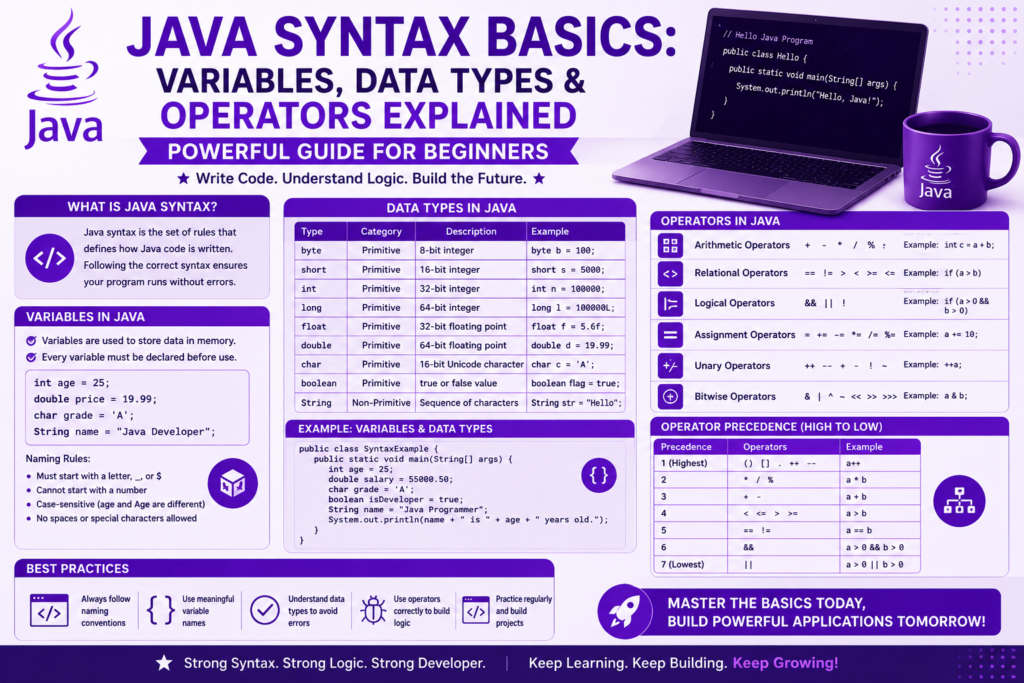
If you are stepping into the world of programming, understanding java syntax basics is the foundation that will support every project you ever build. Java is one of the most respected languages in the world, powering banking systems, Android apps, cloud platforms, and enterprise software. But before you can write powerful applications, you must master the small building blocks: variables, data types, and operators. These three concepts form the heart of every Java program.
This guide is written for true beginners. You do not need any prior coding experience. By the end of this article, you will understand how Java stores information, how it performs calculations, and how it makes decisions. You will also see real code examples you can run on your own machine. Let us dive deep into the world of Java syntax and build a strong foundation that will serve you for years to come.
Why Java Syntax Basics Matter So Much
Java is a strongly typed language, which means every variable must have a clearly defined type before it can store any value. This is very different from languages like Python, where types are flexible. Java’s strict approach may feel slow at first, but it gives you compile time type safety, fewer runtime bugs, and cleaner code that scales beautifully in large projects.
Learning java syntax basics early sets the tone for your entire programming journey. The discipline you build here will help you write better code in any language you learn later. Java is also a major part of the future of software engineering, used in fintech, cloud systems, and Android development. The clearer your syntax foundation, the faster you will grow into advanced topics.
Before you write your first line of code, make sure your environment is ready. If you have not set up Java yet, check this how to install java guide to get everything working on your computer.
A Quick Look at Java Syntax History (1995 – 2026)
Java was created in 1995 by James Gosling and his team at Sun Microsystems. From day one, the language was designed to be readable, predictable, and portable. Its syntax was inspired by C and C++, but it removed many of the dangerous features of those languages, such as manual memory management and pointers.
Over the years, java syntax basics have stayed remarkably consistent. A program written in 1998 still looks familiar to a developer in 2026. However, Java has added powerful new features such as lambda expressions, var keyword for local variables, records, switch expressions, and pattern matching. These additions make modern Java cleaner and more expressive while keeping the original structure intact.
If you want a fascinating look at how it all began, this java history: 1991 to today journey shows how Java grew from a small experimental language into a global powerhouse.
The Structure of a Java Program
Every Java program follows a clear structure. Code lives inside classes, and execution begins inside a special method called main. Here is the simplest possible Java program:
javaRun CodeCopy codepublic class HelloWorld {
    public static void main(String[] args) {
        System.out.println("Welcome to Java!");
    }
}
Let us break this down. The word class defines a blueprint. The keyword public means the class is accessible from anywhere. The method main is the entry point. System.out.println prints text to the screen. Every statement ends with a semicolon. Curly braces group code into blocks.
This structure is the heart of java syntax basics. Once you understand it, you can read almost any Java program with confidence.
Java Variable Declaration and Naming Rules
A variable is a named container that stores a value. In Java, you must declare a variable before using it, and you must specify its type. This is called Java variable declaration. Here is an example:
javaRun CodeCopy codeint age = 25;
double price = 19.99;
String name = "Alex";
boolean isActive = true;
Java naming conventions code follows clear rules. Variable names start with a lowercase letter and use camelCase, such as userName or totalPrice. Class names use PascalCase, such as BankAccount. Constants are written in uppercase with underscores, such as MAX_VALUE.
There are also keyword restrictions. You cannot use reserved words like class, public, int, or return as variable names. Variable names must start with a letter, dollar sign, or underscore. They cannot start with a number. Following these rules keeps your code clean, readable, and professional.
Variable scope rules also matter. A variable declared inside a method only exists inside that method. A variable declared inside a class is available to all methods of that class. Understanding scope early prevents many beginner bugs.
Primitive Data Types in Java
Java has eight primitive data types Java developers use every day. Each one has a specific purpose, memory consumption, and integer data bit width. Here is the complete list:
javaRun CodeCopy codebyte smallNumber = 100;          // 8 bit integer
short mediumNumber = 30000;      // 16 bit integer
int normalNumber = 1000000;      // 32 bit integer
long bigNumber = 9999999999L;    // 64 bit integer

float decimal1 = 3.14f;          // 32 bit floating point
double decimal2 = 3.141592653;   // 64 bit floating point

char letter = 'A';               // single character
boolean isReady = true;          // true or false
Each type has limits. A byte can store values from minus 128 to 127. An int can store values up to about 2.1 billion. A long handles huge numbers. Floating point numbers handle decimals, with double offering more precision than float.
Character literals are written with single quotes, like ‘A’ or ‘9’. Strings are written with double quotes, like “Hello”. Boolean logic evaluation only allows two values, true or false, which makes it perfect for decisions and conditions.
Understanding how to use data types in Java is essential because choosing the right type saves memory and improves performance. For most beginner projects, int, double, boolean, and String will cover almost everything you need.
Strings and String Concatenation in Java
Strings are not primitives. They are objects that represent text. Java makes working with strings easy and powerful. Here is a simple example of string concatenation Java developers use every day:
javaRun CodeCopy codeString firstName = "John";
String lastName = "Doe";
String fullName = firstName + " " + lastName;

System.out.println("Hello, " + fullName + "!");
The plus sign joins strings together. You can also combine strings with numbers, and Java will automatically convert the number to text:
javaRun CodeCopy codeint age = 30;
System.out.println("Age: " + age);
Modern Java also offers powerful tools like String.format and text blocks for multi line strings:
javaRun CodeCopy codeString message = """
        Welcome to Java!
        This is a multi line string.
        """;
These features make java syntax basics feel modern and enjoyable to write.
Declaring Constants in Java
Sometimes you want a value that never changes. This is where declaring constants in Java becomes important. You use the final keyword:
javaRun CodeCopy codefinal double PI = 3.14159;
final int MAX_USERS = 100;
final String COMPANY = "TechCorp";
Once a final variable is assigned, it cannot be changed. If you try, the compiler will give you an error. Constants make code safer, clearer, and easier to maintain. They are widely used in professional Java development.
Basic Operators in Java
Operators are symbols that perform actions on variables and values. Java offers many categories of operators. Let us explore the most important ones.
Arithmetic expressions Java uses include addition, subtraction, multiplication, division, and modulus:
javaRun CodeCopy codeint a = 10;
int b = 3;

System.out.println(a + b); // 13
System.out.println(a - b); // 7
System.out.println(a * b); // 30
System.out.println(a / b); // 3
System.out.println(a % b); // 1 (remainder)
Assignment operators guide your value updates. The most common is the simple equals sign, but there are also compound assignment operators:
javaRun CodeCopy codeint x = 5;
x += 3;  // same as x = x + 3
x -= 2;  // same as x = x - 2
x *= 4;  // same as x = x * 4
x /= 2;  // same as x = x / 2
Relational operators example values produce true or false results. These are essential for decision making:
javaRun CodeCopy codeint score = 85;

System.out.println(score > 80);   // true
System.out.println(score < 50);   // false
System.out.println(score == 85);  // true
System.out.println(score != 90);  // true
Logical operators combine boolean values:
javaRun CodeCopy codeboolean hasTicket = true;
boolean isVIP = false;

System.out.println(hasTicket && isVIP); // false
System.out.println(hasTicket || isVIP); // true
System.out.println(!isVIP);             // true
Java also supports bitwise operations such as AND, OR, XOR, and shift operators. These are used in advanced topics like cryptography and low level programming. For beginners, you can revisit them later.
Operator Precedence Rules
When multiple operators appear in one expression, Java follows operator precedence rules to decide which runs first. Multiplication and division run before addition and subtraction. Parentheses always run first.
javaRun CodeCopy codeint result = 2 + 3 * 4;       // 14, not 20
int result2 = (2 + 3) * 4;    // 20
Always use parentheses when in doubt. They make your code clearer and prevent silent bugs.
Type Casting Methods in Java
Sometimes you need to convert one data type into another. Java offers two type casting methods: implicit and explicit.
Implicit casting happens automatically when converting a smaller type into a larger one:
javaRun CodeCopy codeint number = 100;
double bigger = number; // automatic
Explicit casting is required when converting from a larger type to a smaller one. You must tell Java you are sure about the conversion:
javaRun CodeCopy codedouble price = 99.99;
int rounded = (int) price; // 99
Casting is part of compile time type safety, which prevents accidental data loss and runtime errors. It is one of the reasons Java is so reliable for big systems.
Input From the User
Real programs often need user input. Java provides the Scanner class for this purpose:
javaRun CodeCopy codeimport java.util.Scanner;

public class InputDemo {
    public static void main(String[] args) {
        Scanner input = new Scanner(System.in);

        System.out.print("Enter your name: ");
        String name = input.nextLine();

        System.out.print("Enter your age: ");
        int age = input.nextInt();

        System.out.println("Hello " + name + ", you are " + age + " years old.");
    }
}
This small program shows how variables, data types, and operators work together to build something interactive. Once you understand input and output, you can start building real beginner projects.
A Complete Mini Project Using Java Syntax Basics
Let us combine everything we have learned into a small calculator program:
javaRun CodeCopy codeimport java.util.Scanner;

public class SimpleCalculator {
    public static void main(String[] args) {
        Scanner input = new Scanner(System.in);

        System.out.print("Enter first number: ");
        double num1 = input.nextDouble();

        System.out.print("Enter second number: ");
        double num2 = input.nextDouble();

        System.out.println("Sum: " + (num1 + num2));
        System.out.println("Difference: " + (num1 - num2));
        System.out.println("Product: " + (num1 * num2));
        System.out.println("Quotient: " + (num1 / num2));
    }
}
This program uses variables, primitive data types, operators, and string concatenation. It is a perfect example of how java syntax basics combine to create something useful. You can extend it by adding modulus, exponent, or even user choice menus.
If you want to grow beyond this point, exploring java control flow explained will teach you how to add if statements, switch cases, and loops to your programs. After that, the world of java oop concepts explained opens up, where you start building classes and objects like a real developer.
Modern learners can also speed up their journey by using the best free ai tools to explain confusing code, generate practice problems, and debug errors faster while you study.
Common Beginner Mistakes With Java Syntax
Even with a clean foundation, beginners often make small mistakes. Here are the most common ones to avoid.
- Forgetting semicolons at the end of statements
- Using single quotes for strings instead of double quotes
- Mixing up assignment with comparison, using = instead of ==
- Declaring variables without initializing them
- Ignoring case sensitivity, since myVar and MyVar are different
- Using reserved keywords as variable names
These tiny issues cause big confusion. Once you train your eyes to spot them, your speed and confidence will grow quickly.
Frequently Asked Questions (FAQs)
Is Java case sensitive?
Yes. Java treats myVariable and MyVariable as two different names. Always pay attention to capitalization when writing variable names, method names, and class names.
Do I need to declare a type for every variable?
In traditional Java, yes. However, modern Java allows you to use the var keyword for local variables, and Java will infer the type automatically. For beginners, explicit types are still recommended.
What is the difference between int and Integer?
int is a primitive data type. Integer is a wrapper class that turns int into an object. Wrapper classes are useful when working with collections and frameworks that require objects.
Why does Java use semicolons at the end of statements?
Semicolons tell the compiler that a statement is complete. Without them, Java cannot know where one instruction ends and another begins. They are part of the strict, predictable structure of the language.
Can I learn Java without learning syntax first?
Not really. Syntax is the foundation. Without it, you cannot write or read Java code. Once you master java syntax basics, everything else becomes much easier.
Conclusion
Mastering java syntax basics is the most important step in your programming journey. Variables, data types, and operators are the building blocks of every Java program you will ever write. They may seem small, but together they form the language that powers banks, hospitals, Android phones, and global cloud systems.
Take your time. Practice with small programs. Build calculators, converters, and tiny tools. Each time you write code, your understanding deepens, and your confidence grows. Java rewards patience and discipline with a career path that is stable, exciting, and full of opportunity. Your journey begins here, and the future is bright for every developer who learns these foundations well.