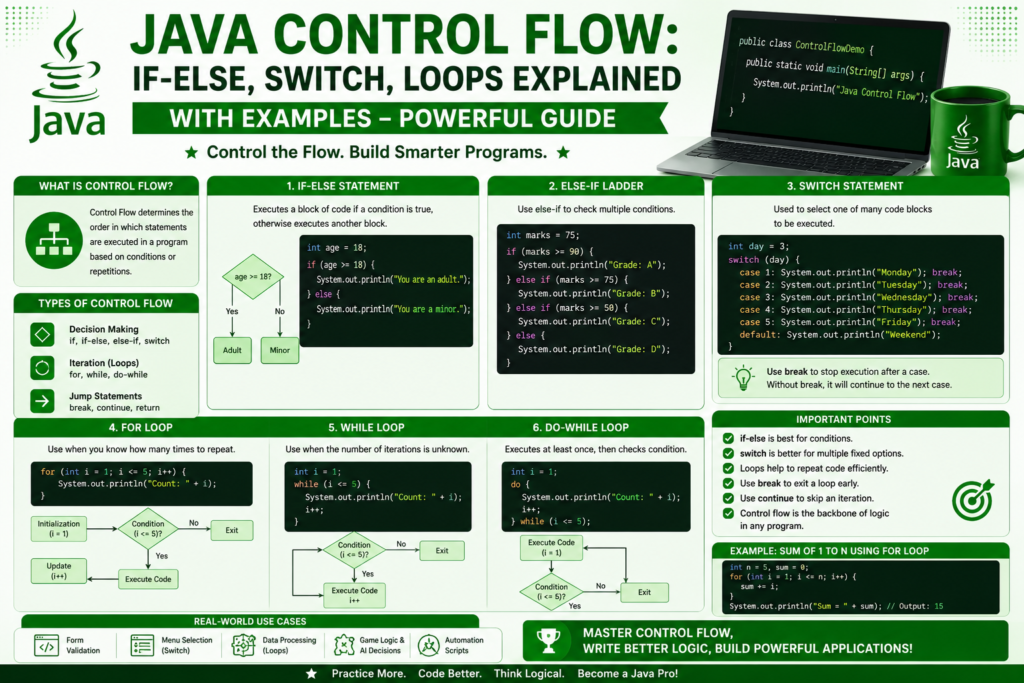
Every powerful program needs the ability to make decisions and repeat actions. That is exactly what java control flow allows you to do. Without it, your code would simply run from top to bottom, line by line, with no real intelligence. Control flow is what turns a basic script into a smart application that can react, decide, repeat, and adapt. If you are learning Java in 2026, mastering control flow is one of the most important steps in your journey.
This guide is written for beginners but packed with real examples that even intermediate developers will enjoy. You will learn how if else statements work, how switch handles multiple choices, how loops repeat tasks, and how modern Java has made all of this cleaner and more expressive. By the end, you will be able to write programs that think, choose, and respond like real software.
Why Java Control Flow Is the Heart of Every Program
Java control flow is the engine that drives logic in your code. It manages the code execution sequence, deciding which line runs next based on conditions and loops. Whether you are building a simple calculator or a massive enterprise system, control flow is always at the center.
Java is used in banking, Android development, cloud platforms, and fintech, all areas where decisions matter. A login system checks if a password is correct. A shopping cart calculates discounts based on conditions. A streaming app loops through millions of songs. These are all examples of control structures optimization at work. Learning java control flow gives you the power to build all of these features yourself.
If you are still setting up your environment, this how to install java guide will help you get ready. Once your tools are installed, you can run every example in this article on your own machine.
A Quick Look at Control Flow History (1995 – 2026)
When Java was released in 1995, it inherited its control flow structure from C and C plus plus. The classic if, else, switch, for, while, and do while statements were all there from day one. These foundations have stayed strong because they are simple, powerful, and predictable.
Over the years, Java has added modern improvements. Java 7 introduced strings in switch statements. Java 14 brought switch expressions, allowing cleaner syntax. Java 21 expanded structural pattern matching, making switch even more powerful. Even with all these upgrades, the core of java control flow remains familiar to anyone who learned it decades ago. That stability is one reason Java is still a giant in the future of software engineering.
The If Statement in Java
The most basic form of decision making in Java is the if statement. It runs a block of code only when a condition is true. Here is a simple example:
javaRun CodeCopy codeint age = 18;

if (age >= 18) {
    System.out.println("You are an adult.");
}
The condition inside the parentheses is a boolean expression analysis. If it evaluates to true, the code inside the curly braces runs. If it is false, the block is skipped completely.
You can also handle the opposite case with else:
javaRun CodeCopy codeint score = 45;

if (score >= 50) {
    System.out.println("You passed the test.");
} else {
    System.out.println("You need to try again.");
}
This is the foundation of conditional statements in Java. Once you understand if and else, you can build real logic in any program.
Else If and Multiple Conditions
Real applications often need to check several conditions in order. That is where else if comes in. Here is a grading system example:
javaRun CodeCopy codeint marks = 78;

if (marks >= 90) {
    System.out.println("Grade: A");
} else if (marks >= 80) {
    System.out.println("Grade: B");
} else if (marks >= 70) {
    System.out.println("Grade: C");
} else if (marks >= 60) {
    System.out.println("Grade: D");
} else {
    System.out.println("Grade: F");
}
Java reads these conditions one by one. As soon as a condition is true, that block runs and the rest are skipped. This is called evaluation short circuiting, and it makes your code faster and cleaner.
You can also combine conditions using logical operators. The AND operator is written as double ampersand, and the OR operator is written as double pipe:
javaRun CodeCopy codeint age = 25;
boolean hasLicense = true;

if (age >= 18 && hasLicense) {
    System.out.println("You can drive.");
}
This is conditional evaluation Java developers use every single day in real applications.
Nested If Statements
Sometimes you need to check a condition inside another condition. This is called nested control flow statements. Here is an example:
javaRun CodeCopy codeint age = 20;
boolean hasID = true;

if (age >= 18) {
    if (hasID) {
        System.out.println("Entry allowed.");
    } else {
        System.out.println("Please bring your ID.");
    }
} else {
    System.out.println("Sorry, you are too young.");
}
Nested logic conditions are powerful but should be used carefully. Too many nested blocks can make code hard to read. A clean alternative is to combine conditions with logical operators when possible.
The Switch Statement in Java
When you have many possible values for a single variable, the switch statement is often cleaner than a long chain of else if blocks. Here is how to use switch case Java style:
javaRun CodeCopy codeint day = 3;

switch (day) {
    case 1:
        System.out.println("Monday");
        break;
    case 2:
        System.out.println("Tuesday");
        break;
    case 3:
        System.out.println("Wednesday");
        break;
    case 4:
        System.out.println("Thursday");
        break;
    case 5:
        System.out.println("Friday");
        break;
    default:
        System.out.println("Weekend");
}
The break keyword stops the switch from continuing into the next case. The default block runs when no case matches. Switch works with int, char, String, and enum types.
Modern Switch Expressions in Java
Since Java 14, you can use switch expressions modern Java offers, which are cleaner and more powerful:
javaRun CodeCopy codeint day = 3;

String name = switch (day) {
    case 1 -> "Monday";
    case 2 -> "Tuesday";
    case 3 -> "Wednesday";
    case 4 -> "Thursday";
    case 5 -> "Friday";
    default -> "Weekend";
};

System.out.println(name);
This new style removes the need for break statements and returns a value directly. It is part of structural pattern matching improvements that make modern Java elegant and concise. If you want to dig deeper into modern Java features, this future of java & what’s coming preview is a great place to explore.
The For Loop in Java
Loops are the second half of java control flow. They let you repeat actions without writing the same code over and over. The most common loop is the for loop. Here is an example that prints numbers from 1 to 5:
javaRun CodeCopy codefor (int i = 1; i <= 5; i++) {
    System.out.println("Number: " + i);
}
A for loop has three parts inside the parentheses. The first is initialization, the second is the condition, and the third is the update. The variable i is used for index tracking, helping you know which iteration you are on.
You can also count down or jump in steps:
javaRun CodeCopy codefor (int i = 10; i >= 1; i--) {
    System.out.println("Countdown: " + i);
}

for (int i = 0; i <= 20; i += 2) {
    System.out.println("Even: " + i);
}
Loop iteration count and direction give you complete control over how many times your code runs.
The Enhanced For Loop
When you want to go through every item in an array or collection, the enhance for loop Java provides is the cleanest option:
javaRun CodeCopy codeString[] fruits = {"Apple", "Banana", "Mango", "Orange"};

for (String fruit : fruits) {
    System.out.println(fruit);
}
This loop reads each item one by one without needing an index. It is perfect for situations where you do not care about position, only about the values themselves.
The While Loop in Java
The while loop repeats as long as a condition is true. It is great when you do not know in advance how many times you need to loop. Here is an example:
javaRun CodeCopy codeint count = 1;

while (count <= 5) {
    System.out.println("Count is: " + count);
    count++;
}
While and for loops Java developers use are often interchangeable, but while shines when the number of iterations depends on user input or external conditions. For example:
javaRun CodeCopy codeimport java.util.Scanner;

public class GuessGame {
    public static void main(String[] args) {
        Scanner input = new Scanner(System.in);
        int secret = 7;
        int guess = 0;

        while (guess != secret) {
            System.out.print("Guess a number: ");
            guess = input.nextInt();
        }

        System.out.println("You got it!");
    }
}
This little game uses iteration control flow to keep asking until the user wins.
The Do While Loop
A do while loop example is similar to a while loop, but it always runs at least once because the condition is checked at the end:
javaRun CodeCopy codeimport java.util.Scanner;

public class MenuDemo {
    public static void main(String[] args) {
        Scanner input = new Scanner(System.in);
        int choice;

        do {
            System.out.println("1. Start");
            System.out.println("2. Settings");
            System.out.println("3. Exit");
            System.out.print("Enter choice: ");
            choice = input.nextInt();
        } while (choice != 3);

        System.out.println("Goodbye!");
    }
}
This is perfect for menus, login prompts, and confirmation dialogs where you always need to show something at least once.
Loop Control Keywords: Break and Continue
Two loop control keywords are essential for managing how loops behave. The break keyword stops a loop immediately. The continue keyword skips the current iteration and moves on to the next one.
javaRun CodeCopy codefor (int i = 1; i <= 10; i++) {
    if (i == 5) {
        break;
    }
    System.out.println(i);
}
This prints numbers from 1 to 4, then stops. Now compare with continue:
javaRun CodeCopy codefor (int i = 1; i <= 10; i++) {
    if (i % 2 == 0) {
        continue;
    }
    System.out.println(i);
}
This prints only odd numbers because even numbers are skipped. These two keywords give you fine grained code branching efficiency.
Infinite Loops and How to Debug Them
Sometimes a loop runs forever because its condition never becomes false. This is called an infinite loop. Infinite loops debugging is an important skill for every developer. Here is an example of a bad loop:
javaRun CodeCopy codeint i = 1;
while (i > 0) {
    System.out.println(i);
    i++;
}
This loop never ends because i keeps growing. To fix it, you must make sure the condition will eventually become false. Always double check your loop variables and update statements. When debugging, you can press the stop button in your IDE or use Ctrl plus C in the terminal.
A Mini Project Using Java Control Flow
Let us combine everything we have learned into a small interactive program:
javaRun CodeCopy codeimport java.util.Scanner;

public class NumberAnalyzer {
    public static void main(String[] args) {
        Scanner input = new Scanner(System.in);

        System.out.print("How many numbers do you want to check? ");
        int count = input.nextInt();

        int positives = 0;
        int negatives = 0;
        int zeros = 0;

        for (int i = 1; i <= count; i++) {
            System.out.print("Enter number " + i + ": ");
            int number = input.nextInt();

            if (number > 0) {
                positives++;
            } else if (number < 0) {
                negatives++;
            } else {
                zeros++;
            }
        }

        System.out.println("Positives: " + positives);
        System.out.println("Negatives: " + negatives);
        System.out.println("Zeros: " + zeros);
    }
}
This program uses if else, loops, user input, and logic flow control statements. It is a perfect example of how java control flow brings programs to life.
Where to Go Next After Mastering Control Flow
Once you are comfortable with control flow, the next big step is learning how Java organizes data and behavior. A great starting point is java oop concepts explained where you discover classes, objects, inheritance, and polymorphism. After that, you can explore java arrays & collections guide to manage large amounts of data efficiently.
Modern learners can also speed up their progress with the best free ai tools that explain code, suggest improvements, and help debug tricky loops or conditions while you study.
Common Beginner Mistakes With Control Flow
Even strong learners make small mistakes. Here are the most common ones to avoid:
- Forgetting break in switch statements, causing fall through
- Using assignment equals instead of comparison double equals
- Creating loops without updating the loop variable, causing infinite loops
- Nesting too many if statements instead of using switch or combined conditions
- Mixing up && and || in complex boolean expressions
Awareness of these issues will save you hours of debugging and make your code much more reliable.
Frequently Asked Questions (FAQs)
What is the difference between if and switch in Java?
If statements handle complex boolean conditions, while switch is best for matching a single variable against many fixed values. Switch is often cleaner when you have many cases.
Can I use Strings in a switch statement?
Yes. Since Java 7, switch supports String values. This makes it useful for handling commands, menu choices, and configuration values.
Which loop should I use, for or while?
Use a for loop when you know how many times you want to repeat. Use a while loop when the number of repetitions depends on a condition that may change at runtime.
Are nested loops slow?
Nested loops can be slow if the data size is large because the total number of iterations multiplies. For most beginner projects, they are perfectly fine. Performance only becomes critical with very large datasets.
Why does my loop run forever?
This usually means the loop variable is not being updated, or the condition can never become false. Carefully check your loop logic and make sure each iteration moves toward an exit condition.
Conclusion
Mastering java control flow is one of the most rewarding milestones in your programming journey. With if else statements, switch expressions, and loops, you can build software that thinks, decides, and adapts to real world situations. These tools are the foundation of every Java application, from small calculators to massive enterprise platforms.
Take your time with each concept. Write small programs, break them, fix them, and improve them. The more you practice control flow, the more natural it becomes. Soon you will be writing logic that feels effortless, and you will be ready to tackle bigger topics like object oriented programming, collections, and real world projects. Your journey into Java is just beginning, and the future is bright for every developer who builds a strong foundation here.