
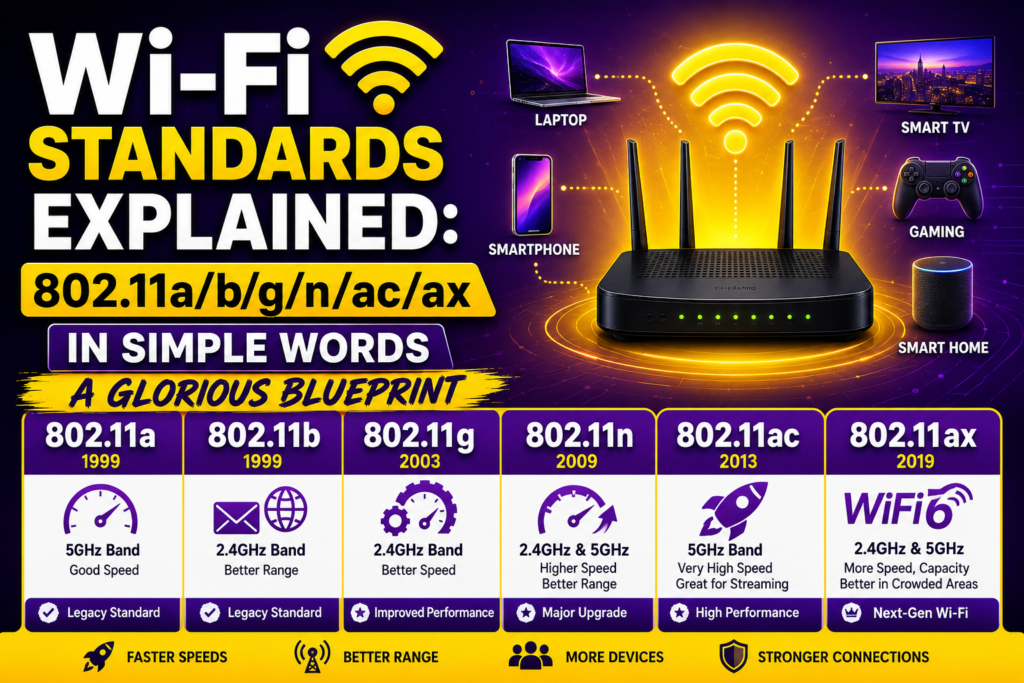
The modern home functions as a thriving ecosystem of invisible digital traffic. While you relax on the living room couch streaming a high definition movie, a smart security camera uploads footage to the cloud, a computer downloads a large software patch, and a smartphone scrolls through social media feeds. This entire web of connection relies completely on local wireless standards to operate without collapsing into a chaotic mess of dropped data.
For the average consumer, looking at the back of a newly purchased network router can feel incredibly intimidating. You are often confronted with a confusing string of letters and numbers like 802.11ac or 802.11ax. These aren’t just arbitrary pieces of corporate jargon. They represent the actual rulebooks that govern how your devices talk to each other across the airwaves.
Gaining a clean, clear mastery over these local wireless standards completely removes the mystery from your home network hardware. It helps you understand exactly what your devices are capable of doing. This ultimate guide will break down the entire history of these wireless protocols, explain the practical real world differences between older Wi-Fi standards, and show you how to optimize your hardware layout to unlock incredible connection speeds.
The Birth of the Rulebook and the IEEE Committee
Before diving into the specific alphabet soup of wireless protocols, we need to understand who sets the rules. Every wireless router in the world transmits data using radio frequencies. If there were no centralized laws dictating exactly when and how a device could transmit, different computers would constantly blast over each other, causing complete signal destruction.
To prevent this digital warfare, an international engineering group called the IEEE committee stepped in. This collective manages the technical standards for all sorts of electrical components. They assigned the specific number “802.11” to classify all local area wireless networking technologies.
Every time engineers develop a massive breakthrough that increases maximum throughput or improves signal stability, they append a new letter to that baseline 802.11 number. This systematic list of Wi-Fi standards serves as a direct timeline of the internet evolution itself, tracking our journey from slow dial up speeds to hyper fast multi gigabit paths.
The Early Pillars of Wireless Networking (1997 – 2003)
The journey of modern local wireless standards officially stepped out of the research labs and into the commercial market at the tail end of the twentieth century. This early era established the core foundations that we still rely on today.
Legacy 802.11 (1997)
This was the absolute baseline architecture published by the IEEE group. It operated on the 2.4 GHz radio band and delivered an original Wi-Fi speed of just 2 megabits per second. While it was an incredible scientific milestone, it lacked the bandwidth capacity to handle heavy web browsing, causing it to quickly disappear from retail shelves.
The Twin Paths: 802.11b and 802.11a (1999)
In 1999, the committee made a major development push, resulting in two distinct wireless naming conventions arriving on the market simultaneously.
The 802.11b standard quickly became the definitive king of the consumer market. It stuck to the affordable 2.4 GHz frequency and boosted data rates up to 11 megabits per second. This was the exact protocol that Apple integrated into its early laptops, sparking the original explosion of residential wireless network history.
Conversely, 802.11a was targeted strictly at high end corporate office buildings. It moved to the completely uncrowded 5 GHz frequency band and achieved a maximum throughput of 54 megabits per second. However, because it used higher frequencies, its waves suffered from terrible wall penetration power, meaning it required an expensive infrastructure layout to cover an office floor.
Bringing High Speeds to the Mainstream (2003 – 2009)
As the mid-2000s arrived, the world wide web shifted from static text pages to media rich platforms filled with downloadable music tracks and digital images. The existing 802.11b networks were buckling under consumer data demands, forcing a major technical upgrade.
The solution arrived in the summer of 2003 with the formal ratification of the 802.11g standard. This release represented a massive triumph for local wireless standards because it elegantly combined the absolute best features of both previous formats.
[802.11b: 11 Mbps at 2.4 GHz] ──┐
                                ├──► [802.11g: 54 Mbps at 2.4 GHz]
[802.11a: 54 Mbps at 5.0 GHz] ──┘
The 802.11g standard operated on the highly compatible 2.4 GHz frequency band, meaning it kept excellent range across a house. However, by using a highly advanced digital modulation scheme, it boosted the raw speed up to 54 megabits per second.
Crucially, it maintained absolute backward compatibility with older legacy hardware. This meant a family could purchase a brand new 802.11g router without being forced to throw away their older 802.11b laptops, setting a permanent standard for consumer friendly hardware transitions.
The Dual-Band Revolution and the Introduction of MIMO (2009 – 2014)
By the end of the decade, a massive technological wave changed civilization: the modern smartphone. Suddenly, instead of a home having just one wireless computer, every single family member carried an active radio receiver inside their pocket. The 2.4 GHz band became incredibly crowded, leading to severe channel interference from nearby electronics and household appliances.
The industry answered this crisis in 2009 with the release of the 802.11n protocol. This standard introduced a massive suite of hardware upgrades that fundamentally altered how wireless data transmission operates.
First, 802.11n brought true dual-band routing to the public. Routers could now broadcast on both the 2.4 GHz and 5 GHz bands at the exact same time. Second, it introduced Multiple Input, Multiple Output (MIMO) technology. Instead of using a single internal antenna to transmit data packets, hardware could now utilize multiple antennas to send distinct spatial streams through the air simultaneously.
To see how modern computer networks analyze these incoming spatial streams to confirm that data rates remain perfectly stable, we can look at the underlying logic running inside device firmware. Below is a clean Python simulation showing how a network adapter tracks multiple antennas to manage connection stability:
Python
def evaluate_mimo_streams(antenna_count, signal_loss_ratio):
    """Simulates how a wireless receiver processes multiple data streams."""
    print(f"Initializing stream check across {antenna_count} active antenna paths...")

    # Baseline calculations for local wireless standards throughput
    base_stream_speed_mbps = 150
    total_theoretical_throughput = antenna_count * base_stream_speed_mbps

    # Calculate real-world efficiency after factoring in environmental signal loss
    actual_efficiency = 1.0 - signal_loss_ratio
    real_world_throughput = total_theoretical_throughput * actual_efficiency

    if real_world_throughput > 300:
        return f"Optimal: Running {antenna_count} spatial streams. Clean performance at {real_world_throughput:.1f} Mbps."
    elif 100 <= real_world_throughput <= 300:
        return f"Stable: Minor attenuation detected. Operating at {real_world_throughput:.1f} Mbps."
    else:
        return "Fallback: High interference. Reducing data rates to legacy protocols for protection."

# Simulating a high-end 802.11n device using 3 distinct internal antennas
active_antennas = 3
measured_interference = 0.15
network_status = evaluate_mimo_streams(active_antennas, measured_interference)
print(f"Hardware Performance Log: {network_status}")
This engineering leap pushed the boundaries of legacy Wi-Fi protocols, allowing real-world data speeds to climb up to a blistering 600 megabits per second under ideal conditions.
Entering the Gigabit Era: The Power of 802.11ac (2014 – 2019)
As high-definition 4K video streaming and massive digital video game downloads became the norm, networks required desktop grade performance without physical cables. The engineering answer arrived in 2014 with the rollout of 802.11ac (which was later retroactively designated as Wi-Fi 5).
The 802.11ac standard focused almost all its engineering tricks on maximizing the 5 GHz frequency band. It widened the maximum channel bandwidth capacity from 40 MHz up to 80 MHz and even 160 MHz. It also expanded the MIMO framework into MU-MIMO (Multi-User MIMO), allowing a router to broadcast data to multiple independent devices simultaneously rather than making them wait in a hyper fast queue.
By pushing the limits of wave modulation, Wi-Fi 5 officially broke through the gigabit speed barrier. This milestone turned commercial wireless technology into a viable replacement for traditional physical desktop ethernet lines.
Solving the Density Crisis: The Power of 802.11ax (2019 – 2024)
By the turn of the decade, the primary technical problem was no longer raw speed for a single laptop. Instead, the major challenge was managing device density. A typical modern smart household now contained dozens of smart TVs, smart light bulbs, voice assistants, and cell phones all fighting for a connection.
To fix this crowded environment problem, the IEEE committee rolled out 802.11ax, universally marketed as Wi-Fi 6. When performing an 802.11ac vs 802.11ax head-to-head comparison, the difference lies entirely in overall network efficiency.
Wi-Fi 6 introduced an enterprise cellular technology called OFDMA (Orthogonal Frequency Division Multiple Access). This method splits a single wireless channel into thousands of tiny sub-channels, allowing a router to deliver data packets to dozens of different low power smart home accessories in a single transmission wave.
Soon after, regulatory groups unlocked a pristine block of radio space: the 6 GHz frequency band. This gave birth to Wi-Fi 6E, providing an exclusive, incredibly wide express lane completely free from the environmental noise of older household electronics.
Simplifying the Jargon: The Modern Wi-Fi Generation Names
Realizing that the average consumer was completely lost trying to figure out if an 802.11ac router was better than an 802.11ax model, the Wi-Fi Alliance made a brilliant branding decision. They threw away the complicated technical lettering system for consumer marketing materials and introduced clean, simplified generation numbers.
This numerical system makes understanding 802.11 compatibility incredibly easy for everyday shoppers. To see how these user friendly marketing names map directly to the official engineering terms, let us look at their structural characteristics side by side:
| Consumer Generation Name | IEEE Technical Standard | Launch Year | Max Theoretical Speed | Primary Radio Frequency |
|---|---|---|---|---|
| Wi-Fi 1 | 802.11b | 1999 | 11 Mbps | 2.4 GHz |
| Wi-Fi 2 | 802.11a | 1999 | 54 Mbps | 5.0 GHz |
| Wi-Fi 3 | 802.11g | 2003 | 54 Mbps | 2.4 GHz |
| Wi-Fi 4 | 802.11n | 2009 | 600 Mbps | 2.4 GHz / 5.0 GHz |
| Wi-Fi 5 | 802.11ac | 2014 | 3.5 Gbps | 5.0 GHz |
| Wi-Fi 6 / 6E | 802.11ax | 2019 | 9.6 Gbps | 2.4 GHz / 5.0 GHz / 6.0 GHz |
| Wi-Fi 7 | 802.11be | 2024 | 46 Gbps | 2.4 GHz / 5.0 GHz / 6.0 GHz |
This transparent numbering pattern ensures that any buyer can look at a retail box and instantly know that a higher number represents a newer, faster, and significantly more efficient piece of hardware.
The Modern Frontier and the Horizon of Wi-Fi 8 (2024 – Today)
This brings us directly to the present day in 2026, where the market is fully embracing the incredible capabilities of Wi-Fi 7 (802.11be), while laboratory teams are actively finalizing the next major leap: Wi-Fi 8 (802.11bn).
The current standard, Wi-Fi 7, utilizes Multi-Link Operation (MLO) to allow premium smartphones to connect to multiple local wireless standards frequencies simultaneously. This feature combines the range of 2.4 GHz with the blistering speed of 6 GHz into a single data pipeline.
Meanwhile, the emerging Wi-Fi 8 standard represents a fascinating shift in industry philosophy. Instead of chasing higher theoretical peak speeds that the human eye can no longer perceive, Wi-Fi 8 is focusing entirely on ultra high reliability. It introduces coordinated multi access point features, allowing your main router and mesh nodes to intelligently share radio channels using built-in artificial intelligence. This optimization maintains stable, latency free performance even when your home is packed with running smart appliances.
Deeply Decoding the Underlying Technology
No matter how advanced the generation number on your router box is, the deep scientific reality of how wi-fi works remains beautifully consistent across decades. Your residential router takes digital files from your modem, translates those files into a stream of binary ones and zeros, and uses an internal transceiver to modulate those numbers onto physical radio waves.
These waves spin through the physical structure of your house until they hit a target antenna inside a tablet or laptop. The client device’s internal hardware captures the wave energy, filters out the environmental background noise, and decodes the signal back into a clean digital format. By creating clear global rules for this process, the industry ensures that different generations of hardware can safely interact without dropping connection states.
Frequently Asked Questions (FAQs)
What does “802.11” actually mean in a Wi-Fi standard name?
The number 802.11 is a technical classification code assigned by the Institute of Electrical and Electronics Engineers (IEEE). The “802” represents the specific committee formed in February 1980 to standardize local area computer networks, while the “.11” is the specific subgroup dedicated exclusively to wireless radio technology.
Can an older Wi-Fi 4 smartphone connect to a brand new Wi-Fi 6 router?
Yes, absolutely. All modern wireless routers are engineered with strict backward compatibility rules built into their architecture. A new Wi-Fi 6 router will easily recognize an older Wi-Fi 4 device and automatically scale down its transmission protocols to a legacy format so the older device can browse the internet safely.
What is the main difference between Wi-Fi 6 and Wi-Fi 6E?
Both generations utilize the exact same 802.11ax standard protocol and offer identical peak speeds. The core difference is that Wi-Fi 6E unlocks an entirely new block of radio spectrum: the 6 GHz band. This additional spectrum provides an exclusive lane free from the channel congestion caused by older nearby electronics.
Why did the industry switch from letters like “ac” and “ax” to simple numbers?
The industry switched to numerical generations because the traditional engineering names were causing massive confusion for everyday consumers. Regular buyers couldn’t tell if an 802.11ac device was newer or faster than an 802.11n device. The clean generation numbers make it easy to see that Wi-Fi 6 is superior to Wi-Fi 5.
Conclusion: The Invisible Foundation of Modern Living
When you reflect on the incredible evolution of local wireless standards, you realize that wireless networking is one of the greatest collaborative achievements in human history. In less than thirty years, international engineering groups have successfully scaled data transmission rates by a factor of over twenty thousand, turning an unstable office experiment into a universal utility.
These strict engineering blueprints ensure that our digital world remains beautifully unified across different brands and eras. As we step deeper into an era defined by high speed smart cities, autonomous devices, and augmented reality, these invisible wireless rules will continue to quietly hold our civilization together, gracefully carrying the entire weight of human communication through thin air.

