
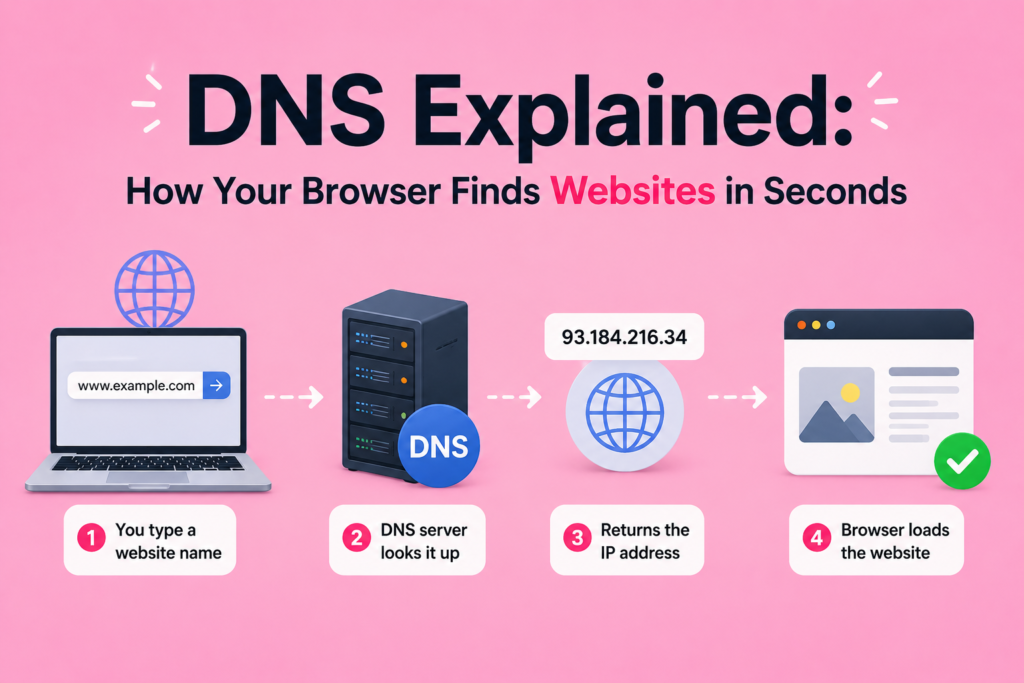
Every time you type a website address into your browser, something remarkable happens within milliseconds. This is where dns explained simply becomes essential to understand, since it reveals how your browser instantly locates the correct website among billions of possibilities. Without this system working quietly in the background, browsing the internet would be far slower and much more complicated.
Most people never think about dns explained in technical terms, yet this system powers nearly every online interaction, from checking email to streaming videos. This article breaks down dns explained step by step, covering how it works, its key components and why it remains a critical part of internet infrastructure.
What Is DNS and Why Does It Matter
To fully grasp dns explained, it helps to start with a simple analogy. The Domain Name System functions much like a phonebook for the internet. Instead of memorizing complicated numerical addresses, users can simply type a familiar domain name, and DNS translates it into the correct IP address behind the scenes.
Without this system, users would need to remember long strings of numbers for every single website they wanted to visit. Dns explained in this way highlights just how essential this technology is for making the internet accessible and user friendly for everyday people.
Domain Names and Their Structure
Understanding dns explained requires first understanding how domain names are structured. Every domain name includes a Top Level Domain, such as dot com or dot org, which appears at the end of the address. Before registering a domain name, individuals or businesses typically work with a domain registrar, an organization responsible for managing domain name registrations.
This structured naming system allows millions of unique domain names to exist without confusion, giving each website a distinct, memorable address that DNS can later translate into the correct destination through what is a computer network communication principles.
How DNS Lookup Actually Works
The core of dns explained lies in the DNS lookup process, a sequence of steps that happens almost instantly whenever you visit a website. When you type a domain name into your browser, your device first checks its own DNS cache to see if it already knows the corresponding IP address from a previous visit.
If the information is not cached locally, your device sends a request to a recursive resolver, which begins searching for the correct address. This resolver plays a central role in the DNS lookup process, coordinating communication between several different types of servers to locate the correct destination.
The Role of Root Servers and Nameservers
If the recursive resolver does not have the answer readily available, it contacts a root server, the starting point for resolving any domain name. The root server does not know the exact IP address, but it directs the resolver toward the appropriate Top Level Domain server, which manages information for specific domain extensions.
From there, the resolver reaches out to the correct nameserver, sometimes called an authoritative DNS server, which holds the actual IP address information for the requested domain. Understanding this hierarchy is essential to fully grasping dns explained from start to finish.
Understanding DNS Records and Zone Files
Every domain relies on specific DNS records stored within a zone file to direct traffic correctly. An A record maps a domain name directly to an IP address, while a CNAME record allows one domain to point to another. Additionally, an MX record directs email traffic to the correct mail server for a given domain.
These records work together within internet infrastructure, ensuring that requests for websites, emails and other services reach their intended destinations accurately and efficiently every single time a user makes a request.
DNS Caching and TTL Explained
To improve speed and reduce unnecessary requests, DNS relies heavily on caching. Once a device successfully resolves a domain name, it stores that information temporarily, allowing faster access during future visits. This cached data remains valid for a specific period known as TTL, or time to live, after which it must be refreshed to ensure accuracy.
DNS caching significantly reduces the load on DNS server types throughout the internet, helping websites load faster while minimizing unnecessary traffic across global networks and internet infrastructure.
Public DNS Servers and Custom Configurations
While most devices automatically use DNS servers provided by their Internet Service Provider, users can also choose to configure public DNS servers instead. These alternative options sometimes offer faster response times or additional privacy features compared to default provider settings.
Learning how to change DNS settings allows users more control over their browsing experience, sometimes improving both speed and reliability. This flexibility is another important aspect of dns explained, since not all DNS servers perform identically across different regions and networks.
Dynamic DNS and Its Practical Uses
Dynamic DNS serves a specific purpose for users whose IP address changes frequently, such as those running home servers or remote access systems. Rather than manually updating records every time an IP address changes, dynamic DNS automatically updates the domain’s corresponding address in real time.
This system proves particularly useful for individuals managing personal websites, security cameras or remote access tools from a home network, ensuring consistent access despite changing IP address explained assignments from their internet provider.
DNS Security and DNSSEC
As with most internet technologies, security remains a critical concern within dns explained discussions. DNSSEC, or Domain Name System Security Extensions, adds an extra layer of protection by verifying that DNS responses have not been tampered with during transmission.
This added network security measure helps protect users from malicious redirects and certain types of cyberattacks that attempt to manipulate DNS responses. Implementing DNSSEC has become increasingly important as reliance on accurate, secure DNS resolution continues growing worldwide.
Anycast Routing and Global DNS Performance
Large scale DNS providers often rely on anycast routing to improve speed and reliability across different regions. This technique allows multiple servers in different locations to share the same IP address, automatically directing user requests to the nearest available server.
This approach significantly reduces latency, ensuring that dns explained processes remain fast regardless of a user’s physical location. Anycast routing has become a standard practice among major DNS providers supporting global internet infrastructure at scale.
Primary Versus Secondary DNS Servers
Most network configurations include both a primary and secondary DNS server for added reliability. The primary server typically handles requests first, while the secondary server acts as a backup in case the primary becomes unavailable or experiences technical issues.
This redundancy ensures that dns explained processes continue functioning smoothly, even during unexpected outages or maintenance periods. Businesses and internet service providers rely heavily on this backup structure to maintain consistent, uninterrupted access for their users.
How DNS Connects to Broader Internet Infrastructure
DNS does not operate in isolation. It works closely alongside other essential technologies, including TCP/IP explained protocols and routing systems, to ensure that requests reach their correct destinations efficiently. Every time a router forwards data, DNS has typically already completed its job of identifying the correct destination address.
This interconnected relationship highlights why dns explained remains such a foundational concept within networking, since nearly every online interaction depends on DNS functioning correctly behind the scenes.
Frequently Asked Questions (FAQs)
What does DNS actually do?
DNS translates human friendly domain names into numerical IP addresses, allowing browsers to locate and connect to the correct website quickly and accurately.
How long does a DNS lookup take?
A DNS lookup typically takes only milliseconds, especially when information is already cached locally or handled efficiently through nearby DNS servers using anycast routing.
What happens if DNS servers go down?
If DNS servers go down, websites relying on them may become temporarily inaccessible, which is why most networks use both primary and secondary DNS servers for redundancy.
Can I change my DNS settings?
Yes, users can change their DNS settings to use public DNS servers instead of default provider options, sometimes improving speed, reliability or privacy while browsing.
Conclusion
Understanding dns explained reveals the hidden complexity behind something as simple as typing a website address into your browser. From DNS lookups and nameservers to caching, security and anycast routing, this system quietly powers nearly every interaction across modern internet infrastructure.
As internet usage continues growing worldwide, dns explained will remain a foundational concept for anyone seeking to understand how the digital world connects seamlessly, reliably and remarkably fast behind the scenes.