
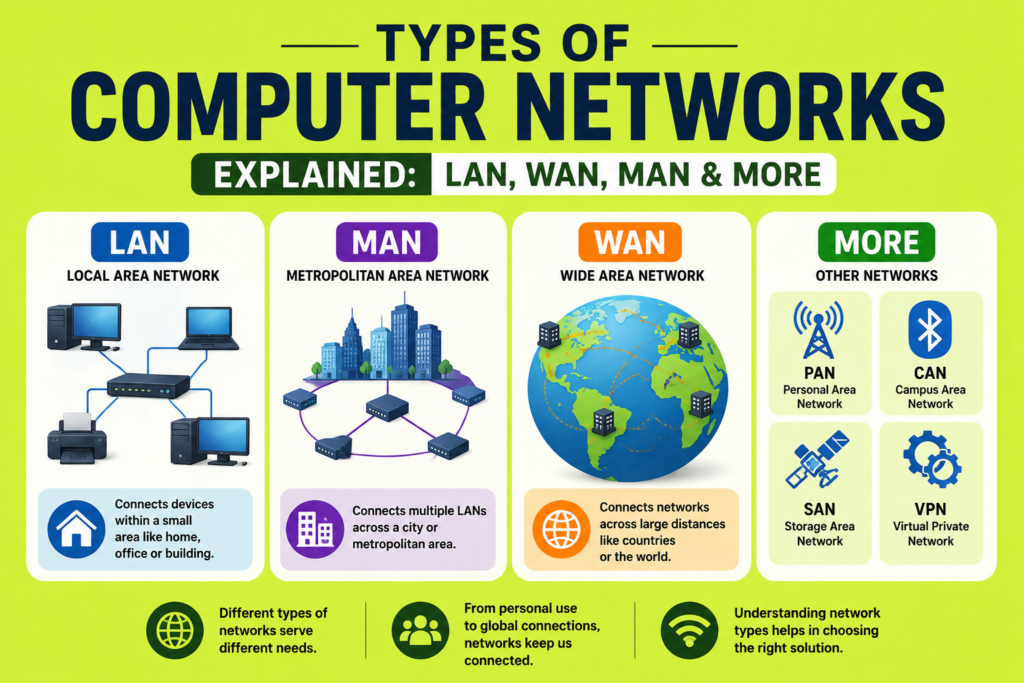
Not all networks are built the same way, and understanding the different types of computer networks helps explain why some connections work best at home while others power entire cities or global businesses. From small personal setups to massive enterprise systems, each network type serves a specific purpose based on distance, speed and scale.
Whether you are studying networking basics or trying to understand your own home setup, learning the types of computer networks gives you a clearer picture of how devices communicate at different levels. This guide breaks down every major category, from personal networks to wide reaching global systems.
Why Understanding Types of Computer Networks Matters
Before diving into specific categories, it helps to understand why the types of computer networks even matter. Networks are typically classified based on geographic span, meaning how far the connected devices are spread apart. A network connecting devices in a single room looks very different from one connecting offices across multiple countries.
This classification system helps engineers design networks appropriately, ensuring the right technology, transmission media and equipment are used for each specific situation. Choosing the wrong network type can lead to unnecessary costs or poor performance, making this knowledge essential for anyone working with technology.
Personal Area Network Explained
The smallest of the types of computer networks is the personal area network, often abbreviated as PAN. A personal area network typically connects devices within a very short range, often just a few meters, centered around a single individual.
Common examples include Bluetooth connections between a smartphone and wireless earbuds, or a smartwatch syncing with a phone. Despite its small scale, a personal area network plays an important role in everyday convenience, allowing personal devices to communicate without cluttered cables.
Local Area Network: The Most Common Type
Among all the types of computer networks, the local area network, commonly known as LAN, is likely the most familiar. A local area network connects devices within a limited physical space, such as a home, school or single office building.
Local area networks typically rely on Ethernet cables or Wi-Fi to connect devices like computers, printers and smart devices. This setup allows fast, reliable data transmission since devices are located close together, minimizing delays and connection issues. Understanding what is a computer network at a basic level often starts with grasping how a LAN operates in everyday environments.
Wireless Local Area Network Versus Traditional LAN
A wireless local area network, or WLAN, functions similarly to a traditional LAN but relies on wireless signals instead of physical cables. Comparing WLAN vs LAN, wired connections generally offer more consistent speeds, while wireless networks provide greater flexibility and easier setup.
Most modern homes and offices use a combination of both, relying on wired vs wireless networks based on specific needs. Wired connections often support critical devices requiring stability, while wireless connections handle mobile devices like laptops, phones and tablets throughout the space.
Campus Area Network for Larger Local Spaces
Slightly larger than a standard LAN, a campus area network connects multiple buildings within a limited geographic area, such as a university campus or large corporate headquarters. This network type bridges several local area networks together, allowing seamless communication across different departments or buildings.
Campus area networks often require more advanced equipment, including multiple routers and switches, to manage increased traffic and ensure reliable connectivity across a wider physical footprint compared to a single building setup.
Metropolitan Area Network Explained
A metropolitan area network, often abbreviated as MAN, extends across an entire city or large metropolitan region. This network type connects multiple local area networks, campus networks and even individual businesses across a broader urban area.
Metropolitan area networks often rely on fiber optics and other high capacity transmission media to handle large volumes of data across significant distances within a city. This type is particularly important for internet service providers, government institutions and large enterprises needing city wide connectivity.
Wide Area Network: Connecting Across Distances
Among the largest types of computer networks, a wide area network, commonly called WAN, spans vast geographic distances, sometimes connecting entire countries or continents. The internet itself is essentially the largest example of a wide area network in existence.
Wide area networks rely heavily on internet infrastructure, including fiber optic cables, satellites and undersea cables, to connect distant locations reliably. Businesses with multiple international offices often depend on wide area networks to maintain consistent communication and data sharing across borders.
Comparing LAN, WAN and MAN Directly
When comparing these major types of computer networks, the primary difference lies in geographic span and intended use. A local area network suits small, contained spaces like homes or single offices. A metropolitan area network expands coverage across an entire city, while a wide area network connects locations across countries or continents.
Understanding these differences helps businesses and individuals choose the appropriate network type based on their specific communication needs, whether that means connecting a few devices at home or linking offices across multiple continents.
Enterprise Network Types and Business Applications
Large organizations often combine several types of computer networks to meet complex operational needs. An enterprise network typically integrates local area networks within individual offices, connected through a wider wide area network to link multiple locations together seamlessly.
These enterprise systems often include intranets, private internal networks used exclusively by employees, alongside extranets that allow limited access for external partners or clients. This layered approach ensures secure, efficient communication while maintaining strict access control across the organization.
The Role of Routers and Gateways in Network Types
Regardless of the specific types of computer networks involved, routers and gateway routers play an essential role in directing traffic between different network segments. A gateway router connects a local network to a larger external network, such as the internet, managing data flow between the two.
Understanding how a router works helps clarify how different network types interconnect. Without these devices, isolated local area networks would have no way of communicating with wide area networks or accessing the broader internet.
Network Security Across Different Network Types
Regardless of size or geographic span, every network type requires proper protection. Network security measures, including firewalls and encryption, help safeguard data as it moves between personal devices, local networks and wide area systems.
Larger network types, such as metropolitan and wide area networks, often face greater security challenges due to their scale and exposure to public infrastructure. Implementing strong security protocols across all types of computer networks helps prevent unauthorized access and data breaches.
Choosing the Right Network Type for Your Needs
Selecting the appropriate types of computer networks depends on several factors, including geographic requirements, budget and the number of devices involved. A small business might only need a simple local area network, while a multinational corporation requires a robust wide area network supported by extensive internet infrastructure.
Understanding these different network classifications allows individuals and organizations to make informed decisions, ensuring their chosen network type matches their specific communication and connectivity requirements effectively.
Frequently Asked Questions (FAQs)
What are the main types of computer networks?
The main types of computer networks include personal area networks, local area networks, campus area networks, metropolitan area networks and wide area networks, each varying by geographic span and purpose.
What is the difference between LAN and WAN?
A local area network connects devices within a small area like a home or office, while a wide area network connects devices across much larger distances, such as entire countries or continents.
What is a metropolitan area network used for?
A metropolitan area network connects multiple local networks across an entire city, often used by internet service providers, government agencies and large businesses needing city wide connectivity.
Which type of network is the internet considered?
The internet is considered the largest example of a wide area network, connecting millions of smaller networks worldwide through extensive internet infrastructure, including fiber optic cables and satellites.
Conclusion
Understanding the various types of computer networks, from small personal area networks to expansive wide area networks, reveals how modern communication systems are structured to meet different needs. Each network type, whether local, metropolitan or wide reaching, plays a specific role in supporting today’s interconnected digital world.
As technology continues advancing, the types of computer networks will keep evolving, becoming faster, more secure and increasingly essential for both individuals and organizations relying on seamless connectivity.