
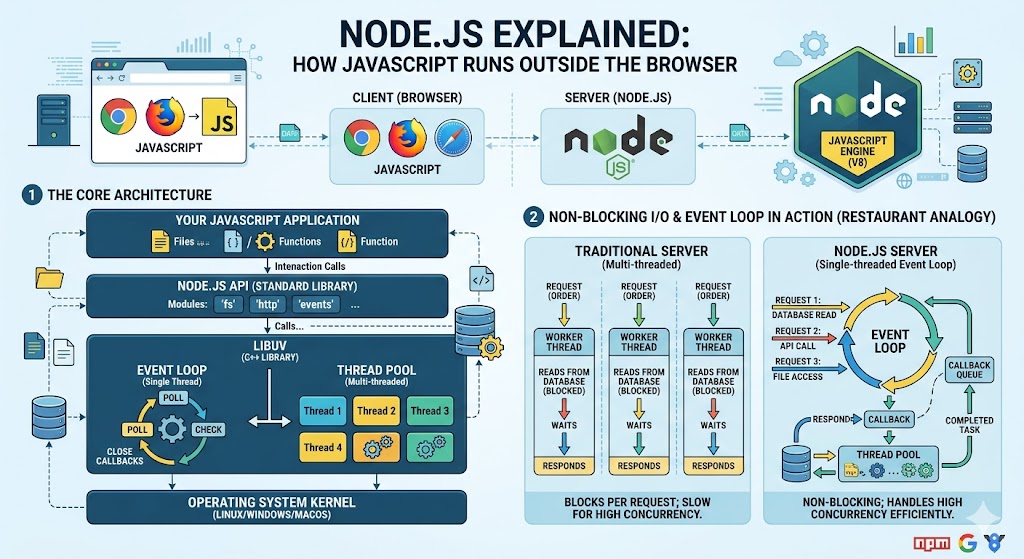
For years, JavaScript lived only in browsers. You could not use it for back end development. That changed forever in 2009. A developer named Ryan Dahl created Node.js. He took Google’s V8 engine and wrapped it in a server environment. Suddenly, JavaScript could run on servers. It could read files. It could listen for network requests. It could connect to databases. This remarkable what is node.js guide will explain everything. You will learn how Node.js works, why it is so fast, and how to build your first server. The history of javascript started in 1995 when Brendan Eich created the language for browsers. For fourteen years, JavaScript was confined to the client. Node.js liberated it. Today, Node.js powers millions of websites and applications. Netflix uses it. PayPal uses it. LinkedIn uses it. NASA uses it. Let me start with the most basic question. What exactly is Node.js?
Understanding What Is Node.js
what is node.js in simple terms? Node.js is a cross-platform runtime that executes JavaScript outside a web browser. It is built on Chrome’s V8 engine server-side . V8 is the same engine that runs JavaScript in Google Chrome. Node.js takes that engine and adds features for server-side development. File system access. HTTP server capabilities. Operating system interactions. Network sockets. Before Node.js, server side JavaScript existed but was slow and obscure. Node.js changed everything. It is not a programming language. It is an execution environment . You write JavaScript. Node.js runs it. You can build web servers, command line tools, desktop applications (with Electron), and even robots. The cross-platform runtime works on Windows, Mac, and Linux. The same code runs everywhere. For javascript beginner guide readers, Node.js is the natural next step after learning browser JavaScript.
The Birth of Node.js (2009)
Ryan Dahl was working on a project at Joyent in 2009. He was frustrated with web servers. Existing servers like Apache used threads. Each connection created a new thread. Threads consume memory. They do not scale well. Dahl wanted a server that could handle many concurrent connections efficiently. He discovered that JavaScript’s event driven model was perfect. The event-driven architecture of JavaScript already handled callbacks and events. Dahl took the fast V8 engine and added non blocking I/O operations. The result was Node.js. The first version was released in 2009. It gained rapid adoption. Developers loved writing both front end and back end in the same language. The non-blocking architecture was key. Traditional servers block on I/O operations. When reading a file, the server waits. Node.js does not wait. It starts the read and continues executing other code. When the read finishes, a callback runs. This is the same asynchronous javascript explained pattern you already know. This what is node.js innovation changed web development forever.
How Node.js Works The Event Loop
Node.js uses the same event loop as browser JavaScript but with different APIs. The non-blocking architecture means Node.js can handle thousands of concurrent connections on a single thread. Here is how it works. When you request a file read, Node.js sends the request to the operating system’s kernel. The kernel handles the waiting. Node.js continues executing other code. When the file read completes, the kernel notifies Node.js. Node.js puts the callback in the event queue. The event loop picks up the callback when the call stack is empty. This allows Node.js to be highly efficient. For comparison, a traditional threaded server might use one thread per connection. With 10,000 connections, you need 10,000 threads. Each thread uses about 2MB of memory. That is 20GB just for threads. Node.js uses one thread for all connections. Memory usage is dramatically lower. The event-driven architecture is ideal for I/O heavy applications like web servers, real time chats, and API gateways. For CPU intensive tasks like image processing or complex math, Node.js is not the best choice. But for most web back ends, it excels.
Installing Node.js and NPM
To start using Node.js, you need to install it. Go to nodejs.org. Download the LTS (Long Term Support) version. Run the installer. Verify the installation:
node --version
npm --version
The node command runs JavaScript files. The npm (Node Package Manager) is the largest software registry in the world. It comes with Node.js. what is node.js without npm is incomplete. Npm lets you install millions of open source packages. To create a new project, create a folder and run:
npm init -y
This creates a package.json file. This file tracks your project’s dependencies and scripts. package.json is the heart of any Node.js project. It contains the project name, version, dependencies, and custom scripts. To install a package:
npm install express
This downloads Express into a node_modules folder. It also adds Express as a dependency in package.json. The node_modules folder can be huge. You never share it. You share package.json. Anyone with package.json can run npm install to get all dependencies. This dependency management system is brilliant.
Your First Node.js Server
Let me show you what what is node.js can do with real code. Create a file called server.js. Write this:
const http = require("http");
const server = http.createServer((req, res) => {
res.writeHead(200, { "Content-Type": "text/plain" });
res.end("Hello from Node.js!");
});
server.listen(3000, () => {
console.log("Server running at http://localhost:3000/");
});
Run the server:
node server.js
Open your browser to http://localhost:3000. You see “Hello from Node.js!” Congratulations. You just built a web server with twelve lines of code. The http module is built into Node.js. You do not need to install anything. The file system module is also built in. You can read and write files without extra packages:
const fs = require("fs");
fs.readFile("example.txt", "utf8", (err, data) => {
if (err) throw err;
console.log(data);
});
This server-side scripting capability is what makes Node.js powerful. You can build APIs, serve HTML pages, process uploads, and connect to databases.
NPM and the Node.js Ecosystem
The npm (Node Package Manager) has over 2 million packages. It is the largest ecosystem in programming. You can find a package for almost anything. Here are essential packages for Node.js development. Express is the most popular web framework. It simplifies routing and middleware.
npm install express
Nodemon automatically restarts your server when files change.
npm install nodemon --save-dev
Dotenv loads environment variables from a .env file.
npm install dotenv
Mongoose connects to MongoDB databases.
npm install mongoose
For building APIs with Node , Express is the standard choice. The command line tools you can build with Node.js are equally powerful. Create CLI tools that run on any operating system. The Node.js ecosystem continues growing. New runtimes like Deno and Bun have appeared. They offer improvements like built in TypeScript and faster performance. But Node.js vs Deno/Bun comparisons show that Node.js still has the largest ecosystem and community. For production applications, Node.js remains the safe choice.
The Node.js Modules System
Node.js uses a module system to organize code. Each file is a module. Variables are private by default. You export what other files need. Export from a file called math.js:
const add = (a, b) => a + b;
const multiply = (a, b) => a * b;
module.exports = { add, multiply };
Import in another file:
const math = require("./math");
console.log(math.add(5, 3)); // 8
console.log(math.multiply(4, 2)); // 8
You can also use ES6 modules with import and export by setting "type": "module" in package.json. This modules system keeps code organized and reusable. It prevents global namespace pollution. Large Node.js applications have hundreds of modules working together. The built in modules like http, fs, path, os, and crypto provide core functionality without external packages.
Building APIs with Node.js and Express
building APIs with Node is the most common use case. Express makes it trivial. Install Express:
npm install express
Create api.js:
const express = require("express");
const app = express();
const port = 3000;
app.use(express.json()); // Parse JSON bodies
const users = [
{ id: 1, name: "Alice" },
{ id: 2, name: "Bob" }
];
app.get("/", (req, res) => {
res.send("API is running");
});
app.get("/api/users", (req, res) => {
res.json(users);
});
app.get("/api/users/:id", (req, res) => {
const user = users.find(u => u.id === parseInt(req.params.id));
if (!user) return res.status(404).send("User not found");
res.json(user);
});
app.post("/api/users", (req, res) => {
const newUser = {
id: users.length + 1,
name: req.body.name
};
users.push(newUser);
res.status(201).json(newUser);
});
app.listen(port, () => {
console.log(Server listening on port ${port});
});
Run with node api.js. Test with a tool like Postman or curl. You have created a REST API. The middleware concept in Express allows you to add functionality before requests reach your routes. Logging, authentication, compression, and parsing are all middleware. Express is minimal but infinitely extensible. For what is node.js , Express is the gateway to professional back-end development.
Node.js in Full Stack JavaScript
Node.js enables full-stack JS development. You write JavaScript on the front end with React, Vue, or Angular. You write JavaScript on the back end with Node.js and Express. The same language. The same concepts. The same tools. This is incredibly productive. You can share code between client and server. Validation logic, utility functions, and types can be reused. The server-side development skills you learn with Node.js transfer to front-end debugging and vice versa. Many modern frameworks embrace this full stack approach. Next.js (React) and Nuxt (Vue) run on Node.js servers. They blend client and server components. For react vs vue vs angular comparison , all can be paired with a Node.js back end. The local development experience with Node.js is excellent. Run node server.js and your API is live. Use tools like nodemon for auto restart during development. The feedback loop is instant.
Frequently Asked Questions (FAQs)
Q1: What is node.js and why should I use it?
Node.js is a JavaScript runtime for building fast, scalable network applications. It is ideal for APIs and real time services.
Q2: Is Node.js single threaded?
Node.js runs on a single thread for JavaScript execution. But it uses multiple threads internally for I/O operations.
Q3: What is npm in Node.js?
npm (Node Package Manager) is the default package manager for Node.js. It installs and manages dependencies.
Q4: Can I use Node.js for CPU intensive tasks?
Node.js is not ideal for CPU intensive tasks like image processing or complex math. It excels at I/O operations.
Q5: Is Node.js only for back end development?
No. Node.js also builds command line tools, desktop apps (with Electron), and Internet of Things (IoT) applications.
Conclusion
You have fully learned what is node.js and why it matters. Node.js is a cross-platform runtime that executes JavaScript outside the browser using the V8 engine server-side . It was created by Ryan Dahl in 2009. The event-driven architecture and non-blocking architecture allow it to handle thousands of concurrent connections efficiently. npm (Node Package Manager) provides access to the largest ecosystem of packages. The package.json file manages dependencies. Built in modules like http and fs provide core functionality. Express is the most popular framework for building APIs with Node . The history of javascript and Brendan Eich led to Node.js. asynchronous javascript explained patterns power Node.js performance. The future of software engineering includes more full stack JavaScript development. Node.js will remain central. Deno and Bun are alternatives, but Node.js has the community and production proven track record. Now go install Node.js. Build a server. Create an API. Deploy an application. You are now a full stack developer.

