
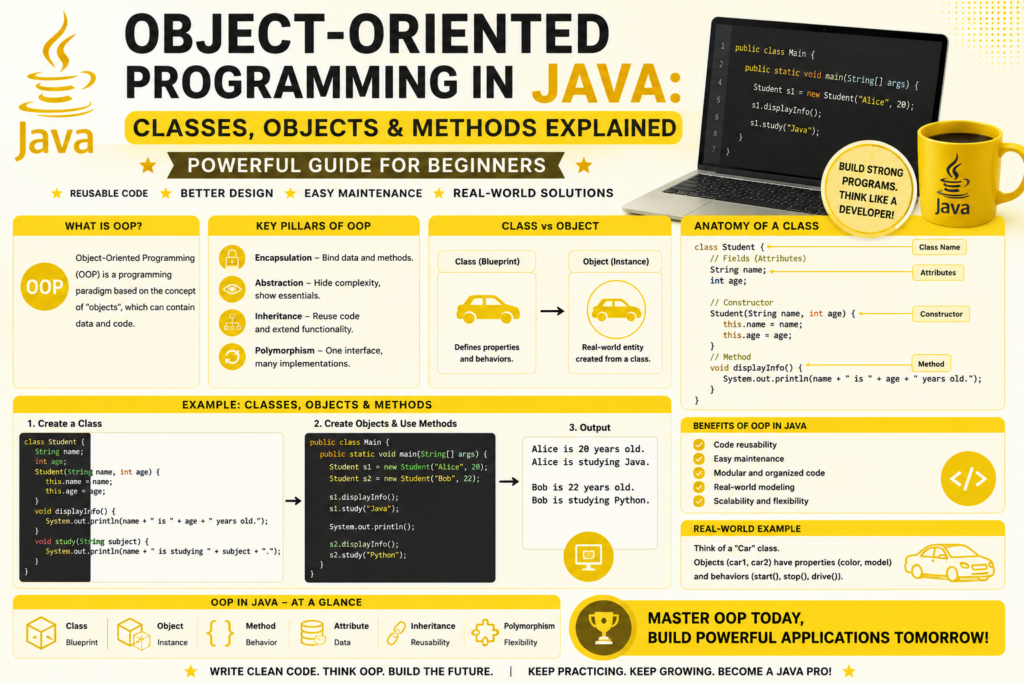
If there is one concept that truly defines modern coding, it is object oriented programming in java. Java was built from the ground up to be an object oriented language, and almost everything you do in Java involves classes, objects, and methods. From small console apps to massive enterprise systems, OOP is the foundation that makes Java powerful, scalable, and elegant. If you are learning Java in 2026, mastering OOP is the moment your skills truly level up.
This guide is designed for beginners but packed with real examples. By the end, you will understand how to create classes, build objects, write methods, and apply the four pillars of OOP. You will also see how OOP is used in real software, from banking applications to Android apps. Let us unlock one of the most important skills any developer can have.
Why Object Oriented Programming in Java Matters
Java was created in 1995 with object oriented programming at its core. Unlike older languages where code was written as long lists of instructions, Java encourages you to think in terms of objects. Each object has data, also called object state attributes, and behavior, defined by methods.
This way of thinking is closer to how humans understand the real world. A car has color, model, and speed. It can start, stop, and accelerate. A bank account has a balance and an owner. It can deposit, withdraw, and transfer funds. OOP lets you model these real world ideas directly in code.
Mastering object oriented programming in java is essential because it powers everything from Android apps to large scale enterprise platforms. It is also a major part of the future of software engineering, since most modern systems rely on object oriented design patterns to stay clean, flexible, and maintainable.
If you have not set up your environment yet, this how to install java guide will help you get ready before running the examples below.
A Short History of OOP in Java (1995 – 2026)
OOP did not start with Java. The roots go back to languages like Simula in the 1960s and Smalltalk in the 1970s. C plus plus brought OOP to the mainstream in the 1980s. But when Java was released in 1995, it took these ideas and made them simpler, safer, and easier to use.
Java removed manual memory management, replaced pointers with references, and built strong rules around classes and inheritance. Over the years, Java has added powerful new OOP features like generics, lambdas, records, and sealed classes. Even with all these improvements, the core idea has stayed the same: structure your code around objects.
If you want a deeper look at how Java itself grew over time, this java history: 1991 to today journey is a fascinating read.
What Is a Class in Java
A class is a blueprint. It defines what an object will look like and what it can do. Think of a class as a template and an object as the real thing built from that template. Here is how to create a class in Java:
javaRun CodeCopy codepublic class Car {
    String brand;
    String model;
    int year;

    void start() {
        System.out.println(brand + " is starting...");
    }

    void stop() {
        System.out.println(brand + " has stopped.");
    }
}
This class has three instance variables and two methods. The variables describe the object state attributes, and the methods describe what the car can do. Notice the method signature definitions: they include the return type, name, and parameters.
Creating Objects in Java
Once you have a class, you can create objects from it. This process is called instantiation of objects Java developers do constantly. Here is how:
javaRun CodeCopy codepublic class Main {
    public static void main(String[] args) {
        Car myCar = new Car();
        myCar.brand = "Toyota";
        myCar.model = "Corolla";
        myCar.year = 2026;

        myCar.start();
        myCar.stop();
    }
}
The keyword new creates a new object in memory. Each object has its own copy of the instance variables. You can create as many objects as you need, and each one will have its own state.
This is where object oriented programming in java becomes truly powerful. You can model real world things, give them behavior, and combine them into larger systems.
Constructors in Java
Setting values one by one is tedious. That is why Java provides constructors. A class constructor example looks like this:
javaRun CodeCopy codepublic class Car {
    String brand;
    String model;
    int year;

    public Car(String brand, String model, int year) {
        this.brand = brand;
        this.model = model;
        this.year = year;
    }

    void start() {
        System.out.println(brand + " " + model + " is starting...");
    }
}
Now you can create objects in one clean line:
javaRun CodeCopy codeCar car1 = new Car("Toyota", "Corolla", 2026);
Car car2 = new Car("Tesla", "Model 3", 2025);

car1.start();
car2.start();
This constructor instantiation pattern is one of the most common things you will do in Java. It keeps your code clean, readable, and professional.
Methods in Java
A method is a block of code that performs a task. Methods make your code reusable and organized. Java methods tutorial style, here is the structure:
javaRun CodeCopy codereturnType methodName(parameters) {
    // code
    return value;
}
Here are some return types Java methods can have:
javaRun CodeCopy codepublic class Calculator {
    int add(int a, int b) {
        return a + b;
    }

    double divide(double a, double b) {
        return a / b;
    }

    void greet(String name) {
        System.out.println("Hello, " + name);
    }

    boolean isEven(int number) {
        return number % 2 == 0;
    }
}
The void keyword means the method does not return anything. Other return types include int, double, boolean, String, and even custom objects development types you create yourself.
Method Overloading in Java
Methods overloading Java allows you to create multiple methods with the same name but different parameters. The compiler picks the right one based on the arguments you pass.
javaRun CodeCopy codepublic class MathHelper {
    int add(int a, int b) {
        return a + b;
    }

    double add(double a, double b) {
        return a + b;
    }

    int add(int a, int b, int c) {
        return a + b + c;
    }
}
This makes your code flexible and easy to use. Overloading is a small but powerful feature that improves clean code with Java classes.
The Four Pillars of OOP
The four pillars of OOP are encapsulation, inheritance, polymorphism, and abstraction. These are the foundations of object oriented programming in java, and every serious developer must understand them deeply.
Encapsulation
Data encapsulation means hiding the internal details of an object and exposing only what is needed. This is done with public private access modifiers and getter and setter methods.
javaRun CodeCopy codepublic class BankAccount {
    private double balance;

    public double getBalance() {
        return balance;
    }

    public void deposit(double amount) {
        if (amount > 0) {
            balance += amount;
        }
    }

    public void withdraw(double amount) {
        if (amount > 0 && amount <= balance) {
            balance -= amount;
        }
    }
}
The balance is private, so no one can change it directly. They must use the deposit and withdraw methods, which protect the data. This is real world banking logic in just a few lines.
Inheritance
Inheritance allows one class to reuse the features of another. This creates a class inheritance hierarchy that keeps code clean and reusable.
javaRun CodeCopy codepublic class Animal {
    String name;

    void eat() {
        System.out.println(name + " is eating.");
    }
}

public class Dog extends Animal {
    void bark() {
        System.out.println(name + " is barking!");
    }
}
A Dog is an Animal, so it gets the eat method automatically. You only add what is new. This is one of the most powerful ideas in OOP concepts in Java.
Polymorphism
Runtime polymorphism allows the same method to behave differently depending on the object. This is done through method overriding.
javaRun CodeCopy codepublic class Animal {
    void sound() {
        System.out.println("Some sound...");
    }
}

public class Dog extends Animal {
    @Override
    void sound() {
        System.out.println("Woof!");
    }
}

public class Cat extends Animal {
    @Override
    void sound() {
        System.out.println("Meow!");
    }
}

public class Main {
    public static void main(String[] args) {
        Animal a1 = new Dog();
        Animal a2 = new Cat();

        a1.sound(); // Woof!
        a2.sound(); // Meow!
    }
}
Even though a1 and a2 are declared as Animal, Java calls the correct method at runtime. This flexibility is why polymorphism is so loved by professional developers.
Abstraction
Data abstraction interfaces hide complex details and expose only what is necessary. Java supports abstraction through abstract classes and interfaces.
javaRun CodeCopy codepublic interface PaymentMethod {
    void pay(double amount);
}

public class CreditCard implements PaymentMethod {
    @Override
    public void pay(double amount) {
        System.out.println("Paid " + amount + " with credit card.");
    }
}

public class PayPal implements PaymentMethod {
    @Override
    public void pay(double amount) {
        System.out.println("Paid " + amount + " with PayPal.");
    }
}
The interface defines what must be done, but each class decides how to do it. This is the essence of object oriented architecture Java systems are built on.
Access Modifiers in Java
Java uses public private access modifiers to control visibility. Here is a quick summary:
- public: accessible from anywhere
- private: accessible only inside the class
- protected: accessible inside the class and its subclasses
- default: accessible inside the same package
Using these correctly keeps your code safe and well organized. For example, instance variables should usually be private, and you should expose them through getter and setter methods. This protects your object state attributes from accidental changes.
A Mini Project Using Object Oriented Programming in Java
Let us combine everything we have learned into a small student management example:
javaRun CodeCopy codepublic class Student {
    private String name;
    private int age;
    private double gpa;

    public Student(String name, int age, double gpa) {
        this.name = name;
        this.age = age;
        this.gpa = gpa;
    }

    public String getName() {
        return name;
    }

    public double getGpa() {
        return gpa;
    }

    public void displayInfo() {
        System.out.println("Name: " + name);
        System.out.println("Age: " + age);
        System.out.println("GPA: " + gpa);
    }

    public boolean isHonorRoll() {
        return gpa >= 3.5;
    }
}

public class Main {
    public static void main(String[] args) {
        Student s1 = new Student("Alice", 20, 3.8);
        Student s2 = new Student("Bob", 22, 3.2);

        s1.displayInfo();
        System.out.println("Honor roll: " + s1.isHonorRoll());

        s2.displayInfo();
        System.out.println("Honor roll: " + s2.isHonorRoll());
    }
}
This small program uses classes, objects, constructors, methods, encapsulation, and decision logic. It is a perfect example of how object oriented programming in java turns ideas into clean, reusable code.
Where to Go Next After Mastering OOP
Once you understand OOP, the next step is to work with larger collections of data. A great resource is java arrays & collections guide which shows how to store and manage groups of objects efficiently. After that, you can explore java exception handling guide to make your programs safer and more reliable.
Modern developers also use the best free ai tools to explain code, generate practice problems, and debug tricky inheritance or polymorphism issues. These tools can speed up your learning when used alongside hands on practice.
Common Beginner Mistakes With OOP
Even strong learners make small mistakes when starting with OOP. Here are the most common ones to avoid:
- Making all variables public instead of using encapsulation
- Forgetting the new keyword when creating objects
- Mixing up class names and object names
- Overusing inheritance when composition would be cleaner
- Writing huge classes that do too many things
Good OOP is about balance, clarity, and design. Keep your classes focused, your methods small, and your responsibilities clear.
Frequently Asked Questions (FAQs)
What is the difference between a class and an object?
A class is a blueprint, while an object is a real instance created from that blueprint. You can create many objects from a single class, each with its own data.
Why is encapsulation important?
Encapsulation protects your data from accidental changes. It also makes your code easier to maintain because internal details can change without affecting other parts of the program.
Can a class inherit from multiple classes in Java?
No. Java does not support multiple class inheritance. However, a class can implement multiple interfaces, which provides similar flexibility without the complexity.
What is the difference between an abstract class and an interface?
An abstract class can have both abstract and regular methods, plus instance variables. An interface mainly defines a contract of methods that implementing classes must provide. Modern interfaces can also have default methods.
When should I use polymorphism?
Use polymorphism when you want to write code that works with many related types in a flexible way. It is especially useful for designing systems that can be extended without changing existing code.
Conclusion
Mastering object oriented programming in java is one of the most rewarding steps in any developer’s journey. Classes, objects, methods, and the four pillars of OOP give you the power to build software that is clean, scalable, and ready for real world challenges. Whether you dream of building Android apps, enterprise systems, or fintech platforms, OOP is the foundation that will support you every step of the way.
Take your time with each concept. Write small programs, refactor them, and improve them. The more you practice, the more natural OOP becomes. Soon you will be designing systems with confidence, writing code that feels professional, and unlocking opportunities that span the entire software industry. Your journey into Java continues, and the future is bright for every developer who builds a strong foundation in object oriented thinking.