
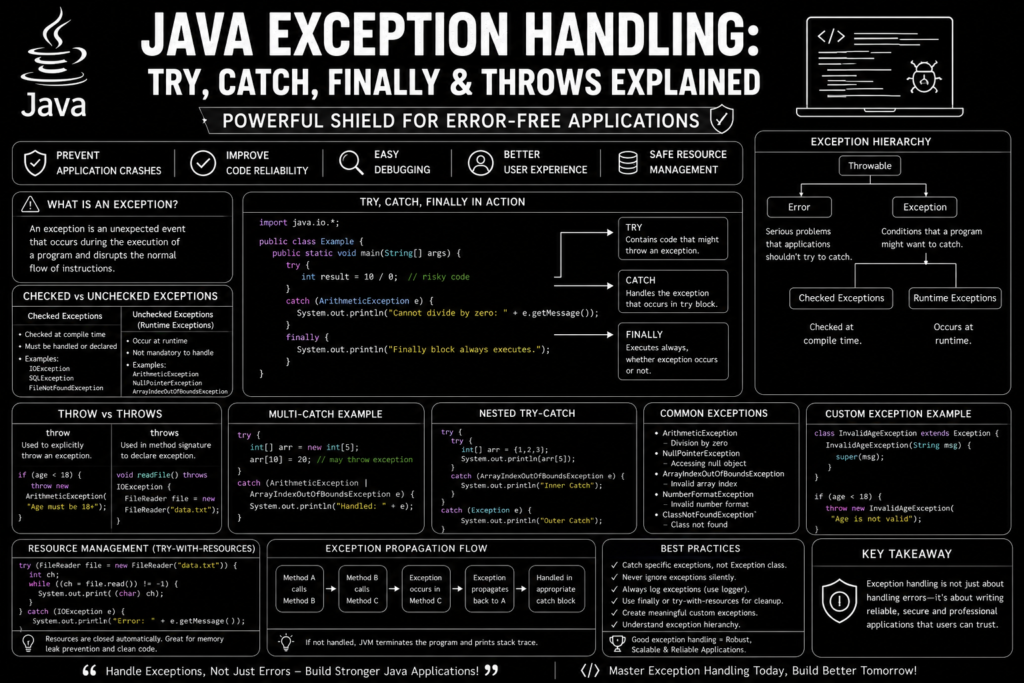
Java exception handling guide is one of the most important topics every Java developer must master. No matter how carefully software is written, errors can still occur during program execution. Users may enter invalid input, files may be missing, network connections may fail, or unexpected conditions may appear. Without proper exception handling, these problems can cause applications to crash.
Java provides a powerful exception handling system that helps developers handle errors in Java gracefully. Instead of terminating programs unexpectedly, Java allows developers to detect problems, recover from failures, and continue execution safely.
Understanding try, catch, finally, throw, and throws is essential for building professional software. Modern enterprise applications, Android apps, cloud services, and backend systems all rely heavily on robust exception handling strategies.
In this complete java exception handling guide, you will learn how exceptions work, why they matter, and how to use Java’s error handling features effectively with practical code examples.
What Is an Exception in Java? (1995 – Today)
An exception is an event that interrupts the normal flow of a program.
For example:
int result = 10 / 0;This code generates:
ArithmeticExceptionbecause division by zero is impossible.
Without exception handling, the application stops immediately.
Java created a structured way to manage application runtime exceptions so developers can respond to errors instead of allowing applications to fail unexpectedly.
This ability is one reason Java became a trusted enterprise programming language.
If you are still learning Java basics, reviewing java syntax & data types guide concepts first will help you understand exception handling more easily.
Why Exception Handling Is Important
The purpose of java exception handling guide concepts is to improve application reliability.
Exception handling helps:
- Prevent application crashes
- Improve user experience
- Simplify debugging
- Support runtime error prevention
- Protect important resources
- Improve code quality
Without exception handling, even small errors could terminate critical business applications.
Large banking systems, cloud platforms, and Android applications depend heavily on exception management.
Java Exception Hierarchy
All exceptions originate from the Throwable base class.
Hierarchy:
Throwable
│
├── Error
│
└── Exception
     │
     ├── Checked Exceptions
     └── Runtime Exceptions
This hierarchy helps Java classify different error types.
Understanding the catch clause hierarchy is important because more specific exceptions should usually be handled before general exceptions.
Checked vs Unchecked Exceptions
One major topic in every java exception handling guide is understanding checked vs unchecked exceptions.
Checked Exceptions
These must be handled during compilation.
Examples:
- IOException
- SQLException
- FileNotFoundException
Example:
FileReader file = new FileReader("data.txt");The compiler requires handling because the file may not exist.
These are governed by checked compiler constraints.
Unchecked Exceptions
These occur during runtime.
Examples:
- ArithmeticException
- NullPointerException
- ArrayIndexOutOfBoundsException
Java does not force developers to handle them.
Understanding Try Block
The try block contains code that might generate exceptions.
Example:
try {
    int result = 10 / 0;
}
Java monitors this block for errors.
If an exception occurs, control transfers to a catch block.
The try block forms the foundation of java exception handling guide principles.
Understanding Catch Block
The catch block handles exceptions.
Example:
try {
    int result = 10 / 0;
}
catch (ArithmeticException e) {
    System.out.println("Cannot divide by zero");
}
Output:
Cannot divide by zeroThis is a classic try catch block example.
Instead of crashing, the program displays a useful message.
This technique supports application crash mitigation strategies.
Understanding Finally Block
Many developers ask:
What is finally block used for?
The finally block always executes whether an exception occurs or not.
Example:
try {
    int number = 10;
}
catch(Exception e) {
    System.out.println("Error");
}
finally {
    System.out.println("Finally executed");
}
Output:
Finally executedThe finally block is often used for cleanup routines execution.
Examples include:
- Closing files
- Releasing database connections
- Releasing network resources
It also helps with memory leak prevention.
Understanding Throw Keyword
The throw keyword manually creates exceptions.
Example:
public class Demo {

    public static void main(String[] args) {

        int age = 15;

        if(age < 18) {
            throw new ArithmeticException("Age must be 18 or above");
        }
    }
}
This demonstrates the Java throw keyword tutorial concept.
Developers use throw when business rules require custom validation.
Understanding Throws Keyword
The throws keyword declares that a method may generate exceptions.
Example:
import java.io.*;

public class Demo {

    static void readFile() throws IOException {
        FileReader file = new FileReader("test.txt");
    }
}
The method warns other developers about possible exceptions.
This improves code clarity and maintainability.
Exception Propagation Flow
Another important concept in a java exception handling guide is exception propagation flow.
When a method does not handle an exception, Java passes it upward through the call stack.
Example:
class Demo {

    static void method1() {
        method2();
    }

    static void method2() {
        int result = 10 / 0;
    }
}
The exception travels upward until Java finds a matching catch block.
If no handler exists, the program terminates.
Multi Catch Exception Handling
Java supports handling multiple exceptions efficiently.
Example:
try {

    int[] arr = new int[5];
    arr[10] = 20;

}
catch (ArithmeticException | ArrayIndexOutOfBoundsException e) {

    System.out.println("Exception handled");

}
This feature is called multi catch exception handling.
It reduces code duplication and improves readability.
Common Runtime Exceptions
The topic of java exception handling guide includes several frequently encountered exceptions.
ArithmeticException
int result = 10 / 0;NullPointerException
String name = null;
name.length();
ArrayIndexOutOfBoundsException
int[] arr = new int[3];
System.out.println(arr[5]);
NumberFormatException
Integer.parseInt("Java");Developers frequently encounter these during application development.
Stack Trace Diagnostic Output
When exceptions occur, Java produces stack trace diagnostic output.
Example:
Exception in thread "main"
java.lang.ArithmeticException: / by zero
The stack trace helps identify:
- Error location
- Method call sequence
- Root cause
This makes debugging code with try catch much easier.
Creating Custom Exceptions
Java allows developers to create custom exception structures.
Example:
class InvalidAgeException extends Exception {

    InvalidAgeException(String message) {
        super(message);
    }
}
Usage:
if(age < 18) {
    throw new InvalidAgeException("Age not valid");
}
This is known as throw custom exception Java functionality.
Custom exceptions improve business logic clarity.
Auto Resource Management
Modern Java supports auto-resource management.
Example:
try (FileReader file =
     new FileReader("data.txt")) {

    System.out.println("Reading file");

}
catch(Exception e) {

    System.out.println("Error");

}
Resources automatically close after execution.
This greatly improves memory leak prevention.
Enterprise applications rely heavily on this feature.
Exception Handling with Collections
Collections frequently generate exceptions.
Example:
ArrayList<String> list = new ArrayList<>();

System.out.println(list.get(5));
This produces:
IndexOutOfBoundsExceptionUnderstanding java arrays & collections guide concepts helps developers avoid these mistakes.
Exception Handling and OOP
Exception handling integrates closely with object oriented programming.
Classes can define custom exceptions and reusable validation systems.
Developers who understand java oop concepts explained topics often create cleaner exception handling architectures.
OOP and exception management work together to improve maintainability.
Exception Handling in Multithreaded Applications
Concurrent applications require careful exception management.
Developers studying java multithreading explained concepts discover that exceptions inside threads require special handling.
Thread failures can affect system stability if exceptions remain unmanaged.
Modern enterprise systems use centralized error logger tracking systems to monitor exceptions across threads.
Best Practices for Exception Handling
A strong java exception handling guide should include best practices.
Catch Specific Exceptions
Avoid:
catch(Exception e)Prefer:
catch(IOException e)Never Ignore Exceptions
Bad practice:
catch(Exception e) {
}
Log Errors Properly
Use structured logging systems.
Use Finally for Cleanup
Always release important resources.
Create Meaningful Custom Exceptions
Improve debugging and maintainability.
These practices improve application reliability dramatically.
Exception Handling and Enterprise Development
Modern enterprise frameworks depend heavily on exception management.
Developers working with best java frameworks compared topics often encounter advanced exception systems inside:
- Spring Boot
- Hibernate
- Jakarta EE
Exception handling remains critical for:
- API reliability
- Database access
- Cloud services
- Security systems
It will continue playing an important role in the future of software engineering as software systems become increasingly complex.
Frequently Asked Questions (FAQs)
What is exception handling in Java?
Exception handling is the process of detecting and managing runtime errors without crashing the application.
What is the difference between throw and throws?
Throw creates an exception manually, while throws declares that a method may generate exceptions.
What is a checked exception?
A checked exception must be handled during compilation, such as IOException.
What is a runtime exception?
Runtime exceptions occur while a program executes, such as NullPointerException or ArithmeticException.
Why is finally important?
The finally block ensures cleanup code executes regardless of whether exceptions occur.
Can we create custom exceptions in Java?
Yes. Developers can create custom exception classes by extending Exception.
Conclusion
The complete java exception handling guide demonstrates why exception management is essential for professional Java development. Without proper handling, applications become unstable, difficult to maintain, and vulnerable to unexpected failures.
Using try, catch, finally, throw, and throws correctly allows developers to manage errors gracefully, improve user experience, and build reliable software systems. From simple console applications to large enterprise platforms, exception handling remains one of Java’s most powerful features.
As Java continues evolving, strong exception handling practices will remain fundamental for scalable applications, cloud services, and the growing future of software engineering.