
The modern wireless world relies completely on invisible radio waves looping through our homes and offices, making a comprehensive wi-fi range explained analysis critical for every internet user. Whether you are building a modern smart home, managing a remote workspace, or streaming continuous ultra-high-definition video files, understanding your coverage boundaries dictates your productivity. Radio signal degradation is not just an annoying minor inconvenience; it fundamentally limits your hardware performance, network speed, and system reliability.
Many device owners mistakenly believe that buying a premium broadcasting unit guarantees unlimited coverage across their entire property. While transmission technology has advanced tremendously, open-air radio signals remain subject to strict physical laws and environmental limitations. Exploring the science of how data waves travel over physical distances, split past solid household blockades, and interact with electronic devices reveals why dead zones occur. By taking control of this wi-fi range explained blueprint, you can eliminate dead zones and create an elite wireless environment optimized for flawless throughput.
The Physics of Wireless Broadcasting Power
To accurately grasp how far a wireless connection can travel, we must look into the core mathematics of signal propagation. Wireless access points convert digital data packets into high-frequency electromagnetic waves, which radiate outward into space from the central antenna array.
The strength of these open-air transmissions is calculated in Decibels (dBm), representing the exact broadcasting power leaving the transmitter. As radio waves push further away from the source, they experience a natural physical phenomenon known as path loss. This means the energy of the wave spreads thin over an expanding geometric sphere, causing a steady drop in signal volume. To capture this fading transmission, your smartphones and computers rely on high receiver sensitivity to pick up faint data packets before they drop beneath the background static noise floor.
Theoretical Limits vs Real World Radius (1997 – 2026)
Tracking the evolution of networking coverage boundaries between 1997 and 2026 highlights a continuous engineering battle against physical distance. In the earliest days of consumer wireless networking, reaching the far edge of a small room without losing connection was considered an achievement. Modern protocols push coverage limits to boundaries that were completely unimaginable decades ago.
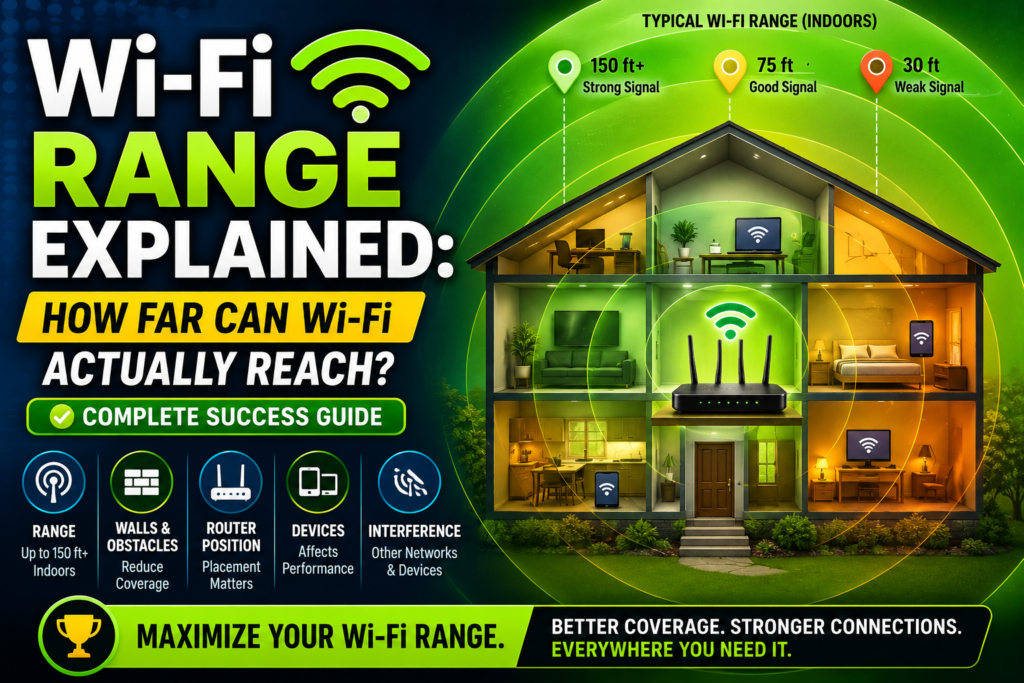
Under absolute perfect laboratory conditions with zero physical obstacles, a standard consumer router can claim an average Wi-Fi router distance of roughly 150 feet indoors and up to 300 feet outdoors. However, real world execution drops significantly lower than these clean manufacturer specifications. When deploying these systems inside normal residential structures, your practical wireless signal radius is reshaped by structural layouts and unexpected airwave clutter. This makes an authentic wi-fi range explained study vital because theoretical specifications almost never align with actual household layout performance.
Structural Blockades: What Blocks Wi-Fi Signals?
The biggest enemy of a reliable wireless signal is the physical building material used to construct modern homes and commercial offices. As radio frequencies hit solid objects, they experience a sharp drop in energy known as signal attenuation.
[Router] ---> (Clean Signal) ---> [Drywall: Low Loss] ---> (Decent Signal)
[Router] ---> (Clean Signal) ---> [Concrete: High Loss] ---> [Dead Zone]
Different materials absorb or reflect electromagnetic energy at vastly different rates. Basic drywall and standard wooden doors cause minimal disruption, allowing data waves to pass through with only minor energy loss. Solid brickwork, heavy stone pillars, and concrete walls Wi-Fi signal paths suffer severe degradation, often swallowing up to ninety percent of the broadcasting power instantly. Furthermore, large glass mirrors and steel foil insulation bounce radio waves backward, creating chaotic signal reflections and severe local dead zones. Recognizing these material hurdles helps explain exactly why a signal completely disappears when you step into an adjacent room.
Frequency Bands and Their Coverage Boundaries
Modern networking hardware splits traffic across completely different radio frequency spectrums to balance local network speeds against overall broadcasting distance.
The traditional 2.4 GHz frequency band operates as the heavy workhorse for broad coverage area requirements. Because it utilizes longer physical radio waves, it can wrap around bulky objects and penetrate dense walls with greater ease, providing an extensive wireless coverage footprint. The main downside is that this frequency space is highly congested, offering much slower data transfer rates.
Alternatively, the 5 GHz and 6 GHz bands utilize incredibly short radio waves to deliver blazing fast performance. However, these shorter waves exhaust their energy rapidly when encountering obstacles, giving them a much smaller router range in feet compared to their lower-frequency counterpart.
Electronic Interference and Open Air Noise
Even if your living space features completely open rooms with no solid walls, your wireless signal radius can still contract due to invisible electronic pollution.
The 2.4 GHz spectrum is incredibly crowded with everyday consumer devices. Household kitchen microwaves, wireless baby monitors, Bluetooth speakers, and old cordless office phones broadcast on identical frequencies. When these appliances run, they create immediate channel conflict, causing massive data packet collisions. To understand this chaos, reviewing a guide on wi-fi vs ethernet compared shows exactly why a physical wire is immune to this open-air noise, while wireless links must continuously fight for clean channel space.
Measuring Strength and Managing Path Loss
Network engineers keep a close eye on signal degradation using specific metrics to pinpoint where a connection starts failing. This allows them to make smart adjustments to hardware placement before running into total drops.
Python
def check_signal_status(dbm_value):
    # Analyzing wireless signal health based on decibel levels
    if dbm_value >= -30:
        return "Excellent: Perfect connection right next to the transmitter."
    elif dbm_value >= -67:
        return "Good: Minimum requirement for smooth HD video streaming."
    elif dbm_value >= -70:
        return "Fair: Okay for basic text web browsing, but prone to drops."
    else:
        return "Poor: Severe packets loss and constant disconnection."

# Example diagnostic check
current_signal = -72
print(f"Current Status: {check_signal_status(current_signal)}")
Maintaining a target connection strength above -67 dBm is essential for handling modern high-bandwidth tasks like video conferencing or multiplayer gaming without encountering random freezes. Once your signal drops down into the -80 dBm range, the receiver sensitivity of your device struggles to separate data packets from ambient environmental noise, causing your connection to stall completely.
Advanced Antenna Tech: Beamforming and Amplification
To push past the limits of standard path loss, modern router manufacturers have designed smart antenna technologies that shape how signals travel through space.
Older routers broadcasted data uniformly in a massive circle, wasting a huge amount of energy on empty corners and unused walls. Modern hardware features an intelligent tracking technology called beamforming. Instead of scattering waves everywhere, the router locates your connected laptop or smartphone and focuses its radio waves directly toward that device in a concentrated beam. This targeted amplification boosts the overall range, reduces interference, and keeps your signal strong even at the far edges of your home.
Outdoor Wi-Fi Distance and Open Area Limits
When you take a wireless transmitter outside and clear away all physical obstructions, the signal dynamics change completely.
An outdoor Wi-Fi distance can stretch across several hundred feet if you maintain a perfect, unobstructed line of sight between the transmitter and the client hardware. Without concrete walls Wi-Fi signal drops to worry about, the radio waves are free to travel until natural path loss eventually saps their energy. This is why commercial venues, public parks, and farms can successfully project internet access across massive outdoor zones using dedicated weather-resistant access points designed for long-distance broadcasting power.
Hardware Standards: Wi-Fi 6, 6E, and Wi-Fi 7
The specific wireless generation built into your personal devices plays a massive role in determining your real world coverage experience.
Older standards struggled to manage multiple devices at once, which often caused the entire network to slow down to a crawl if several family members logged on simultaneously. Newer standards solve this issue by introducing advanced channel dividing techniques that handle hundreds of client devices at the same time. To see how these generations match up against each other, looking over a comparison of wi-fi 6 vs wi-fi 6e vs wi-fi 7 reveals how modern hardware uses wider channels and better scheduling to maximize Wi-Fi coverage across busy households.
Smart Tricks to Expand Your Coverage Area
If your current networking hardware leaves half of your home in a frustrating dead zone, you do not necessarily need to purchase an entirely new system. You can use several practical techniques to instantly optimize your signal path.
First, make sure to read up on how to set up a wi-fi router correctly, as simple placement errors are the number one cause of poor range. Elevate your router on a high shelf or central desk, and keep it away from enclosed entertainment centers or metal filing cabinets.
[Dead Zone] <--- [Mesh Node] <--- (Wireless Link) <--- [Main Mesh Router]
If your home is too large for a single router to cover, consider upgrading to a modern mesh network. A mesh system uses a main router connected to your modem, along with several small satellite nodes placed throughout your house. These nodes communicate with each other to form a single, seamless network that blanket your entire property in a stable, high-speed connection.
Hardware Configuration for Maximized Range
For users who want to dive into their advanced firmware dashboards, fine-tuning your internal radio channels can provide a significant boost to your overall coverage.
Log into your admin portal using your local browser and locate the advanced wireless settings menu. If your router is currently set to an “Auto” channel configuration, it might be trapping your signal on a crowded channel used by all your neighbors. Manually locking your 2.4 GHz frequency band to channels 1, 6, or 11 ensures your signal stays on the only non-overlapping frequencies available. This clean separation reduces local background noise and gives your signal the extra breathing room it needs to travel further through your home.
Future Boundaries of Wireless Expansion
As we look forward, the technology governing wireless signals continues to evolve at a breakneck pace. Engineers are constantly developing brand-new protocols that combine high-frequency speeds with low-frequency distance capabilities.
Future hardware deployments will rely heavily on automated AI algorithms built directly into the device firmware. These smart systems will monitor your movements in real time and automatically adjust internal antenna arrays to focus power exactly where it is needed. Learning how wi-fi works at this deep level proves that while we cannot break the laws of physics, we can certainly find incredibly clever ways to work within them.
Frequently Asked Questions (FAQs)
What blocks Wi-Fi signals the most in a standard house?
Solid concrete, brickwork, and metal mesh lathed plaster walls are the absolute worst offenders for wireless signals. Large glass mirrors and heavy security doors also reflect or absorb a massive amount of radio energy, creating immediate dead zones directly behind them.
Can a software update actually increase my router broadcasting power?
While a firmware update can optimize how your router handles data traffic and channels, it cannot exceed the legal broadcasting power limits set by government communication regulations. It can, however, improve receiver sensitivity to help your router pick up faint signals from distant devices.
Is it better to use a range extender or a mesh network?
Mesh networks are vastly superior to traditional range extenders. Extenders simply grab a fading signal and rebroadcast it under a separate network name, cutting your available speed in half. A mesh system uses intelligent nodes to create a single, seamless high-speed network across your entire home.
Conclusion: Mastering Your Home Wireless Footprint
Taking the time to review a detailed wi-fi range explained breakdown gives you the practical knowledge needed to take full control of your home network. By understanding the limits of your average Wi-Fi router distance, choosing smart central placement, and avoiding thick concrete blockades, you can easily maximize Wi-Fi coverage without paying for unnecessary technical support. Keep your hardware clear of electronic noise, configure your firmware channels intelligently, and enjoy a fast, reliable wireless connection in every single room of your house. To get a better look at how this technology developed over time, checking out the details of wi-fi history: 1997 to today shows just how far these invisible networks have traveled to keep us connected.

