
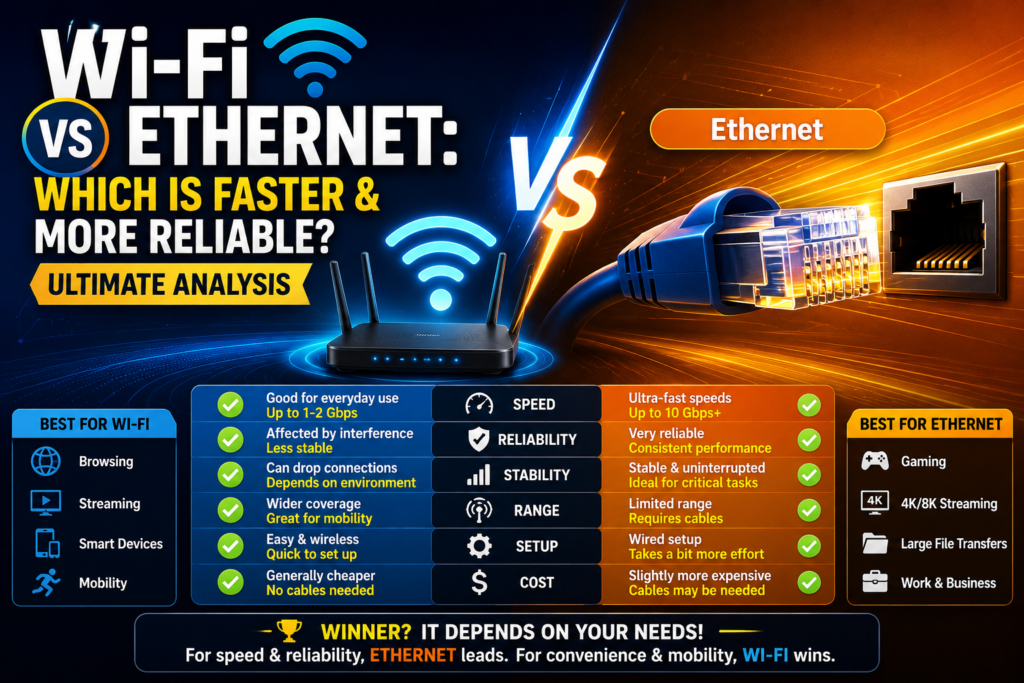
The modern digital age demands instantaneous connectivity, forcing users to constantly analyze the massive debate surrounding wi-fi vs ethernet setups. Whether you are download heavy multimedia files, managing real-time data pipelines, or streaming high-definition media, your chosen connection medium alters your productivity entirely. Choosing a wired vs wireless connection is no longer just about convenience; it directly dictates your network throughput, data protection, and daily stability.
Many consumers assume that modern wireless networks have entirely replaced physical cables. While radio frequency technologies have made monumental evolutionary leaps, physical data lines remain the undisputed champion of raw, uncompromised performance. Understanding the fundamental mechanics of how data travels through space versus solid copper wires reveals why this tech battle persists. By examining the structural realities of wi-fi vs ethernet platforms, you can engineer an elite workspace optimized for maximum operational efficiency.
The Core Technical Differences
To understand why one medium outperforms the other, we must inspect the physical layers of data transport. Wireless networks broadcast data via radio frequencies traveling through open air, while wired networks trap data signals inside tightly shielded physical cables.
Data Transmission Physics
Wireless routers use omnidirectional antennas to broadcast data across various frequency spaces, which makes understanding how wi-fi works essential to grasping its physical range limitations. These open-air radio waves degrade rapidly when passing through solid materials like concrete walls, heavy glass windows, or metallic home appliances.
Conversely, a physical Cat6 cable confines the electromagnetic signals entirely within insulated copper strands. This direct pipeline eliminates the risk of environmental signal degradation, allowing information packets to reach their destination with flawless structural integrity.
Speed and Bandwidth Boundaries (1997 – 2026)
The historical trajectory of networking throughput between 1997 and 2026 illustrates a relentless race for pure speed. In the late nineties, early consumer networks crawled at speeds that made local file transfers painful. Today, multi-gigabit speeds are standard operational requirements in both residential and enterprise environments.
When evaluating a wired vs wireless connection, raw local transfer speed remains a critical benchmark. Under ideal lab conditions, the latest wireless standards promise staggering maximum speeds. However, real-world execution always drops below these theoretical limits due to distance, overhead, and environmental layout challenges. Physical copper wires suffer from no such real-world performance drops, consistently delivering full-duplex gigabit speeds across long distances without flinching. This means a wired connection can transmit and receive data at maximum bandwidth simultaneously, completely removing any internal bandwidth bottleneck.
Latency and Gaming Performance Explained
For real-time data environments, raw download speed is secondary to latency, which is the total time it takes for a data packet to travel from your device to a remote server and back. High latency results in noticeable delays, rubber-banding, and dropped sessions.
Wireless Connection:
[Device] ---( Radio Waves + Interference )---> [Router] ---> [Internet] (Higher Ping)

Wired Connection:
[Device] ===( Shielded Cat6 Copper Cable )===> [Router] ---> [Internet] (Stable Low Ping)
The core difference in wireless latency vs wired performance is immediately obvious when monitoring your network ping. Wireless signals fluctuate based on local air activity, causing unpredictable spikes in latency and noticeable jitter. When gaming on Wi-Fi vs ethernet infrastructure, even a brief microsecond spike can disrupt your experience.
A physical wire maintains an incredibly steady, rock-low ping rate Wi-Fi vs ethernet tests can never replicate over the air. Copper paths completely prevent packets loss, ensuring that every command you input executes instantly without the random stutters caused by crowded airwaves.
Stability and Environmental Interference Challenges
Wireless connections operate in an incredibly noisy environment. The air inside a standard home is packed with overlapping electromagnetic signals competing for priority, causing consistent packet collisions.
Major Sources of Wireless Signal Disruption
- Physical Objects: Thick brick walls, metal support beams, and structural drywall absorb radio waves and create severe dead zones.
- Household Appliances: Kitchen microwave ovens, wireless baby monitors, and older cordless office phones broadcast on matching frequencies, causing sudden drops in speed.
- Neighboring Networks: In crowded apartment complexes, dozens of consumer routers blasting signals on identical channels create heavy network friction.
Physical wired setups are entirely immune to these open-air environmental issues. The tight internal twisting of pairs within a modern Cat6 cable protects the data streams from external electromagnetic pollution, ensuring maximum stability regardless of how crowded your local airspace becomes.
Network Security and Data Privacy Realities
In an era of rising cybersecurity threats, safeguarding your internal network traffic is paramount. The underlying physical architecture of your connection method directly influences your vulnerability to external intrusion.
Because wireless signals radiate outward in all directions, they inevitably bleed past the physical walls of your home or business office. This visibility allows malicious entities sitting in a nearby car or adjacent apartment to intercept your data packets or launch automated brute-force attacks against your encryption. Maintaining a secure router setup requires continuous monitoring, strong WPA3 passwords, and complex firewall configurations to keep bad actors at bay.
Physical copper lines offer an inherently superior level of base security. To intercept data traveling across a hardwired system, an intruder must gain physical access to your building and manually splice into the physical cable. For high-security environments, the hardwired internet benefits make physical cables the only acceptable choice for processing sensitive data.
Convenience, Mobility, and Physical Deployment Costs
While cables win every performance category, wireless networks dominate the arena of sheer convenience and overall deployment flexibility.
+-------------------------------------------------------------+
|               NETWORK TYPE COMPARISON MATRIX                |
+----------------------+--------------------------------------+
| FEATURE              | WI-FI CONNECTION  | ETHERNET CABLE   |
+----------------------+-------------------+------------------+
| Mobility             | Complete Freedom  | Tethered to Wall |
| Setup Complexity     | Very Low          | High (Running Wires)|
| Physical Clutter     | Zero Cables       | High Cable Count |
| Multi-Device Support | Excellent         | Limited by Ports |
+----------------------+-------------------+------------------+
The absolute lack of physical clutter is the primary reason wireless networks have exploded in global popularity. Connecting a new smartphone, tablet, smart speaker, or laptop requires nothing more than selecting an SSID and entering a passcode. It grants users complete mobility, allowing them to work from anywhere within the broadcasting zone.
Deploying an extensive wired network requires drilling holes through walls, running long cable lines along baseboards, and installing physical switch boxes. This installation process can be highly time-consuming and expensive, particularly in multi-story buildings or historical structures where modifying walls is deeply problematic.
Alternative Networking Solutions
If running long copper cables through your structural walls is impossible, but you still require the low-latency stability of a wire, alternative technologies can bridge the gap.
A powerline adapter vs Wi-Fi setup provides an excellent middle-ground option for difficult household layouts. These small devices plug directly into your existing electrical wall outlets, using the existing electrical copper wiring inside your walls to transmit local data packets from one room to another. While they do not fully match the pure speed of a dedicated Cat6 line, they offer a vastly more stable alternative with lower latency than traditional wireless connections struggling to pass through thick interior brickwork.
When to Choose Wireless Networks
Wireless setups are the ideal choice for secondary consumer hardware where absolute speed is not critical to operations. Smartphones, mobile tablets, streaming audio sticks, and low-power smart home automation components thrive on a wireless footprint. Modern multi-band routers do an excellent job organizing these lighter traffic streams, ensuring that your home remains fully connected without wrapping your living space in ugly cords. If your daily internet usage is limited to reading emails, scrolling social media feeds, and casual web searches, a properly optimized wireless link is more than adequate.
When to Connect via Physical Cables
Physical connections are mandatory for any high-performance station where data drops mean financial or operational failure. Desktop workstations handling large file uploads, network-attached storage units, security video recorders, and gaming consoles should always use a direct wire.
Eliminating the internal bandwidth bottleneck by deploying a physical line ensures that your critical hardware receives the maximum speed your provider allows. If your workflow requires flawless video conferencing, heavy database management, or competitive gaming where every millisecond counts, an investment in physical cabling is always worth the effort.
Optimizing Both Connections for Peak Performance
You do not have to pick just one connection style for your home. The most intelligent network designs leverage a hybrid approach, using the strengths of both mediums to create an elite digital ecosystem.
                [ Main Broadband Modem ]
                           |
                           v
              [ High-End Wireless Router ]
               /                        \
      (Radio Waves)               (Ethernet Cable)
             /                            \
            v                              v
   [ Mobile Smartphones ]         [ Gaming PC / NAS Server ]
   [ Tablets & Smart TV ]         [ Dedicated Office Hub   ]
To optimize this hybrid layout, connect your high-traffic stationary components directly to the back ports of your router using high-quality cables. This frees up clean, uncrowded wireless airspace for your mobile hardware, significantly reducing local packet collisions. For your remaining wireless segments, take the time to learn how to set up a wi-fi router correctly, ensuring that the broadcast channels are clear of local appliance interference.
Frequently Asked Questions (FAQs)
Is ethernet better than Wi-Fi for basic web browsing?
For basic activities like reading blogs or checking email, you will not notice a major difference. However, a wire provides immediate page loading and completely avoids the brief random drops that can happen over a wireless link when household appliances turn on.
Does using a longer network cable slow down your internet speed?
Standard consumer network cables can run up to 100 meters (approximately 328 feet) before suffering any signal degradation or speed drop. As long as your cable length stays under this limit, your connection will deliver full, uncompromised speed.
Can I convert an older wall jack into an active data line?
Yes, if your home was wired with modern telephone or networking cables, a technician can easily re-terminate those wall jacks into active internet ports. This allows you to experience all the hardwired internet benefits without running new cords across your floors.
Conclusion: Securing Your Digital Future
In the ultimate showdown of wi-fi vs ethernet, neither option is a complete loser. Wireless networks deliver unmatched lifestyle convenience and physical freedom, while wired lines provide raw, unmatched speed, absolute security, and rock-solid reliability. By analyzing your unique performance needs, you can deploy your devices intelligently, ensuring your network remains fast, secure, and ready for future technological demands. Advanced users can read up on the future of wi-fi explained to see how next-generation protocols aim to close this performance gap even further.

