
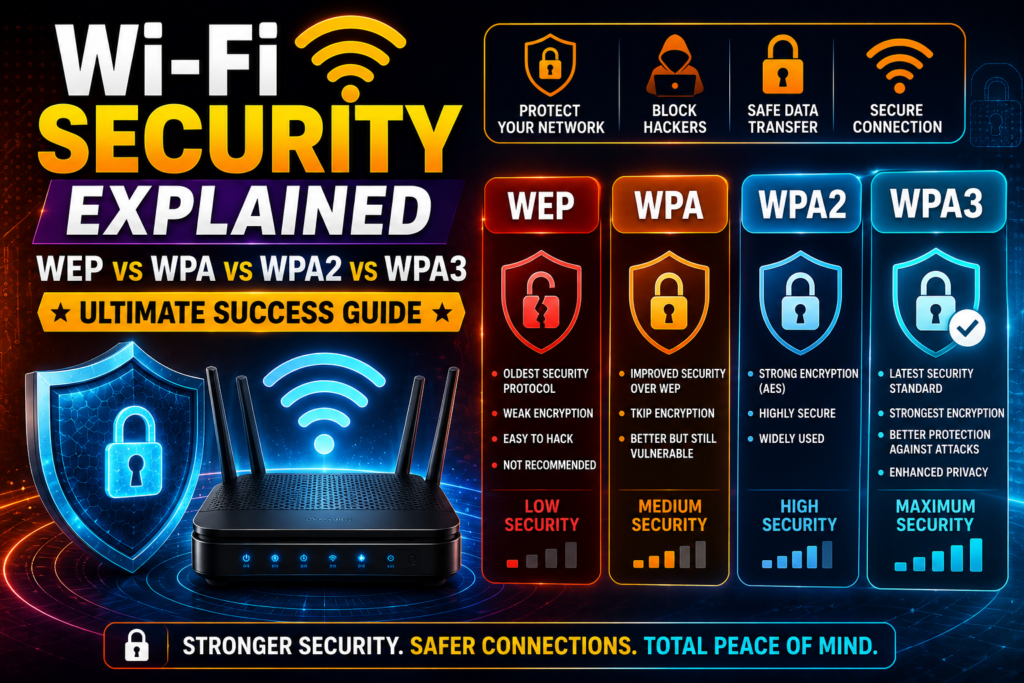
The modern digital ecosystem relies completely on invisible networking frequencies to transmit deeply sensitive personal data, making a complete wi-fi security explained breakdown absolutely vital for protecting your digital life. Whether you are operating a growing tech business, managing personal bank accounts from home, or storing private photographs on network hard drives, the security standard you choose dictates your safety. Leaving an airwave path open or using outdated protection is a massive invitation to cyber criminals looking to steal your identity or compromise your devices.
Many internet users assume that merely having a password on their network keeps them perfectly safe from outside intrusion. However, different generations of protective technology shield your information in completely different ways. Understanding how open-air data is encrypted, scrambled, and verified before hitting the wider internet prevents malicious entities from executing devastating cyber security breaches. By diving deep into this wi-fi security explained blueprint, you can eliminate every network vulnerability and choose the absolute best wireless defense for your hardware setup.
The Core Concept of Wireless Data Encryption
To understand why network protection has evolved so dramatically over the years, we must look at how open-air data transport naturally functions. Wireless devices send data packages through the air using radio frequencies, meaning anyone within physical broadcast range can pick up the signal.
[Unsecured Router] ----( Data in Plain Text )----> [Hacker Intercepts Data]
[Secured Router] ----( Data Encrypted via AES )----> [Hacker Sees Random Gibberish]
Without an active protective standard, your passwords, credit card numbers, and private chat messages travel through the air in plain readable text. A strong wireless security protocol changes this completely by applying an advanced encryption key to every outgoing packet. This mathematical operation scrambles the readable text into a massive string of random gibberish. Only a client device that possesses the correct matching passphrase can execute the decryption process to read the original information.
The WEP Generation: The Broken Foundation (1997 – 2003)
The historical timeline of wireless safety began in the late nineties, a period where engineering teams were just beginning to build the foundational architecture of the modern web.
Wired Equivalent Privacy (WEP) launched alongside original wireless standards between 1997 and 2003 as the first official attempt to secure local airwaves. The primary goal of WEP was simple; it aimed to give wireless networks the exact same level of physical privacy found on a hardwired copper line. Unfortunately, the mathematical design behind WEP was deeply flawed from day one. It utilized a static encryption key that remained exactly the same for every single data packet traveling across the local network.
Because the key never changed, eavesdropping software running on a basic laptop could easily monitor the repeating patterns in the local airwaves. Within minutes, a bad actor could collect enough packets to automatically reverse-engineer the master key, leading to swift hacking Wi-Fi passwords without needing direct permission from the admin. By 2004, international technology bodies officially retired the WEP standard due to its severe systemic vulnerabilities.
The WPA Generation: A Temporary Quick Fix (2003 – 2004)
As WEP collapsed under continuous security exploits, the industry desperately needed an immediate replacement that could run on older existing hardware without forcing consumers to buy brand-new equipment.
Wi-Fi Protected Access (WPA) rolled out as an emergency stopgap patch to fix the massive structural leaks of the previous generation. To solve the static key issue, WPA introduced the Temporal Key Integrity Protocol (TKIP). Unlike WEP, TKIP dynamically generated a completely fresh encryption key for every individual data packet sent across the network.
This moving target made it vastly more difficult for early hacking utilities to crack the master code. However, because WPA still utilized the core physical framework of the broken WEP system, security researchers quickly found alternative pathways to break inside. TKIP was prone to small data injections, proving that a completely fresh foundation was required to secure a modern wireless network effectively. To get a better grasp on how these early transmission mechanics functioned, reading an overview on how wi-fi works demonstrates why basic packet shifting was not enough to stop advanced digital attacks.
The WPA2 Generation: The Golden Standard of Protection (2004 – 2018)
The introduction of the third generation marked the true birth of modern, industrial-grade civilian cyber security across the global networking landscape.
Python
def check_encryption_strength(protocol):
    # Analyzing wireless security standards for home and business deployment
    if protocol == "WEP" or protocol == "WPA":
        return "CRITICAL VULNERABILITY: Do not use! Highly vulnerable to fast automated attacks."
    elif protocol == "WPA2":
        return "SECURE: Uses strong AES encryption. Safe for most standard consumer devices."
    elif protocol == "WPA3":
        return "MAXIMUM SECURITY: Best Wi-Fi security protocol. Complete protection against brute-force threats."
    else:
        return "UNKNOWN: Please verify your router firmware settings immediately."

# Simulating a local hardware diagnostic audit
print(check_encryption_strength("WPA2"))
WPA2 launched officially with a mandatory hardware requirement: the implementation of the Advanced Encryption Standard (AES). AES is an incredibly robust, military-grade symmetric encryption block cipher that is trusted by international governments to protect top-secret government documents. It completely replaced the weak TKIP system, ensuring that data packets remained completely unreadable even if intercepted by advanced hardware.
For nearly fifteen years, configuring a secure home Wi-Fi encryption path meant locking your hardware to WPA2-AES. It provided an exceptionally stable, fast, and secure environment that successfully protected billions of devices worldwide.
The Vulnerability That Shook WPA2
Despite its incredible strength and long reign as the undisputed king of wireless safety, WPA2 was not entirely invincible against highly targeted digital exploits.
In the latter half of its lifecycle, security researchers uncovered a major structural vulnerability built directly into the core connection handshake mechanism. Known as the KRACK vulnerability (Key Reinstallation Attack), this exploit allowed clever attackers to trick a wireless device into reusing an old encryption key during its initial connection phase. By forcing this key reuse, hackers could bypass the AES shield to decrypt local data traffic or inject malicious code directly into the browser stream of a victim. While manufacturers rushed out software firmware patches to fix this specific leak, the discovery made it clear that a brand-new generation of wireless security standards was desperately required.
The WPA3 Generation: Cutting Edge Modern Shielding (2018 – 2026)
The development of network security reached an elite milestone with the release of the newest safety protocol, designed to address every known flaw of the past while looking forward toward future threats.
WPA3 launched to provide the absolute best Wi-Fi security protocol for both residential homes and massive corporate networks. The single most impressive feature of WPA3 is its replacement of the traditional pre-shared key handshake with a highly advanced protocol called Simultaneous Authentication of Equals (SAE).
WPA2 Handshake:
[Device] ----( Sends Hashed Passphrase )----> [Router] -> (Vulnerable to Offline Brute-Force Guessing)

WPA3 SAE Handshake:
[Device] <====( Interactive Mathematical Proof )====> [Router] -> (Immune to Offline Guessing)
Under old WPA2 systems, a hacker could capture the initial connection handshake from your driveway and use a powerful computer offline to guess your password millions of times per second. This style of brute-force attack allowed weak passwords to be broken within hours. WPA3 completely neutralizes this threat; the SAE handshake forces an interactive mathematical proof for every single guess. This means an attacker only gets one single guess per connection attempt, completely destroying the effectiveness of automated dictionary attacks.
WPA2 vs WPA3 Differences: A Direct Comparison
When choosing how to secure wireless network paths, understanding the specific upgrades built into the newest standard helps you configure your hardware for optimal defense.
The primary differences lie in how encryption keys are managed and how open public networks are protected. WPA3 utilizes individualized data encryption, meaning that even if you are logged into a public open network at a local coffee shop, your traffic remains encrypted and isolated from every other user on that same network. Furthermore, WPA3 upgrades the core encryption suite to a 192-bit cryptographic strength within enterprise Wi-Fi security layouts, giving massive corporate networks a virtually uncrackable shield against industrial espionage and state-sponsored digital threats.
Deploying Your Network Protection Safely
Implementing these advanced security standards inside your own home is a straightforward process that you can complete within a few minutes.
First, you must access your internal network management dashboard using a standard web browser on a connected computer. If you are unsure how to reach this configuration screen, reviewing a step-by-step guide on how to set up a wi-fi router will walk you through finding your default gateway IP address and administrative credentials. Once inside the main setup portal, navigate directly to the wireless security menu, select WPA3-Personal from the available dropdown menu, and input a highly complex passphrase to ensure your data remains safely locked away from outside eyes.
Balancing Security with Legacy Device Compatibility
The main challenge when shifting your home network completely over to the absolute latest encryption standard is managing older consumer electronics.
Many smart home appliances, older laptops, and legacy gaming consoles manufactured years ago do not possess the internal hardware chips required to process modern WPA3 mathematical handshakes. If you force your router into a strict “WPA3-Only” mode, these older client devices will fail to connect entirely. To solve this issue, most modern routers offer a smart hybrid setting labeled “WPA2/WPA3 Mixed Mode”. This allows modern smartphones and computers to leverage advanced protection, while older smart bulbs or legacy hardware can fall back safely to WPA2-AES encryption.
Moving Beyond Passwords: Enhancing Your Local Shield
While choosing a modern encryption standard forms the backbone of your digital defense, true network security requires a multi-layered approach to eliminate every possible entry point.
Crucial Steps to Secure Your Network
- Change Factory Admin Details: Never keep the default login credentials that came printed on your router box. If an outsider connects to your signal, a factory password allows them to take complete control of your system firmware.
- Establish a Dedicated Guest Network: Create an isolated secondary wireless network name exclusively for visitors and smart home IoT appliances. This keeps your main computers completely separate from potentially infected guest devices.
- Disable Remote Management Tools: Turn off the setting that allows your admin dashboard to be accessed over the open internet. This ensures that configuration changes can only be made by a computer physically located inside your house.
The Consequences of Ignoring Network Vulnerabilities
Failing to take active control of your wireless security settings can result in severe financial, legal, and personal complications.
If a malicious actor successfully breaks past a weak security protocol, they gain immediate access to your entire local network traffic stream. This allows them to execute man-in-the-middle attacks, redirecting your browser away from official banking sites toward identical fraudulent phishing portals designed to harvest your credit card details. Furthermore, if a neighbor or criminal uses your unsecured connection to download illegal files, your name and physical address will show up directly on your internet service provider logs, creating massive legal headaches that are incredibly difficult to resolve. If you have ever run into connectivity issues after a breach, studying a manual on how to fix wi-fi problems can help reset your routing paths to a safe baseline.
The Future Landscape of Wireless Security
As quantum computing and automated AI hacking tools continue to advance, international technology consortia are already hard at work drafting next-generation protection layers.
The future of network defense will rely heavily on zero-trust architectures and continuous automated authentication protocols running silently in the background of your operating system. These upcoming systems will analyze the behavioral patterns of connected devices in real time, instantly dropping any device that begins transmitting unusual data packets. Keeping your router firmware updated to the latest version ensures that your system receives these critical defenses the moment they are published. To see how these security features integrate with upcoming hardware changes, looking over the future of wi-fi explained highlights how speed and safety are evolving hand in hand.
Frequently Asked Questions (FAQs)
Which is the best Wi-Fi security protocol for a modern home?
WPA3-Personal is the absolute best and most secure protocol available today. It provides advanced protection against automated password guessing attacks and ensures that your open-air data remains completely encrypted with cutting-edge mathematics.
Can an old router be upgraded to support WPA3 via a software update?
While some premium manufacturers have pushed out firmware updates to add WPA3 support to older high-end devices, most standard budget routers require updated internal physical chips. If your current router does not offer WPA3, it may be time to consider upgrading your hardware.
Is it safe to leave my home Wi-Fi network hidden?
Hiding your network name (SSID) does not provide any real security benefit. Hacking software can easily detect hidden networks by monitoring the connection requests sent out by your smartphones. It is vastly better to broadcast your network name clearly while protecting it with a strong WPA3 passphrase.
Conclusion: Securing Your Digital Space for Long-Term Success
Taking the time to study a comprehensive wi-fi security explained guide gives you the practical knowledge needed to confidently shield your home or business network from modern cyber threats. By systematically moving away from outdated WEP and WPA protocols, activating WPA3 encryption, and modifying your default administrative credentials, you create an uncompromised digital fortress. Keep your local firmware updated regularly, monitor your connected client devices, and enjoy a fast, worry-free connection knowing your private data is fully safe. For a deeper look at how these complex wireless protocols first developed, checking out the evolution of wi-fi history: 1997 to today shows how far network safety has come to protect our global connections.

