
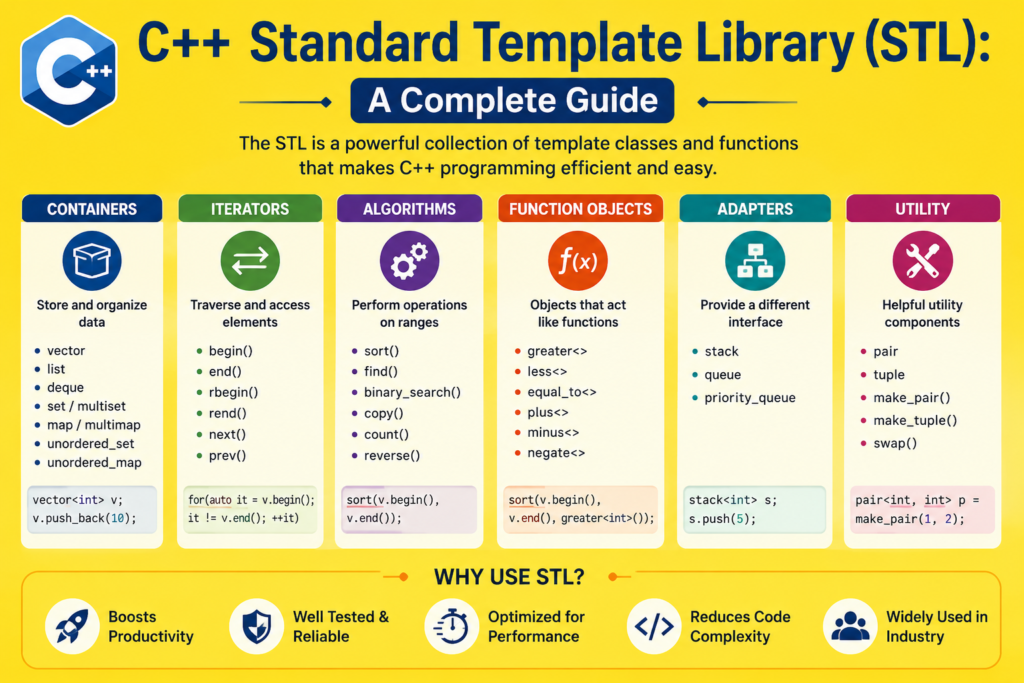
Every serious C++ developer reaches a point where writing everything from scratch stops making sense. Why build your own dynamic array when a perfect one already exists? Why implement sorting algorithms when the standard library has faster, more tested versions ready to use? That is exactly the problem the c++ stl was designed to solve. The c++ stl, or Standard Template Library, is one of the most powerful and comprehensive collections of reusable data structures and algorithms ever assembled for any programming language.
c++ stl gives you instant access to containers that store data, iterators that traverse it, and algorithms that transform it. Together, these three pillars form a complete toolkit for writing fast, clean, and reliable C++ code without reinventing the wheel on every project. Whether you are sorting a million records, looking up values in a dictionary, or processing a queue of tasks, the c++ stl has a tool built exactly for that job.
This guide covers everything you need to know: what the c++ stl is, how its components work together, and how to use its most important features with real code examples throughout.
What Is the C++ STL and Where Did It Come From (1994 – 1998)
The c++ stl was originally designed by Alexander Stepanov and Meng Lee at Hewlett-Packard in the early 1990s. Stepanov’s vision was revolutionary: create a library of generic algorithms and data structures that work with any data type through the power of templates. The goal was maximum reusability without any sacrifice in performance.
The c++ stl was proposed for inclusion in the C++ standard in 1994 and officially adopted as part of the C++98 standard, the first formal ISO standard for the C++ language. Since then it has evolved with every new standard, growing richer and more powerful with C++11, C++14, C++17, and C++20 each adding significant new components.
For anyone interested in the history of C++, the inclusion of the STL in C++98 was one of the most transformative moments in the language’s development. It transformed C++ from a powerful but manually intensive language into a genuinely high-productivity environment where complex data manipulation could be accomplished with clean, expressive, and type-safe code.
The c++ stl is built on the concept of generic programming. Using C++ templates, its containers and algorithms work with any data type without modification. A std::vector of integers and a std::vector of custom objects use the exact same underlying code. The compiler generates type-specific versions automatically. This is the core genius of the c++ stl: write once, use with anything.
The Three Pillars of c++ stl: Containers, Iterators, and Algorithms
The c++ stl is organized around three interconnected components that work together seamlessly.
Containers are the data structures that store your data. They come in several categories: sequence containers like std::vector and std::list that store elements in a linear order, associative containers like std::map and std::set that organize elements by key for fast lookup, and container adapters like stack and queue that provide restricted interfaces on top of other containers.
Iterators are the bridge between containers and algorithms. An iterator behaves like a pointer, pointing to an element inside a container and supporting operations like increment to move to the next element and dereference to access the current element’s value. Every container provides iterators, and every algorithm works through iterators. This design is what makes the c++ stl so flexible: an algorithm written to work with iterators works with any container that provides them.
Algorithms are the functions that operate on data through iterators. Sorting, searching, transforming, counting, partitioning, and dozens of other operations are all available as standard algorithms that work with any container.
Understanding how these three pillars work together is the key to unlocking everything the c++ stl offers.
Sequence Containers: Vector, List, and Deque
Sequence containers are the workhorses of the c++ stl. They store elements in a specific order and provide different performance trade-offs depending on how you need to access and modify the data.
std::vector is the most widely used container in all of c++ stl. It stores elements in continuous memory, provides constant-time element access by index, and grows dynamically as elements are added. For most use cases involving ordered collections, vector is the right default choice.
#include <iostream>
#include <vector>
#include <algorithm>
using namespace std;

int main() {
    vector<int> scores = {85, 92, 78, 96, 88, 71, 95};

    // Add elements
    scores.push_back(89);
    scores.push_back(93);

    // Sort the vector
    sort(scores.begin(), scores.end());

    // Display all elements
    cout << "Sorted scores: ";
    for (int score : scores) {
        cout << score << " ";
    }
    cout << endl;

    // Find a specific value
    auto it = find(scores.begin(), scores.end(), 96);
    if (it != scores.end()) {
        cout << "Found 96 at position: " << distance(scores.begin(), it) << endl;
    }

    // Calculate sum using accumulate
    #include <numeric>
    // Already included via algorithm in most implementations
    cout << "Total elements: " << scores.size() << endl;

    return 0;
}
std::list is a doubly linked list. It provides constant-time insertion and deletion at any position but does not support random access by index. Use list when you need to insert or remove elements frequently from the middle of the collection.
std::deque, short for double-ended queue, supports fast insertion and deletion at both the front and the back. Unlike vector, deque can efficiently add elements to the front without shifting all existing elements.
#include <iostream>
#include <deque>
using namespace std;

int main() {
    deque<string> taskQueue;

    // Add tasks to both ends
    taskQueue.push_back("Process payment");
    taskQueue.push_back("Send email");
    taskQueue.push_front("Handle urgent request");
    taskQueue.push_front("System alert");

    cout << "Task queue (front to back):" << endl;
    for (const string& task : taskQueue) {
        cout << " - " << task << endl;
    }

    // Remove from front
    taskQueue.pop_front();
    cout << "\nAfter removing front task: " << taskQueue.front() << endl;

    return 0;
}
Associative Containers: Map, Set, and Their Variants
Associative containers in the c++ stl store elements in a sorted order and provide logarithmic-time lookup, insertion, and deletion. They are backed by balanced binary search trees internally, which guarantees consistent performance regardless of the number of elements.
std::map is a collection of key-value pairs where each key is unique. It is essentially a dictionary: you store a value under a key, and you can retrieve that value instantly by providing the key. std::map keeps its keys sorted automatically.
#include <iostream>
#include <map>
#include <string>
using namespace std;

int main() {
    map<string, int> studentGrades;

    // Insert key-value pairs
    studentGrades["Alice"] = 95;
    studentGrades["Bob"] = 82;
    studentGrades["Charlie"] = 91;
    studentGrades["Diana"] = 88;
    studentGrades["Edward"] = 76;

    // Access a specific value
    cout << "Alice's grade: " << studentGrades["Alice"] << endl;

    // Iterate over all pairs (automatically sorted by key)
    cout << "\nAll student grades:" << endl;
    for (const auto& pair : studentGrades) {
        cout << pair.first << ": " << pair.second << endl;
    }

    // Check if a key exists
    if (studentGrades.count("Bob") > 0) {
        cout << "\nBob is enrolled." << endl;
    }

    // Find and update
    auto it = studentGrades.find("Charlie");
    if (it != studentGrades.end()) {
        it->second = 94;
        cout << "Updated Charlie's grade: " << it->second << endl;
    }

    return 0;
}
std::set stores unique values in sorted order. It is perfect when you need to maintain a collection of distinct items and quickly check whether a specific item exists.
#include <iostream>
#include <set>
using namespace std;

int main() {
    set<int> uniqueNumbers;

    // Insert values - duplicates are ignored automatically
    uniqueNumbers.insert(42);
    uniqueNumbers.insert(17);
    uniqueNumbers.insert(89);
    uniqueNumbers.insert(42);  // Duplicate - will not be inserted
    uniqueNumbers.insert(31);
    uniqueNumbers.insert(17);  // Duplicate - will not be inserted

    cout << "Unique numbers (sorted): ";
    for (int num : uniqueNumbers) {
        cout << num << " ";
    }
    cout << endl;

    cout << "Total unique values: " << uniqueNumbers.size() << endl;

    // Check membership
    if (uniqueNumbers.count(89)) {
        cout << "89 is in the set." << endl;
    }

    return 0;
}
The c++ stl also provides std::unordered_map and std::unordered_set, which use hash tables internally instead of binary search trees. These provide average constant-time lookup instead of logarithmic time, making them even faster for large datasets where sorted order is not required.
Container Adapters: Stack, Queue, and Priority Queue
Container adapters are specialized interfaces built on top of other c++ stl containers. They restrict what operations are available to enforce specific data structure behavior.
std::stack provides last-in-first-out behavior. You can only add elements to the top and remove elements from the top. This mirrors the mathematical stack data structure used in expression evaluation, undo systems, and recursive algorithm simulations.
#include <iostream>
#include <stack>
#include <string>
using namespace std;

int main() {
    stack<string> browserHistory;

    // Simulate browser navigation
    browserHistory.push("google.com");
    browserHistory.push("github.com");
    browserHistory.push("stackoverflow.com");
    browserHistory.push("cppreference.com");

    cout << "Current page: " << browserHistory.top() << endl;

    // Navigate back
    cout << "\nNavigating back:" << endl;
    while (!browserHistory.empty()) {
        cout << "Visiting: " << browserHistory.top() << endl;
        browserHistory.pop();
    }

    return 0;
}
std::queue provides first-in-first-out behavior. Elements are added at the back and removed from the front, exactly like a real-world queue of people waiting in line.
#include <iostream>
#include <queue>
#include <string>
using namespace std;

int main() {
    queue<string> printQueue;

    // Add print jobs
    printQueue.push("Document_A.pdf");
    printQueue.push("Report_Q3.docx");
    printQueue.push("Invoice_2026.pdf");
    printQueue.push("Presentation.pptx");

    cout << "Processing print queue:" << endl;
    while (!printQueue.empty()) {
        cout << "Printing: " << printQueue.front() << endl;
        printQueue.pop();
    }

    return 0;
}
std::priority_queue automatically keeps its elements sorted so that the highest priority element is always at the top. This makes it invaluable for task scheduling, pathfinding algorithms, and any scenario where you always need to process the most important item next.
c++ stl Algorithms: Sorting, Searching, and Transforming
The algorithms component of the c++ stl is where the library truly reveals its power. The header provides dozens of ready-to-use algorithms that work with any container through iterators. These algorithms are highly optimized, extensively tested, and cover the vast majority of data manipulation tasks you will ever need.
#include <iostream>
#include <vector>
#include <algorithm>
#include <numeric>
using namespace std;

int main() {
    vector<int> data = {64, 25, 12, 92, 37, 8, 71, 45, 55, 18};

    // Sort in ascending order
    sort(data.begin(), data.end());
    cout << "Sorted ascending: ";
    for (int n : data) cout << n << " ";
    cout << endl;

    // Sort in descending order
    sort(data.begin(), data.end(), greater<int>());
    cout << "Sorted descending: ";
    for (int n : data) cout << n << " ";
    cout << endl;

    // Binary search (requires sorted data)
    sort(data.begin(), data.end());
    bool found = binary_search(data.begin(), data.end(), 45);
    cout << "45 found: " << (found ? "Yes" : "No") << endl;

    // Count occurrences
    vector<int> repeated = {1, 2, 3, 2, 4, 2, 5, 2};
    int twos = count(repeated.begin(), repeated.end(), 2);
    cout << "Number of 2s: " << twos << endl;

    // Sum of all elements
    int total = accumulate(data.begin(), data.end(), 0);
    cout << "Sum: " << total << endl;

    // Find minimum and maximum
    auto minIt = min_element(data.begin(), data.end());
    auto maxIt = max_element(data.begin(), data.end());
    cout << "Min: " << *minIt << ", Max: " << *maxIt << endl;

    return 0;
}
The transform algorithm applies a function to every element and stores the results. The remove_if algorithm removes all elements matching a condition. The for_each algorithm applies a function to every element for side effects. These algorithms accept lambda expressions in modern C++, making them enormously flexible.
#include <iostream>
#include <vector>
#include <algorithm>
using namespace std;

int main() {
    vector<int> numbers = {1, 2, 3, 4, 5, 6, 7, 8, 9, 10};

    // Transform: square every element
    vector<int> squared(numbers.size());
    transform(numbers.begin(), numbers.end(), squared.begin(),
              [](int n) { return n * n; });

    cout << "Squared values: ";
    for (int n : squared) cout << n << " ";
    cout << endl;

    // Remove even numbers using remove_if
    auto newEnd = remove_if(numbers.begin(), numbers.end(),
                             [](int n) { return n % 2 == 0; });
    numbers.erase(newEnd, numbers.end());

    cout << "Odd numbers only: ";
    for (int n : numbers) cout << n << " ";
    cout << endl;

    return 0;
}
Iterators: The Glue That Holds c++ stl Together
Iterators are the mechanism that connects containers to algorithms in the c++ stl. Every container provides iterators that support a common interface: incrementing to move forward, decrementing to move backward in bidirectional iterators, and dereferencing to access the current element.
#include <iostream>
#include <vector>
#include <map>
using namespace std;

int main() {
    // Vector iterator
    vector<double> temperatures = {22.5, 19.8, 25.3, 18.1, 23.7};

    cout << "Temperatures using iterator:" << endl;
    for (vector<double>::iterator it = temperatures.begin();
         it != temperatures.end(); ++it) {
        cout << *it << "C" << endl;
    }

    // Map iterator
    map<string, string> capitals;
    capitals["France"] = "Paris";
    capitals["Germany"] = "Berlin";
    capitals["Japan"] = "Tokyo";

    cout << "\nCapital cities:" << endl;
    for (map<string, string>::iterator it = capitals.begin();
         it != capitals.end(); ++it) {
        cout << it->first << " : " << it->second << endl;
    }

    // Reverse iterator
    cout << "\nTemperatures in reverse:" << endl;
    for (auto it = temperatures.rbegin(); it != temperatures.rend(); ++it) {
        cout << *it << "C" << endl;
    }

    return 0;
}
The auto keyword in modern C++ makes iterator code much cleaner by letting the compiler deduce the iterator type automatically. This is one of the improvements that C++11 brought to working with the c++ stl and made the library significantly more approachable for everyday use.
c++ stl in Real-World Applications and Modern Technology
The c++ stl is not just a teaching tool. It is the backbone of production software running some of the world’s most demanding applications. In C++ in modern technology, the STL powers everything from database query engines and network servers to game engines and scientific computing platforms. Every major C++ codebase in existence relies on the STL for its foundational data structures and algorithms.
For developers working in C++ game development, the STL is used throughout game engine code. Vectors store lists of game entities. Maps associate asset names with loaded resources. Priority queues implement event scheduling systems. Sets track unique active elements. The STL’s combination of performance and expressiveness makes it indispensable in game development, where both execution speed and code maintainability matter enormously.
For developers exploring advanced C++ concepts, the STL is where deep C++ expertise is built. Understanding how the STL is implemented using templates, iterator traits, and allocator patterns reveals the full power of C++ generic programming. The STL is both a practical tool and a masterclass in sophisticated C++ design.
For anyone studying OOP in C++, the STL demonstrates how object-oriented and generic programming paradigms complement each other powerfully. STL containers are themselves class templates that combine data storage with rich method interfaces, showing exactly how C++ classes can be designed for maximum reusability.
Pairs and Tuples: Lightweight Compound Data in c++ stl
The c++ stl also provides utility types for grouping multiple values together. std::pair stores exactly two values of potentially different types. std::tuple generalizes this to any number of values.
cpp
#include <iostream>
#include <vector>
#include <algorithm>
#include <tuple>
using namespace std;

int main() {
    // Using pairs
    vector<pair<string, int>> employees;
    employees.push_back({"Alice", 95000});
    employees.push_back({"Bob", 87000});
    employees.push_back({"Charlie", 112000});
    employees.push_back({"Diana", 98000});

    // Sort by salary (second element)
    sort(employees.begin(), employees.end(),
         [](const pair<string,int>& a, const pair<string,int>& b) {
             return a.second > b.second;
         });

    cout << "Employees sorted by salary:" << endl;
    for (const auto& emp : employees) {
        cout << emp.first << ": $" << emp.second << endl;
    }

    // Using tuples
    tuple<string, int, double> student("Emma", 20, 3.85);
    cout << "\nStudent: " << get<0>(student)
         << ", Age: " << get<1>(student)
         << ", GPA: " << get<2>(student) << endl;

    return 0;
}
Pairs are used extensively throughout the STL itself. When you iterate over a std::map, each element is a pair containing the key and value. When functions need to return two related values, pair provides a clean, expressive solution without defining a custom struct.
Frequently Asked Questions
What Is the C++ STL and Why Should I Learn It?
The c++ stl is the Standard Template Library, a collection of generic containers, iterators, and algorithms that is part of the C++ standard library. You should learn it because it provides tested, optimized implementations of the data structures and algorithms you would otherwise have to build from scratch. Using the STL makes your code faster to write, more reliable, and more readable. It is used in virtually every professional C++ codebase in existence.
What Is the Difference Between std::map and std::unordered_map?
std::map stores key-value pairs in sorted order using a balanced binary search tree internally. It provides logarithmic-time lookup, insertion, and deletion. std::unordered_map stores key-value pairs in a hash table without any guaranteed order. It provides average constant-time operations but can degrade to linear time in worst-case scenarios with many hash collisions. Use std::map when you need sorted keys or guaranteed worst-case performance. Use std::unordered_map when you need the fastest average lookup time and do not care about key order.
When Should You Use std::vector vs std::list in C++?
Use std::vector when you need fast random access by index, you add or remove elements mostly at the end, and cache performance matters. Vector stores elements in continuous memory, which is extremely cache-friendly and makes iteration very fast. Use std::list when you need to insert or delete elements frequently at arbitrary positions in the middle of the collection, since list provides constant-time insertion and deletion at any position. For most practical applications, vector is the better default choice.
What Are Iterators in C++ STL and How Do They Work?
Iterators are objects that behave like pointers to elements inside STL containers. They provide a uniform interface for traversing containers regardless of the underlying data structure. You use begin() to get an iterator to the first element and end() to get an iterator one past the last element. Incrementing an iterator moves it to the next element. Dereferencing an iterator gives you the current element’s value. Every STL algorithm works through iterators, which is what makes algorithms compatible with all containers.
Does Using the C++ STL Slow Down Your Program?
No. The c++ stl is designed around the zero-overhead principle championed by C++. STL containers and algorithms use templates, which means the compiler generates type-specific code at compile time. There is no runtime type checking or virtual dispatch overhead. The algorithms in the STL are also highly optimized implementations that typically perform as well as or better than hand-written equivalents. In practice, using the STL almost always produces code that is both faster to write and faster to execute than manual implementations.
Conclusion
The c++ stl is one of the most powerful tools available to any C++ programmer, and mastering it is a genuine turning point in your development as a software engineer. It transforms the way you approach problems. Instead of spending hours implementing and debugging a sorted container or a search algorithm, you reach for the right STL tool, write clean and expressive code, and move on to solving the actual problem your software exists to address.
c++ stl rewards every hour you invest in learning it deeply. The containers cover every fundamental data structure you will ever need. The algorithms handle every common operation on those structures. The iterators tie everything together in a coherent, flexible system that works with any type and any container. This is generic programming at its finest, and it is why the STL has remained central to professional C++ development for nearly three decades.
The code examples in this guide are your entry points into each component. Study them, run them, modify them, and combine them to solve real problems. As you build experience with the c++ stl, you will find yourself writing more powerful, more reliable, and more elegant C++ code than you ever thought possible.

