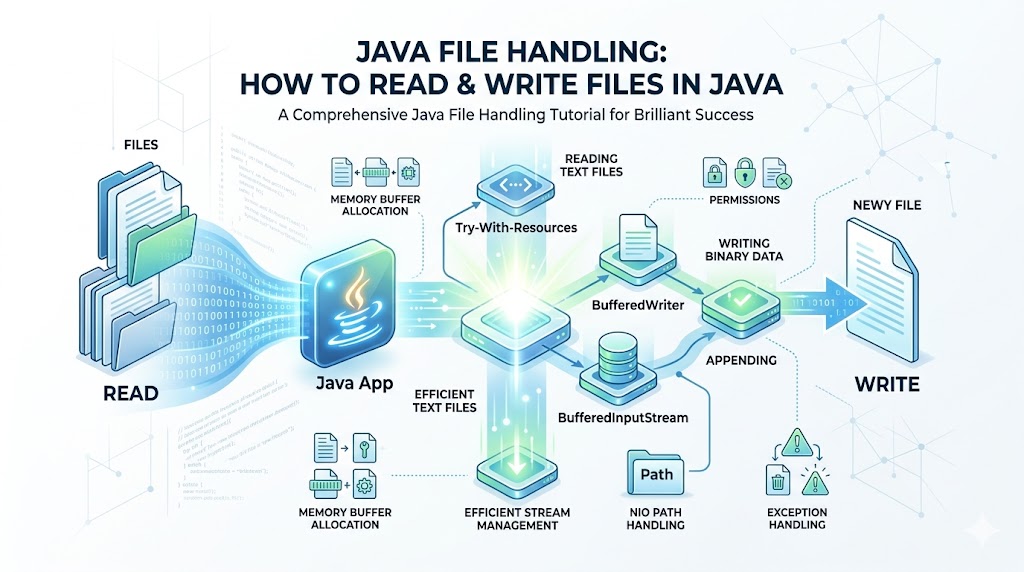
Interacting with the file system is a core requirement for almost any modern software application. Whether you are building a web application that processes user uploads, a desktop tool that saves configuration states, or a data processing pipeline, managing data on a hard drive is essential. This comprehensive java file handling tutorial will walk you through the fundamental and advanced mechanics of interacting with storage systems using the Java programming language.
By mastering the techniques outlined in this guide, you will gain the ability to manipulate persistent data securely and efficiently, ensuring your applications remain robust and scalable. Understanding these concepts is highly critical for anyone looking to build enterprise-grade systems or those tracking the future of software engineering.
Evolution of Java IO and NIO (1995 – 2011)
To understand how Java interacts with the underlying file system, it helps to examine its historical architecture. When Java was first introduced, input and output operations relied exclusively on the java.io package. This framework utilized synchronous, blocking I/O, which meant a thread would halt execution until a read or write operation completed.
While straightforward, this approach suffered from performance bottlenecks when handling multiple simultaneous connections or massive datasets. The architecture was built around stream buffering classes and character encoding schemes to bridge the gap between binary data and human-readable text.
As technology progressed, the limitations of the traditional java io base package became apparent. To resolve these scalability issues, Sun Microsystems introduced New I/O (NIO) in Java 1.4, which was later enhanced significantly in Java 7 through NIO2. This modern java nio alternative introduced non-blocking I/O operations, channels, and selectors.
Instead of treating data as a continuous stream of single bytes or characters, NIO leverages memory buffer allocation to process data in substantial blocks. This architectural evolution allowed developers to choose between the simplicity of classic stream resource disposal models and the high performance of modern asynchronous file systems.
Core Principles of Java Stream Architecture
At the heart of the classic standard library is the concept of a stream. A stream is an abstraction representing a continuous sequence of data flowing from a source to a destination. Understanding the distinction between the two primary stream types is vital for proper data integrity.
- Byte Streams: These handle raw binary data. They read and write data exactly as it exists on disk, one byte (8 bits) at a time. They are ideal for working with images, audio files, executable programs, or any non-textual data. The foundational classes for these operations are
InputStreamandOutputStream. - Character Streams: These are designed specifically for handling text data. They automatically manage character encoding schemes (such as UTF-8 or UTF-16) to translate raw binary stream manipulation into human-readable characters (16-bit Unicode). The foundational classes here are
ReaderandWriter.
When building applications, failing to separate binary streams from text streams can result in corrupted data or broken encodings. Let us dive deep into the specific classes required to construct efficient file management code.
Working with the File Class to Manage Metadata
Before reading or writing data, you often need to inspect or manipulate the file system structure itself. The traditional java.io.File class represents an abstract pathway to a file or directory. It does not actually open a data connection to the contents of a file; instead, it provides metadata tools to check if a resource exists, determine its size, check filesystem permission parameters, or distinguish between file system directories and files.
Let us explore how to create new file Java objects and verify their properties on disk. The system relies heavily on identifying absolute relative paths to locate resources across different operating systems.
Java
import java.io.File;
import java.io.IOException;

public class FileMetadataDemo {
    public static void main(String[] args) {
        // Specifying a path using absolute relative paths logic
        File file = new File("example_report.txt");

        try {
            // How to create new file Java structures safely
            if (file.createNewFile()) {
                System.out.println("File successfully created: " + file.getName());
            } else {
                System.out.println("File already exists in the target directory.");
            }

            // Checking metadata and filesystem permission parameters
            if (file.exists()) {
                System.out.println("Absolute Path: " + file.getAbsolutePath());
                System.out.println("Is Writeable: " + file.canWrite());
                System.out.println("Is Readable: " + file.canRead());
                System.out.println("File size in bytes: " + file.length());
            }
        } catch (IOException e) {
            System.err.println("An error occurred during file initialization.");
            e.printStackTrace();
        }
    }
}
Writing Data to Text Files
Once your file exists on disk, the next step is writing content into it. To execute this safely, developers typically employ character streams. The standard classes for this purpose are FileWriter and BufferedWriter.
The FileWriter connects directly to the target file on the disk, while the BufferedWriter provides an internal memory layout to reduce the number of direct interactions with the physical storage drive. This combination optimizes overall execution speed.
Here is an explicit implementation demonstrating how to write data to file Java applications securely:
Java
import java.io.BufferedWriter;
import java.io.FileWriter;
import java.io.IOException;

public class TextFileWriter {
    public static void main(String[] args) {
        String data = "Discovering the depths of Java development helps build scalable systems.\n";

        // Initializing Java FileReader and FileWriter mechanics with automatic resource management
        try (FileWriter fw = new FileWriter("output_log.txt");
             BufferedWriter bw = new BufferedWriter(fw)) {

            bw.write(data);
            bw.write("Adding a second line of system metrics for validation.");
            System.out.println("Data successfully written to the target storage path.");

        } catch (IOException e) {
            System.err.println("Exception encountered while executing write operation.");
            e.printStackTrace();
        }
    }
}
For a comprehensive foundation on basic programming syntax before diving into advanced storage patterns, review our java syntax & data types guide.
Appending Data to Existing Files
By default, creating a new FileWriter instance will completely overwrite any existing data within that file. In production environments—such as application logging or transaction auditing—you usually want to add content to the end of a file without destroying what is already there.
To accomplish this, the FileWriter constructor accepts an optional boolean flag called append. Setting this parameter to true tells the system to preserve the original contents and position the write pointer at the very end of the file. This simple setting unlocks safe append data to file Java capabilities.
Java
import java.io.BufferedWriter;
import java.io.FileWriter;
import java.io.IOException;

public class FileAppendExample {
    public static void main(String[] args) {
        String appendContent = "New log entry: System running smoothly at standard operational capacity.\n";

        // The second parameter 'true' enables the append data to file Java mode
        try (FileWriter fw = new FileWriter("output_log.txt", true);
             BufferedWriter bw = new BufferedWriter(fw)) {

            bw.write(appendContent);
            System.out.println("Data successfully appended to the log file.");

        } catch (IOException e) {
            System.err.println("Failed to append data safely.");
            e.printStackTrace();
        }
    }
}
Reading Data From Text Files
Reading records from disk mirrors the writing process but uses FileReader and BufferedReader. The BufferedReader reads chunks of characters into a buffer ahead of time, allowing you to use the convenient readLine() method to process a text file line-by-line until the end of the file is reached.
The following program shows how to read text file Java systems line by line while handling potential checked IO exceptions safely.
Java
import java.io.BufferedReader;
import java.io.FileReader;
import java.io.IOException;

public class TextFileReaderDemo {
    public static void main(String[] args) {
        // Utilizing Java FileReader and FileWriter logic for character streaming
        try (FileReader fr = new FileReader("output_log.txt");
             BufferedReader br = new BufferedReader(fr)) {

            String currentLine;
            System.out.println("--- Displaying File Contents ---");

            // Loop through the file until readLine() returns null
            while ((currentLine = br.readLine()) != null) {
                System.out.println(currentLine);
            }

        } catch (IOException e) {
            System.err.println("Error encountered while attempting to read text file Java resource.");
            e.printStackTrace();
        }
    }
}
If you are unfamiliar with managing unexpected errors or runtime failures during stream access, take a moment to look over our java exception handling guide.
Processing Binary Streams
When dealing with files that do not consist of plain text—such as raw system bytes, compressed archives, encrypted packets, or images—character readers will distort the data due to automatic encoding conversions. For binary files, you must use input output streams Java protocols directly.
The FileInputStream and FileOutputStream classes read and write raw bytes. To optimize performance, these are wrapped inside BufferedInputStream and BufferedOutputStream objects.
Java
import java.io.BufferedInputStream;
import java.io.BufferedOutputStream;
import java.io.FileInputStream;
import java.io.FileOutputStream;
import java.io.IOException;

public class BinaryStreamCopy {
    public static void main(String[] args) {
        // Low level input output streams Java handling for raw binary manipulation
        try (BufferedInputStream bis = new BufferedInputStream(new FileInputStream("source_image.png"));
             BufferedOutputStream bos = new BufferedOutputStream(new FileOutputStream("destination_image.png"))) {

            byte[] byteBuffer = new byte[1024];
            int bytesRead;

            // Read chunks of bytes into the memory allocation buffer
            while ((bytesRead = bis.read(byteBuffer)) != -1) {
                bos.write(byteBuffer, 0, bytesRead);
            }
            System.out.println("Binary payload cloned successfully without byte degradation.");

        } catch (IOException e) {
            System.err.println("Error processing binary data stream.");
            e.printStackTrace();
        }
    }
}
Modern File Handling with NIO.2 (Post 2011)
With the release of Java 7, the NIO.2 framework introduced a more flexible, feature-rich syntax for file system management. It shifted focus from traditional File instances to the modern java.nio.file.Path and java.nio.file.Files utilities. This modernization resolved longstanding platform-specific issues and simplified standard boilerplate patterns.
The NIO path handling Java system handles file structures directly through operating system drivers, offering a significant performance boost over older methods.
Java
import java.nio.file.Files;
import java.nio.file.Path;
import java.nio.file.Paths;
import java.nio.file.StandardOpenOption;
import java.io.IOException;
import java.util.List;

public class ModernNioExample {
    public static void main(String[] args) {
        // Advanced NIO path handling Java mechanics
        Path path = Paths.get("nio_document.txt");

        try {
            // Write lines directly to disk with a single call
            List<String> content = List.of("Line 1: NIO operations", "Line 2: High efficiency streaming");
            Files.write(path, content, StandardOpenOption.CREATE, StandardOpenOption.TRUNCATE_EXISTING);

            // Read all lines from disk instantly
            List<String> readContent = Files.readAllLines(path);
            System.out.println("NIO Read Output: " + readContent);

        } catch (IOException e) {
            System.err.println("Exception handled in modern java nio alternative stack.");
            e.printStackTrace();
        }
    }
}
Best Practices for High-Performance File Handling
To build high-performance applications that read or modify files, you must follow established industry standards. Neglecting these rules can lead to resource locks, sluggish performance, or memory leaks.
1. Always Use Try-With-Resources
Every time an input or output stream is opened, it consumes an operating system handle. If these handles are not closed, your system will experience a resource leak. Java 7 introduced the try-with-resources statement, which guarantees proper stream resource disposal when execution finishes, even if an exception occurs mid-operation.
2. Read Large Files Efficiently
Loading an entire file into memory at once can crash your JVM if the dataset is several gigabytes in size. To read large files efficiently, stream data sequentially or use memory-mapped buffers via NIO. This allows you to process substantial files line by line or chunk by chunk without running out of RAM.
For complex processing logic involving sequential data, you can structure your information using the concepts found in our java arrays & collections guide.
3. Implement Robust Buffer Strategies
Direct disk access is incredibly slow compared to memory execution. Always wrap raw streams in buffering classes (BufferedReader or BufferedInputStream) to store data chunks in memory before flushing them to disk.
Deleting Files Programmatically
A complete java file handling tutorial must cover data cleanup. When dealing with temporary cache structures or expired records, you will need to delete a file programmatically. This can be handled using either traditional or modern NIO approaches.
Java
import java.nio.file.Files;
import java.nio.file.Path;
import java.nio.file.Paths;
import java.io.IOException;

public class FileCleanupDemo {
    public static void main(String[] args) {
        Path targetPath = Paths.get("temp_cache.txt");

        try {
            // Securely delete a file programmatically via NIO.2 utilities
            boolean isDeleted = Files.deleteIfExists(targetPath);
            if (isDeleted) {
                System.out.println("The target resource was successfully erased from disk storage.");
            } else {
                System.out.println("Deletion aborted: The requested resource does not exist.");
            }
        } catch (IOException e) {
            System.err.println("Failed to execute file deletion command due to permission locks.");
            e.printStackTrace();
        }
    }
}
Frequently Asked Questions (FAQs)
What is the primary difference between Java IO and Java NIO?
Java IO relies on traditional blocking byte and character stream mechanisms, meaning a thread must wait for data to transfer completely. Java NIO provides a non-blocking alternative that uses channels, selectors, and deliberate memory buffer allocation to process data in blocks, resulting in faster performance for large-scale operations.
Why is using a BufferedReader faster than using a FileReader alone?
A FileReader accesses the hard drive directly for every character requested, which is computationally expensive. A BufferedReader pulls large blocks of characters from disk into an internal memory buffer in a single read step, allowing subsequent calls to access data directly from RAM.
How do I handle file path differences across different operating systems?
Hardcoding file separators like / or \ will break your application on different operating systems. To write cross-platform code, use the File.separator property, or pass paths as individual string arguments to the Paths.get() method in the modern NIO library.
What happens if I forget to close an input or output stream?
Forgetting to close your streams leaves open file descriptors running in the operating system. Over time, these unclosed handles cause resource leaks that can prevent your application from opening new files, degrade system performance, or completely crash the program.
Conclusion
Mastering file I/O operations is essential for building real-world software applications. This java file handling tutorial has covered everything from classic streaming models and character buffers to modern NIO path operations and file cleanup tools. By applying these concepts, you can build data-driven systems that manage persistent application data safely, reliably, and efficiently. Use these design patterns in your next project to ensure clean file system management.