
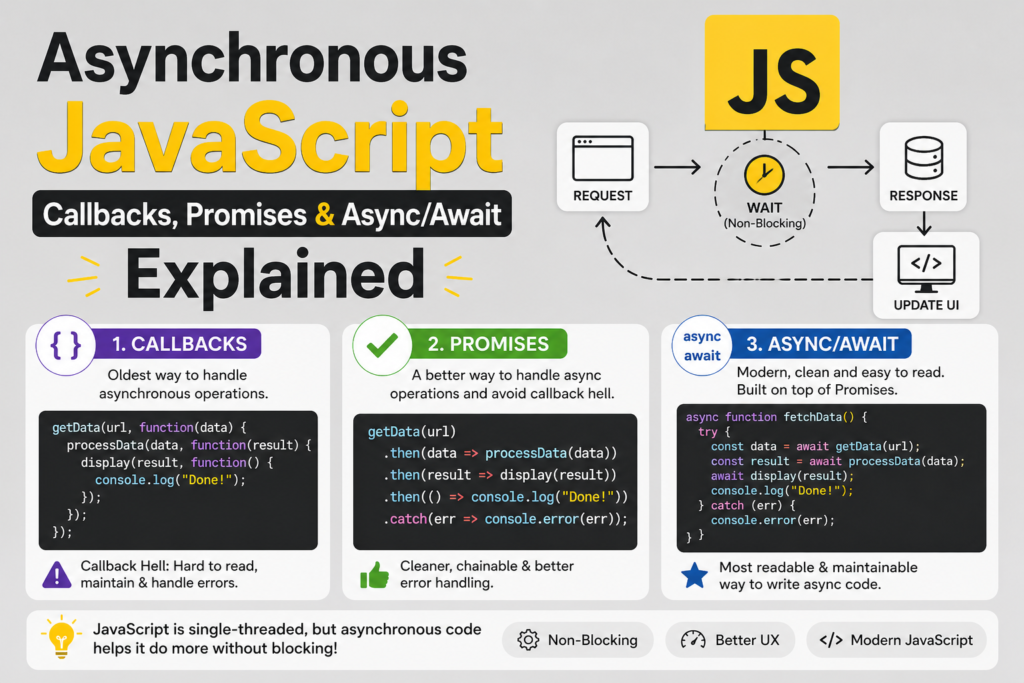
JavaScript is single threaded. It can do one thing at a time. That sounds limiting. How does a web browser stay responsive while loading a large file? How does a server handle thousands of simultaneous users? The answer is asynchronous programming. This asynchronous javascript explained guide will teach you everything. You will learn why JavaScript needs asynchronous patterns. You will master callbacks, promises, and async/await. You will understand the event loop that makes it all work. By the end, you will write non blocking code that performs beautifully. The history of javascript shows that asynchronous programming evolved dramatically. Brendan Eich created the language in 1995. Early JavaScript used callbacks. Callbacks led to “callback hell.” ES6 introduced javascript ES6 features like promises in 2015. ES8 (2017) added async/await. Each step made asynchronous programming more readable and maintainable. Let me start with a fundamental concept. JavaScript runs in a browser or Node.js environment. These environments provide Web APIs for slow operations like network requests, file reading, and timers.
Synchronous vs Asynchronous Code
To understand asynchronous javascript explained , you must first understand synchronous code. Synchronous code runs line by line. Each line must finish before the next starts.
console.log("First");
console.log("Second");
console.log("Third");
This prints First, then Second, then Third. Simple. But what if a line takes five seconds? The entire program freezes. The browser becomes unresponsive. Users cannot click buttons. That is bad. Asynchronous code solves this. Asynchronous operations start, then move to the next line while waiting. The operation finishes later. The non-blocking I/O model keeps the program responsive.
console.log("Start");
setTimeout(() => {
console.log("Inside timeout");
}, 2000);
console.log("End");
This prints Start, then End, then after two seconds, Inside timeout. The setTimeout did not block the code. This is the essence of asynchronous programming . The single-threaded nature of JavaScript does not prevent concurrency. The environment handles waiting. JavaScript continues executing other code.
The Event Loop How Asynchronous Works
The event loop is the magic behind asynchronous javascript explained . It constantly checks two places. The call stack and the task queue . The call stack holds functions currently executing. The task queue holds callbacks waiting to run. The event loop follows simple rules. First, run everything in the call stack until empty. Second, check the task queue. Third, move the first task from the queue to the call stack. Fourth, repeat forever. This explains setTimeout behavior. The callback goes to the task queue. It waits until the call stack is empty. Even if the timer finishes early, the callback waits. Here is a demonstration:
console.log("1");
setTimeout(() => console.log("2"), 0);
console.log("3");
This prints 1, 3, then 2. Even with zero milliseconds delay, the callback goes to the task queue. The call stack must empty first. Understanding the event loop helps debug timing issues. There are also microtasks from promises. Microtasks run before regular tasks. They have their own queue that empties after each task. For javascript beginner guide readers, the event loop is advanced but worth understanding.
Callbacks The Original Pattern
Callbacks are functions passed as arguments to other functions. The outer function calls the callback when the asynchronous operation completes. This is the oldest pattern in asynchronous javascript explained . Here is a callback example with setTimeout:
function waitAndGreet(name, callback) {
setTimeout(() => {
console.log("Waited for 1 second");
callback(name);
}, 1000);
}
waitAndGreet("Alice", (name) => {
console.log(Hello ${name});
});
Real world example with file reading (Node.js):
const fs = require("fs");
fs.readFile("example.txt", "utf8", (err, data) => {
if (err) {
console.error("Error reading file:", err);
return;
}
console.log("File content:", data);
});
Callbacks work fine for simple cases. But they have a major problem. Nesting multiple asynchronous operations leads to callback hell .
Callback Hell The Pyramid of Doom
When you have multiple dependent asynchronous operations, callbacks nest inside callbacks. The code becomes a pyramid shape. It is hard to read and maintain.
getUser(1, (user) => {
console.log("User:", user);
getOrders(user.id, (orders) => {
console.log("Orders:", orders);
getOrderDetails(orders[0].id, (details) => {
console.log("Details:", details);
getPaymentInfo(details.paymentId, (payment) => {
console.log("Payment:", payment);
// One more level and you lose your mind
});
});
});
});
This is callback hell. The execution stack grows deep. Error handling is duplicated everywhere. The code flow is impossible to follow. The indentation gets ridiculous. Developers needed a better way. That better way arrived with promises. For asynchronous javascript explained , understanding callback hell motivates why promises and async/await exist.
Promises A Better Way (ES6 2015)
A Promise object represents a future value. It has three states: pending, fulfilled, or rejected. You create a promise with the Promise constructor. It takes a function with resolve and reject parameters.
const myPromise = new Promise((resolve, reject) => {
const success = true;
if (success) {
resolve("Operation succeeded");
} else {
reject("Operation failed");
}
});
You use a promise with .then() for success and .catch() for errors.
myPromise
.then(result => console.log(result))
.catch(error => console.error(error));
A real promise example using fetch. The fetch API async returns a promise.
fetch("https://jsonplaceholder.typicode.com/users/1")
.then(response => {
if (!response.ok) {
throw new Error("Network response was not ok");
}
return response.json();
})
.then(user => {
console.log("User:", user);
return fetch(https://jsonplaceholder.typicode.com/posts?userId=${user.id}`);`
})
.then(response => response.json())
.then(posts => console.log("Posts:", posts))
.catch(error => console.error("Error:", error));
This is Promise chaining . Each .then() returns a new promise. The chain stays flat. No nesting. Error handling is centralized in .catch(). The difference between pending vs fulfilled is state tracking. Promises also have Promise.all for parallel operations and Promise.race for first completion.
Promise.all([
fetch("/api/user"),
fetch("/api/posts"),
fetch("/api/comments")
]).then(responses => Promise.all(responses.map(r => r.json())))
.then(([user, posts, comments]) => {
console.log("All data loaded", { user, posts, comments });
});
Promises transformed asynchronous programming . But they still require .then() and .catch() chains. Async/await made it even cleaner.
Async/Await The Modern Way (ES8 2017)
async/await is built on promises. It makes asynchronous code look synchronous. This is the most readable pattern in asynchronous javascript explained . Mark a function with async. Inside, use await before any promise. The await keyword pauses the function until the promise resolves.
async function getUserData(userId) {
try {
const response = await fetch(https://jsonplaceholder.typicode.com/users/${userId}`);`
const user = await response.json();
const postsResponse = await fetch(https://jsonplaceholder.typicode.com/posts?userId=${user.id}`);`
const posts = await postsResponse.json();
return { user, posts };
} catch (error) {
console.error("Failed:", error);
}
}
getUserData(1).then(data => console.log(data));
The try/catch block handles error handling in async . This is much cleaner than callback pyramids or long promise chains. The await keyword can only be used inside async functions. At the top level of modules, you can use top level await (ES13 2022). Async functions always return a promise. Even if you return a value, it is wrapped in a promise. Here is a comparison of all three patterns for the same task:
Callbacks:
getUser(1, (user) => {
getPosts(user.id, (posts) => {
getComments(posts[0].id, (comments) => {
console.log(comments);
}, errorHandler);
}, errorHandler);
}, errorHandler);
Promises:
getUser(1)
.then(user => getPosts(user.id))
.then(posts => getComments(posts[0].id))
.then(comments => console.log(comments))
.catch(errorHandler);
Async/Await:
async function displayComments() {
try {
const user = await getUser(1);
const posts = await getPosts(user.id);
const comments = await getComments(posts[0].id);
console.log(comments);
} catch (error) {
errorHandler(error);
}
}
Async/await is clearly the winner for code flow readability.
Fetch API and Error Handling
The javascript fetch API tutorial always includes async/await. Fetch returns a promise. But it only rejects on network errors. HTTP errors like 404 still resolve. You must check response.ok.
async function fetchUser(id) {
try {
const response = await fetch(https://api.example.com/users/${id}`);`
if (!response.ok) {
throw new Error(HTTP response.status:{response.statusText});
}
const user = await response.json();
return user;
} catch (error) {
console.error("Fetch failed:", error.message);
return null;
}
}
Error handling in async should be granular. Wrap specific operations in try/catch. Or use .catch() on the returned promise. Avoid one giant try/catch that hides which operation failed. For react vs vue vs angular comparison , all modern frameworks use async/await for data fetching.
Common Asynchronous Patterns
Several patterns appear frequently in asynchronous programming . Sequential execution runs operations one after another.
async function sequential() {
const result1 = await operation1();
const result2 = await operation2(result1);
const result3 = await operation3(result2);
return result3;
}
Parallel execution runs operations simultaneously.
async function parallel() {
const [result1, result2, result3] = await Promise.all([
operation1(),
operation2(),
operation3()
]);
return { result1, result2, result3 };
}
Race returns the first completed operation.
async function race() {
const result = await Promise.race([
fetch("/api/fast"),
fetch("/api/slow")
]);
return result;
}
Retry with exponential backoff handles temporary failures.
async function fetchWithRetry(url, maxRetries = 3) {
for (let i = 0; i < maxRetries; i++) {
try {
const response = await fetch(url);
if (response.ok) return response.json();
} catch (error) {
if (i === maxRetries - 1) throw error;
await new Promise(resolve => setTimeout(resolve, 1000 * (i + 1)));
}
}
}
Timeout patterns limit waiting time.
async function fetchWithTimeout(url, timeoutMs = 5000) {
const controller = new AbortController();
const timeoutId = setTimeout(() => controller.abort(), timeoutMs);
try {
const response = await fetch(url, { signal: controller.signal });
return await response.json();
} finally {
clearTimeout(timeoutId);
}
}
These patterns demonstrate performance optimization through proper async design.
Microtasks and Macrotasks
Understanding microtasks helps explain promise behavior. When a promise resolves, its .then() callback goes to the microtask queue. Microtasks run before regular tasks (macrotasks). This causes the order:
console.log("1");
setTimeout(() => console.log("2"), 0);
Promise.resolve().then(() => console.log("3"));
console.log("4");
The output is 1, 4, 3, 2. Promise microtask runs before setTimeout macrotask. This matters for performance and debugging. The task queue has priority levels. Microtasks are processed completely before moving to the next macrotask. For asynchronous javascript explained , this is advanced but good to know.
Converting Callbacks to Promises
Sometimes you need to convert old callback APIs to promises. Use util.promisify in Node.js or wrap manually.
function wait(ms) {
return new Promise(resolve => setTimeout(resolve, ms));
}
async function demo() {
console.log("Start");
await wait(2000);
console.log("After 2 seconds");
}
Wrapping Node.js fs.readFile:
const fs = require("fs");
const { promisify } = require("util");
const readFileAsync = promisify(fs.readFile);
async function readFile() {
const data = await readFileAsync("example.txt", "utf8");
console.log(data);
}
Manual wrapping for any callback function:
function promisifyCallback(fn) {
return (...args) => {
return new Promise((resolve, reject) => {
fn(...args, (err, result) => {
if (err) reject(err);
else resolve(result);
});
});
};
}
This flexibility lets you use async/await everywhere.
Frequently Asked Questions (FAQs)
Q1: What is asynchronous javascript explained in simple terms?
Asynchronous code starts an operation and moves on. It does not wait for completion. The operation finishes later, running a callback.
Q2: What is the difference between callbacks, promises, and async/await?
Callbacks are functions passed as arguments. Promises are objects with .then() and .catch(). Async/await is syntactic sugar over promises.
Q3: What is callback hell in JavaScript?
Callback hell is deeply nested callback functions that are hard to read and maintain, often shaped like a pyramid.
Q4: How does the event loop work in JavaScript?
The event loop constantly checks the call stack and task queue. It moves tasks from the queue to the stack when the stack is empty.
Q5: Can I use await without async?
No. The await keyword can only be used inside functions marked with the async keyword.
Conclusion
You have mastered asynchronous javascript explained completely. Callbacks were the original pattern. They work but lead to callback hell and nesting. Promises arrived in javascript ES6 features (2015). They provide .then() chaining and centralized error handling. Async/await arrived in ES8 (2017). It makes asynchronous code look synchronous and readable. The event loop manages the call stack and task queue . It enables the single-threaded nature of JavaScript to handle concurrency in JS . The fetch API async uses promises. Error handling in async uses try/catch. Patterns like sequential, parallel, race, retry, and timeout cover real world needs. The history of javascript shows continuous improvement in asynchronous patterns. Brendan Eich could not have predicted how far JavaScript would come. The future of software engineering depends on efficient asynchronous code. Web applications, servers, and mobile apps all rely on non-blocking operations. You now have the knowledge to write fast, responsive, reliable asynchronous JavaScript. Go build something that waits well.

