
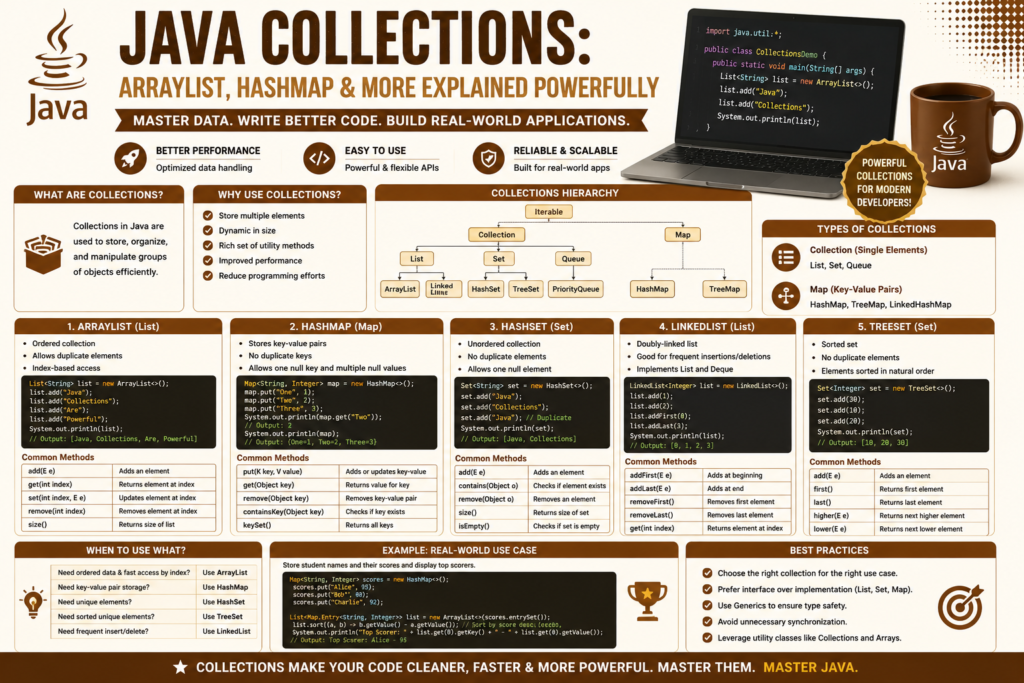
Java arrays & collections guide is one of the most important topics for every Java beginner because arrays and collections are the foundation of data storage in Java programming. Whether you are building enterprise applications, Android apps, games, or backend systems, you must understand how Java stores, organizes, and manages data efficiently.
Java provides several powerful data storage classes Java developers use every day. Arrays offer fast and simple storage, while collections provide flexible and dynamic sizing data structures for real world applications.
The Java Collections Framework guide introduces developers to advanced tools like ArrayList, HashMap, HashSet, LinkedList, and TreeMap. These structures make Java development more scalable, readable, and efficient.
In this article, you will learn everything about Java arrays, collections, ArrayList, HashMap, and other important collection types with practical examples and real world explanations shaping the future of software engineering.
What Are Arrays in Java? (1995 – Today)
Arrays are one of the oldest and most fundamental data structures in programming.
A Java array stores multiple elements of the same type inside a fixed memory block index structure.
Example:
int[] numbers = {10, 20, 30, 40, 50};In this example:
numbers[0]= 10numbers[1]= 20numbers[2]= 30
Arrays are fast because Java directly accesses elements using indexes.
However, arrays have limitations:
- Fixed size
- Difficult resizing
- Limited utility methods
These limitations later inspired the creation of Java collection systems.
If you are new to Java, you should first explore java syntax & data types guide concepts before learning collections deeply.
Why Arrays Are Important
The topic of java arrays & collections guide starts with arrays because they remain extremely important in programming.
Arrays are useful for:
- Mathematical operations
- Fast indexed storage
- Game development
- Scientific computing
- Multi-dimensional arrays Java systems
Example of a two dimensional array:
int[][] matrix = {
    {1, 2, 3},
    {4, 5, 6}
};
This structure stores data in rows and columns.
Multi dimensional arrays are heavily used in graphics, AI systems, and matrix calculations.
The Problem With Arrays
Although arrays are fast, they have one major weakness:
Fixed size.
Example:
String[] names = new String[3];This array can only hold three elements permanently.
If developers need more space later, resizing arrays Java systems becomes complicated.
This challenge created the need for collections.
Collections provide flexible and dynamic storage systems.
Introduction to Java Collections Framework
The Java Collections Framework guide introduced a revolutionary way to handle data dynamically.
Java collections are groups of classes and interfaces used to store, organize, and manipulate data efficiently.
The collection interface hierarchy includes:
- List
- Set
- Queue
- Map
These interfaces support:
- Dynamic sizing
- Generic types parameterization
- Easy data retrieval
- Sorting algorithms
- Duplicate data prevention
Collections became one of Java’s most powerful features.
What Is ArrayList in Java?
ArrayList is one of the most commonly used collection classes in Java.
Unlike arrays, ArrayList supports dynamic sizing data structures.
Example:
import java.util.ArrayList;

public class Demo {
    public static void main(String[] args) {

        ArrayList<String> names = new ArrayList<>();

        names.add("Ali");
        names.add("Sara");
        names.add("Ahmed");

        System.out.println(names);
    }
}
Output:
[Ali, Sara, Ahmed]ArrayList automatically increases its size when needed.
This makes it far more flexible than normal arrays.
ArrayList vs Array Java
Understanding ArrayList vs Array Java differences is essential.
Arrays
- Fixed size
- Faster performance
- Simple structure
ArrayList
- Dynamic size
- Rich utility methods
- Easier insertion and deletion
ArrayList introduces slight performance overhead profiling because resizing operations occasionally occur.
However, its flexibility makes it ideal for most applications.
Important ArrayList Methods
The topic of java arrays & collections guide becomes easier when developers learn common methods.
Add Elements
names.add("Usman");Access Elements
System.out.println(names.get(0));Remove Elements
names.remove(1);ArrayList Size
System.out.println(names.size());These utility methods simplify data management significantly.
What Is HashMap in Java?
HashMap stores map key value pairs Java developers use constantly.
Unlike ArrayList, HashMap stores data using keys and values.
Example:
import java.util.HashMap;

public class Demo {
    public static void main(String[] args) {

        HashMap<String, Integer> marks = new HashMap<>();

        marks.put("Ali", 90);
        marks.put("Sara", 95);

        System.out.println(marks);
    }
}
Output:
{Ali=90, Sara=95}HashMap behaves similarly to dictionary structures Java systems use for fast searching.
How to Use HashMap
Learning how to use HashMap is essential for backend and enterprise development.
Important methods:
Add Data
marks.put("Ahmed", 88);Retrieve Data
System.out.println(marks.get("Ali"));Remove Data
marks.remove("Sara");Check Keys
System.out.println(marks.containsKey("Ali"));HashMap uses load factor resizing systems internally for better performance optimization.
What Is HashSet in Java?
HashSet stores unique values only.
Duplicate data prevention is the main purpose of HashSet.
Example:
import java.util.HashSet;

public class Demo {
    public static void main(String[] args) {

        HashSet<String> cities = new HashSet<>();

        cities.add("Lahore");
        cities.add("Karachi");
        cities.add("Lahore");

        System.out.println(cities);
    }
}
Output:
[Karachi, Lahore]The duplicate value disappears automatically.
This makes HashSet extremely useful for unique datasets.
LinkedList in Java
LinkedList is another powerful collection class.
Unlike ArrayList, LinkedList uses connected nodes instead of contiguous memory.
Benefits:
- Faster insertions
- Better deletions
- Dynamic structure
Example:
import java.util.LinkedList;

LinkedList<String> list = new LinkedList<>();

list.add("Java");
list.add("Python");
LinkedList performs better when applications constantly add or remove elements.
TreeMap and TreeSet
TreeMap and TreeSet automatically sort elements.
These structures use elements sorting algorithms internally.
Example:
import java.util.TreeSet;

TreeSet<Integer> numbers = new TreeSet<>();

numbers.add(30);
numbers.add(10);
numbers.add(20);

System.out.println(numbers);
Output:
[10, 20, 30]Sorted collections are extremely useful for search systems and ranking applications.
Traversing Collections Code
Developers often need elements iteration loops to process collection data.
Example using a for-each loop:
ArrayList<String> fruits = new ArrayList<>();

fruits.add("Apple");
fruits.add("Mango");

for(String item : fruits) {
    System.out.println(item);
}
Output:
Apple
Mango
This method is cleaner and safer than manual indexing.
If you want to understand loops deeply, study java control flow explained concepts carefully.
Java Generics and Type Safety
Modern Java collections use generic types parameterization.
Example:
ArrayList<String> names = new ArrayList<>();This ensures only String values enter the list.
Without generics:
ArrayList list = new ArrayList();This older style can create runtime errors.
Generics improve type safety and code readability.
Collections Performance Comparison
Different collections have different strengths.
ArrayList
Best for fast indexed access.
LinkedList
Best for insertions and deletions.
HashMap
Best for key-value mapping elements.
HashSet
Best for preventing duplicates.
TreeMap
Best for sorted data.
Choosing the correct structure improves application performance significantly.
Real World Use Cases
The topic of java arrays & collections guide becomes more practical with real examples.
Banking Systems
HashMap stores account details.
Social Media Platforms
ArrayList stores user posts.
E Commerce Websites
HashSet prevents duplicate product IDs.
Gaming Systems
Arrays manage player coordinates.
Enterprise Applications
Collections organize huge datasets efficiently.
Collections remain central to modern Java development.
Java Collections and Object Oriented Programming
Collections work closely with OOP systems.
Example storing custom objects:
class Student {
    String name;

    Student(String name) {
        this.name = name;
    }
}

ArrayList<Student> students = new ArrayList<>();
Collections become far more powerful when combined with classes and objects.
Developers should first study java oop concepts explained concepts before advanced collection systems.
Collections in Multithreading
Collections also appear heavily in concurrent systems.
Developers learning java multithreading explained topics eventually discover synchronized collections and thread safe structures.
Modern enterprise applications heavily depend on concurrent collections.
Java Collections and Android Development
Collections are extremely important in Android apps.
Developers building apps with java for android development frequently use:
- ArrayList
- RecyclerView data
- HashMap APIs
- JSON object storage
Collections help organize mobile app data efficiently.
Advanced Collection Features
Modern Java collections support:
- Streams API
- Lambda expressions
- Functional operations
- Sorting comparators
Developers exploring advanced java concepts guide topics often study advanced collection pipelines and performance optimization techniques.
These modern features greatly improve code readability.
Why Collections Matter for Modern Programming
Collections solve real world data problems efficiently.
They support:
- Fast retrieval
- Better scalability
- Cleaner code
- Dynamic storage
- Enterprise systems
Without collections, modern Java development would become far more complicated.
Collections remain one of Java’s biggest strengths compared to many other languages.
Frequently Asked Questions (FAQs)
What is the difference between arrays and ArrayList?
Arrays have fixed size, while ArrayList supports dynamic resizing.
What is HashMap used for?
HashMap stores key-value pairs for fast searching and retrieval.
Why use HashSet?
HashSet automatically removes duplicate values.
Which collection is fastest in Java?
It depends on the operation. Arrays are fastest for indexing, while HashMap is excellent for searching.
What are generics in Java collections?
Generics provide type safety by restricting the type of stored elements.
Are collections important in Android development?
Yes. Collections are heavily used in Android applications and enterprise systems.
Conclusion
The complete java arrays & collections guide shows why collections are among the most powerful features in Java programming. Arrays provide simple and fast storage, while collections add flexibility, scalability, and advanced functionality for real world software systems.
From ArrayList and HashMap to HashSet and TreeMap, Java collections help developers organize data efficiently across enterprise applications, Android systems, cloud platforms, and backend services.
Understanding collections is essential for becoming a strong Java developer. As Java continues evolving, collections remain central to scalable software architecture and the growing future of software engineering.