
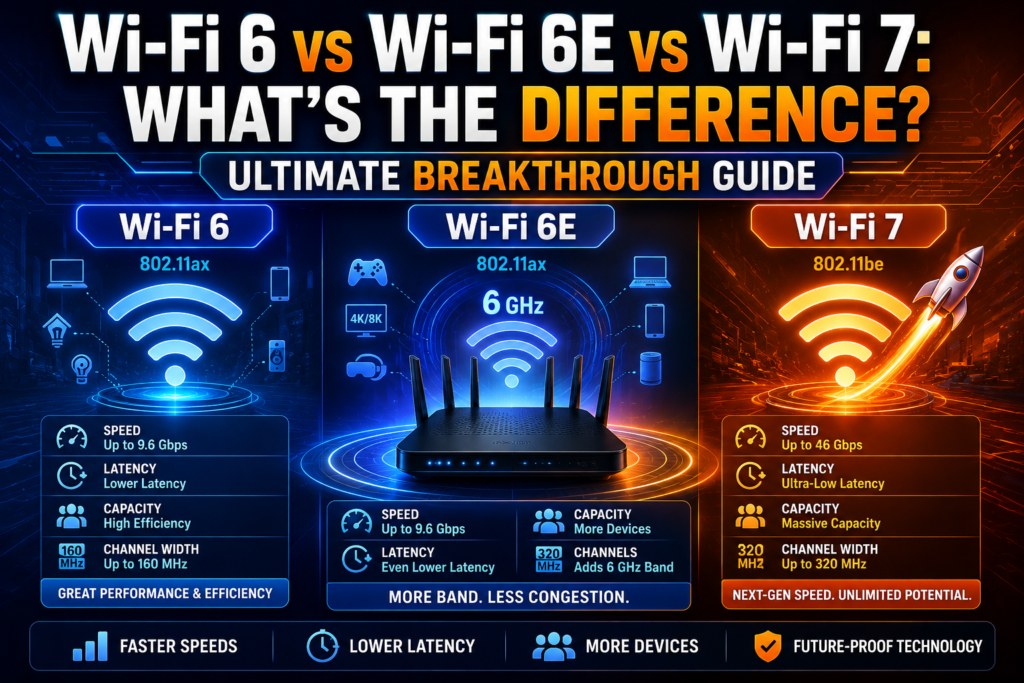
The rapid evolution of consumer networking standards has completely transformed how data moves across our homes, pushing the massive wi-fi 6 vs wi-fi 6e vs wi-fi 7 comparison to the forefront of technology choices. Whether you are managing an intensive smart home layout, working with cloud-based production files, or streaming massive high-definition video assets, your wireless generation dictates your daily productivity. Upgrading your router is no longer just about gaining slightly better numbers on a speed test tool; it directly influences device capacity, local network lag, and overall connection stability.
Many device owners assume that all wireless connections function identically as long as their broadband plan remains the same. However, different generations of wireless technology manipulate radio bands, organize data packets, and divide air channels in completely unique ways. Diving deep into the technical mechanics behind these generational shifts reveals how network engineers are successfully conquering local congestion issues. By reviewing this definitive wi-fi 6 vs wi-fi 6e vs wi-fi 7 comparison blueprint, you can invest in the perfect hardware upgrade to future-proof your digital workspace.
The Foundation of Next-Gen Wireless Tech
To understand the core differences between these three iterations, we must examine the physical properties of how radio signals carry data through the air. Wireless devices function by translating digital binary files into complex radio waves, which are then broadcast across dedicated frequency lanes.
As more wireless gadgets enter our homes, these invisible lanes become heavily crowded, leading to signal cross-talk, high packet drops, and extreme transmission delays. Each new hardware standard introduces advanced mathematical frameworks designed to cram more data into the same radio spectrum while sorting traffic efficiently. Learning the inner workings of how wi-fi works at this architectural level highlights why simple channel adjustments are no longer enough to handle a household packed with smart televisions, smartphones, and automated home appliances.
Wi-Fi 6: High Efficiency for Crowded Areas (2019 – 2021)
The generational timeline made a monumental shift in the late tens, moving away from simple raw speed increases to focus entirely on managing crowded residential spaces.
Wi-Fi 6 arrived between 2019 and 2021 as a major technological milestone designed to fix the structural weaknesses of legacy protocols. Instead of just targeting maximum theoretical speed for a single client device, the engineering goal behind Wi-Fi 6 was high overall efficiency. It continued to operate on the traditional 2.4 GHz and 5 GHz frequency lanes but introduced a game-changing scheduling technology known as OFDMA (Orthogonal Frequency-Division Multiple Access).
Legacy Transmission (One device per delivery):
[Router] ---> [Data Packet for Phone] ---> (Next device must wait)

Wi-Fi 6 OFDMA Transmission (Split delivery):
[Router] ---> [ [Phone Data] [Laptop Data] [TV Data] ] ---> (Simultaneous Delivery)
Before this upgrade, a wireless router could only talk to one single device at a time per channel, forcing other hardware to wait in a fast digital line. OFDMA solved this issue by dividing a single channel into smaller sub-channels, allowing the router to bundle data for multiple separate devices into a single transmission wave. This provided significant latency reduction and allowed large families to browse concurrently without crashing local network stability.
Wi-Fi 6E: Opening the Congestion-Free Express Lane (2021 – 2024)
While the improvements introduced in the previous iteration were exceptional, the 2.4 GHz and 5 GHz bands remained fundamentally limited by a lack of physical broadcast space.
Wi-Fi 6E launched between 2021 and 2024 to solve this physical limitation by taking advantage of a brand-new, completely untouched slice of radio real estate: the 6 GHz frequency band. The introduction of Wi-Fi 6E features did not change the core data-handling math of Wi-Fi 6, but it gave those features an incredibly wide, ultra-wide band highway to run on. This new spectrum added up to 1,200 MHz of fresh airwave space, containing seven separate, massive 160 MHz channels that do not overlap with one another.
Because older legacy electronics cannot access this new 6 GHz spectrum, it serves as an exclusive, completely congestion-free lane for compatible modern hardware. Connecting a new computer to this band removes the constant interference caused by neighboring apartment routers, providing incredible local transfer speed performance alongside rock-solid stability. To see how these layout principles compare against physical lines, checking out an analysis on wi-fi vs ethernet compared shows why this new spectrum brings wireless links closer than ever to physical copper capabilities.
Wi-Fi 7: The Era of Extreme Low Latency Wireless (2024 – 2026)
The newest chapter in consumer networking technology breaks past old boundaries, introducing an elite standard designed to handle the multi-gigabit demands of the current era.
Wi-Fi 7 rolled out between 2024 and 2026 to unlock massive data throughput and near-zero latency for cutting-edge workflows like real-time virtual reality, local 8K media streaming, and massive cloud computing arrays. When analyzing a wi-fi 6 vs wi-fi 6e vs wi-fi 7 layout, the latest generation leaves older standards behind by doubling the maximum available channel size to an absolute peak of a 320 MHz channel Wi-Fi boundary. This massive expansion acts like a giant data pipe, allowing the router to push twice as much information to a device in the exact same fraction of a second.
+-------------------------------------------------------------+
|              CHANNEL WIDTH COMPARISON GENERATIONS           |
+----------------------+--------------------------------------+
| GENERATION           | MAXIMUM AVAILABLE CHANNEL WIDTH      |
+----------------------+--------------------------------------+
| Wi-Fi 6              | 160 MHz                              |
| Wi-Fi 6E             | 160 MHz                              |
| Wi-Fi 7              | 320 MHz (Double the Data Capacity)   |
+----------------------+--------------------------------------+
Furthermore, the new standard introduces Multi-Link Operation (MLO). In all previous wireless iterations, your smartphone could only connect to one single radio band at a time, such as just the 5 GHz lane or just the 2.4 GHz lane. MLO Wi-Fi 7 engineering changes this rule completely, allowing compatible hardware to open multiple simultaneous connections across the 2.4 GHz, 5 GHz, and 6 GHz spectrums at the exact same moment. This feature ensures that if one channel runs into unexpected local interference, data continues to flow instantly across the other channels without causing a single stutter.
Advanced Data Cramming: Understanding 4K QAM
To hit its legendary multi-gigabit Wi-Fi milestones, the latest generation upgrades how data points are physically encoded onto radio waves.
This process relies on an advanced technology called 4K QAM modulation. Older Wi-Fi 6 hardware utilized 1024-QAM, which could pack 10 bits of data into a single signal wave transmission. Wi-Fi 7 pushes this boundary up to 4096-QAM, allowing the signal to carry 12 bits of information simultaneously. While a two-bit upgrade sounds minor to casual users, this shift results in a massive twenty percent boost in total real-world data throughput, maximizing your internal speeds across every single transmission cycle.
Wi-Fi 6 vs 7 Speed and Latency Performance Metrics
When tracking performance across a modern wi-fi 6 vs wi-fi 6e vs wi-fi 7 grid, the technical leaps can be easily monitored through specialized diagnostic code profiles.
Python
def calculate_network_limits(generation):
    # Analyzing generational boundaries for maximum throughput and latency
    if generation == "Wi-Fi 6":
        return {"Max_Speed": "9.6 Gbps", "Latency": "Average", "Bands": "2.4 GHz / 5 GHz"}
    elif generation == "Wi-Fi 6E":
        return {"Max_Speed": "9.6 Gbps", "Latency": "Low", "Bands": "2.4 GHz / 5 GHz / 6 GHz"}
    elif generation == "Wi-Fi 7":
        return {"Max_Speed": "46 Gbps", "Latency": "Ultra-Low", "Bands": "2.4 GHz / 5 GHz / 6 GHz"}
    else:
        return None

# Evaluating generational profiles for a hardware upgrade plan
for gen in ["Wi-Fi 6", "Wi-Fi 6E", "Wi-Fi 7"]:
    stats = calculate_network_limits(gen)
    print(f"{gen} -> Max Theoretical Throughput: {stats['Max_Speed']} | Latency Profile: {stats['Latency']}")
While these theoretical maximum numbers are rarely hit under normal household conditions, the practical scaling remains completely consistent. A Wi-Fi 7 setup will regularly outpace a standard Wi-Fi 6 node by a massive margin, easily delivering multi-gigabit speeds directly over the air while dropping internal ping rates to single-digit milliseconds.
Analyzing Transmission Distance Limitations
A critical aspect of any wi-fi 6 vs wi-fi 6e vs wi-fi 7 deployment is understanding how far these new high-frequency signals can actually reach.
As radio frequencies climb higher into the spectrum, their physical range patterns change significantly. The 2.4 GHz band remains the absolute king of covering long physical distances, but it offers much slower transfer speeds. The 6 GHz spectrum utilized by Wi-Fi 6E and Wi-Fi 7 delivers incredible performance, but its short waves exhaust their energy rapidly when trying to pass through thick interior structures or dense furniture layout setups. To get a better look at how these range variables shift inside a normal home, reading up on wi-fi range explained helps you place your access nodes correctly to avoid creating accidental dead zones.
Should I Upgrade to Wi-Fi 7 Right Now?
Deciding whether to purchase a new premium routing unit depends heavily on your current collection of personal client hardware and your daily internet usage patterns.
If your household consists primarily of older smartphones, legacy smart televisions, and standard office laptops, buying a Wi-Fi 7 router will not provide an immediate performance boost. Wireless standards are completely backward-compatible, meaning a next-gen router will connect to older gear perfectly, but that older gear will still communicate using its original, slower legacy protocols. A router upgrade becomes highly beneficial if you have recently invested in high-end modern computers, gaming consoles, or virtual reality headsets that explicitly feature built-in Wi-Fi 7 internal receivers.
Deploying Your New Network Hardware Efficiently
When you finally decide to upgrade your home ecosystem to a modern multi-band standard, setting up the hardware correctly ensures you capture every bit of available performance.
Avoid stuffing your new high-performance router inside a closed wooden entertainment cabinet or near heavy metal kitchen appliances, as these objects create immediate signal blockades. Take the time to read a detailed guide on how to set up a wi-fi router to ensure you configure your administrative passwords, activate your individual frequency bands, and update your internal firmware to the latest manufacturer patch right out of the box.
Long-Term Benefits of Future-Proofing Your Home
Investing in a premium multi-band routing system provides major security and capacity benefits that stretch far beyond simple raw download speed.
Modern Wi-Fi 6E and Wi-Fi 7 platforms come with mandatory WPA3 wireless encryption built directly into their core framework. This advanced security protocol uses complex mathematical handshakes to protect your private data from automated password-guessing tools. To see why this matters for your home safety, exploring a guide on wi-fi security explained shows how modern encryption standards keep your financial information and personal files fully safe from outside monitoring threats.
Summary of Generational Differences
Choosing between these three options comes down to balancing your budget against your specific local network congestion issues.
Wi-Fi 6 serves as an excellent, cost-effective baseline for average households, providing great multi-device management via OFDMA on standard bands. Wi-Fi 6E is the perfect mid-tier upgrade for crowded urban spaces, using the clean 6 GHz spectrum to bypass neighboring signal interference completely. Wi-Fi 7 represents the absolute peak of premium wireless technology, combining a 320 MHz channel width with Multi-Link Operation to deliver uncompromised multi-gigabit speeds and ultra-low latency performance across your entire property.
Frequently Asked Questions (FAQs)
Can a Wi-Fi 6 device connect to a Wi-Fi 7 wireless router?
Yes, all modern wireless generations are completely backward-compatible. Your older Wi-Fi 6 hardware will connect to a new Wi-Fi 7 router perfectly safely, but it will communicate using its native Wi-Fi 6 speed limits rather than unlocking next-gen performance features.
Does upgrading to a Wi-Fi 7 router automatically make my home internet faster?
A new router will significantly increase your local file transfer speeds and eliminate internal network lag caused by multi-device congestion. However, your peak download speed from the open web will still be limited by the maximum bandwidth plan you pay for through your Internet Service Provider.
Why do higher frequency 6 GHz bands have a shorter broadcast range?
High-frequency radio waves carry a massive amount of data over a short period, but they possess very short physical wavelengths. These tiny waves exhaust their energy rapidly and struggle to pass through thick concrete walls, brickwork, or large mirrors compared to traditional long-wavelength 2.4 GHz signals.
Conclusion: Making the Right Networking Choice
Mastering a complete wi-fi 6 vs wi-fi 6e vs wi-fi 7 breakdown gives you the technical insights needed to make a smart, informed decision for your home network footprint. By matching your daily workflow needs against the unique strengths of each generation, you can easily select a system that eliminates annoying dead zones, minimizes network lag, and maximizes your hardware investment. Position your router centrally, pair it with compatible high-end client hardware, and enjoy a fast, reliable connection built to handle the future of the web. For a broader look at how these complex protocols first evolved, tracing the full details of wi-fi history: 1997 to today shows just how far home networking has traveled to keep us seamlessly connected.

