
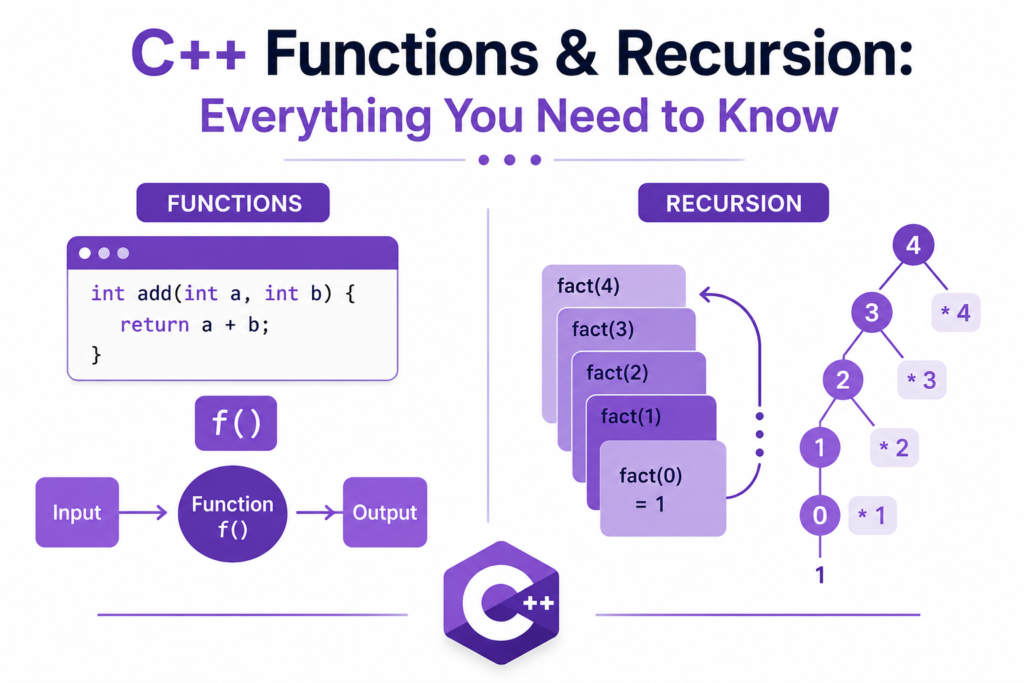
Every powerful C++ program is built from small, reusable blocks of logic. Those blocks are c++ functions. Whether you are writing a simple calculator or a complex game engine, c++ functions are the foundation that keeps your code organized, readable, and maintainable. They allow you to write a piece of logic once and use it anywhere, eliminating repetition and making your programs dramatically easier to debug and extend.
But c++ functions are not just about code organization. They are the gateway to one of the most elegant and intellectually satisfying concepts in programming: recursion. Recursion is the technique where a function calls itself to solve a problem by breaking it down into smaller and smaller versions of the same problem. It sounds like a paradox the first time you hear it. By the end of this guide, it will feel completely natural.
This article covers every essential aspect of c++ functions, from basic declarations and definitions to advanced topics like inline functions, function overloading, and recursive algorithms with real working code examples throughout.
What Are C++ Functions and Why Do They Matter
A function is a named block of code that performs a specific task. You define it once, give it a name, and call it as many times as you need from anywhere in your program. c++ functions bring structure to what would otherwise be a chaotic wall of instructions, and they are the primary tool programmers use to break complex problems into manageable pieces.
The main function is the entry point of every C++ program. When you run a C++ application, execution begins at main and flows from there. Every other function in your program exists to be called, either directly from main or from other functions that main eventually triggers.
#include <iostream>
using namespace std;

void greetUser() {
    cout << "Welcome to C++ Functions!" << endl;
}

int main() {
    greetUser();
    greetUser();
    greetUser();
    return 0;
}
This simple example shows the core benefit immediately. greetUser is defined once but called three times. If you ever need to change the greeting, you change it in exactly one place. This principle of writing logic once and reusing it everywhere is what makes c++ functions one of the most valuable tools in any programmer’s toolkit.
For anyone who is new and still getting started with C++, mastering functions early will save enormous time and effort as your programs grow in complexity.
Function Declaration, Definition, and Prototype
Before you can call a c++ function, the compiler needs to know it exists. This is handled through function declarations and definitions. A function declaration, also called a prototype, tells the compiler the function’s name, return type, and parameter list without providing the actual body. A function definition provides the complete implementation.
#include <iostream>
using namespace std;

// Function prototype (declaration)
int addNumbers(int a, int b);

int main() {
    int result = addNumbers(10, 25);
    cout << "Sum: " << result << endl;
    return 0;
}

// Function definition
int addNumbers(int a, int b) {
    return a + b;
}
The prototype at the top tells the compiler everything it needs to know about addNumbers before the function is actually defined below main. This pattern is extremely common in professional C++ codebases where functions are declared in header files and defined in separate source files. Understanding the separation between declaration and definition is fundamental to writing well-organized c++ functions.
Return Types and Parameters in C++ Functions
Every c++ function has a return type that specifies what kind of value it sends back to the caller. If a function does not return anything, its return type is void. Parameters are the inputs a function accepts, defined inside the parentheses in the function signature.
#include <iostream>
using namespace std;

// Returns nothing (void)
void printMessage(string message) {
    cout << message << endl;
}

// Returns an integer
int multiply(int x, int y) {
    return x * y;
}

// Returns a double
double calculateAverage(double a, double b, double c) {
    return (a + b + c) / 3.0;
}

// No parameters
void displaySeparator() {
    cout << "-------------------" << endl;
}

int main() {
    printMessage("Hello from a function!");
    displaySeparator();

    int product = multiply(6, 7);
    cout << "Product: " << product << endl;

    double avg = calculateAverage(85.5, 92.0, 78.5);
    cout << "Average: " << avg << endl;

    return 0;
}
The return types and parameter types you choose for your c++ functions define the contract between a function and the code that calls it. A well-designed function has a clear, single purpose, takes only the inputs it needs, and returns exactly what the caller expects. This discipline makes large codebases manageable and testable.
Call by Value vs Call by Reference in C++ Functions
One of the most important decisions you make when writing c++ functions is how to pass your arguments. C++ supports two primary mechanisms: call by value and call by reference.
In call by value, the function receives a copy of the argument. Modifications inside the function do not affect the original variable. In call by reference, the function receives a direct reference to the original variable and can modify it.
#include <iostream>
using namespace std;

// Call by value - original unchanged
void doubleByValue(int num) {
    num = num * 2;
    cout << "Inside function: " << num << endl;
}

// Call by reference - original modified
void doubleByReference(int& num) {
    num = num * 2;
    cout << "Inside function: " << num << endl;
}

// Call by pointer - also modifies original
void doubleByPointer(int* num) {
    *num = *num * 2;
}

int main() {
    int a = 10;
    doubleByValue(a);
    cout << "After call by value: " << a << endl;

    int b = 10;
    doubleByReference(b);
    cout << "After call by reference: " << b << endl;

    int c = 10;
    doubleByPointer(&c);
    cout << "After call by pointer: " << c << endl;

    return 0;
}
After the call by value, a remains 10 because the function only modified its own copy. After the call by reference, b becomes 20 because the function worked directly on the original variable. Understanding this distinction is absolutely essential for writing c++ functions that behave exactly as intended.
For developers also studying C++ pointers, call by pointer and call by reference achieve similar outcomes through different syntax, and knowing when to use each is a mark of genuine C++ competence.
Function Overloading: Same Name, Different Signatures
C++ allows you to define multiple c++ functions with the same name as long as their parameter lists are different. This feature is called function overloading, and it allows you to create cleaner, more intuitive interfaces where one descriptive name handles multiple types or numbers of inputs.
#include <iostream>
using namespace std;

int add(int a, int b) {
    return a + b;
}

double add(double a, double b) {
    return a + b;
}

int add(int a, int b, int c) {
    return a + b + c;
}

string add(string a, string b) {
    return a + b;
}

int main() {
    cout << add(3, 4) << endl;
    cout << add(2.5, 3.7) << endl;
    cout << add(1, 2, 3) << endl;
    cout << add("Hello, ", "World!") << endl;

    return 0;
}
The compiler selects the correct version of add based on the types and number of arguments provided. This compile-time selection is called static dispatch. Function overloading is one of the features that makes c++ functions expressive and natural to use. Instead of writing addInts, addDoubles, and addStrings, you write add and let the compiler handle the rest.
Inline Functions: Eliminating Call Overhead
Every time your program calls a function, there is a small amount of overhead involved. The program must push arguments onto the call stack, jump to the function’s location in memory, execute the function, and then return. For tiny functions called millions of times in a tight loop, this overhead can actually matter.
Inline functions are a hint to the compiler to replace the function call with the actual function body at every call site, eliminating the call overhead entirely.
#include <iostream>
using namespace std;

inline int square(int x) {
    return x * x;
}

inline double toFahrenheit(double celsius) {
    return (celsius * 9.0 / 5.0) + 32.0;
}

int main() {
    for (int i = 1; i <= 5; i++) {
        cout << i << " squared = " << square(i) << endl;
    }

    cout << "25C = " << toFahrenheit(25.0) << "F" << endl;

    return 0;
}
The inline keyword is a suggestion, not a command. Modern compilers are intelligent enough to inline small functions automatically when they judge it beneficial, and they may ignore the inline keyword if the function is too large. Still, using inline for small, frequently called utility functions is a good habit and signals your intent clearly to both the compiler and other developers reading your code.
Default Arguments in C++ Functions
C++ allows you to specify default values for function parameters. If the caller does not provide a value for that parameter, the default is used automatically. This feature makes c++ functions more flexible and reduces the need for multiple overloaded versions.
#include <iostream>
using namespace std;

void printBox(int width = 10, int height = 5, char symbol = '*') {
    for (int i = 0; i < height; i++) {
        for (int j = 0; j < width; j++) {
            cout << symbol;
        }
        cout << endl;
    }
}

int main() {
    printBox();              // Uses all defaults
    cout << endl;
    printBox(15);            // Custom width, rest default
    cout << endl;
    printBox(8, 3, '#');     // All custom

    return 0;
}
Default arguments must always be placed at the end of the parameter list. You cannot have a parameter without a default value after one that has a default. This rule ensures that the compiler can always unambiguously match the arguments provided by the caller to the correct parameters.
C++ Functions and Variable Scope
Every variable in C++ exists within a scope, the region of the program where it is accessible. Local variables are declared inside a function and exist only for the lifetime of that function call. Global scope variables are declared outside all functions and accessible from anywhere in the program.
#include <iostream>
using namespace std;

int globalCounter = 0;  // Global scope

void incrementCounter() {
    globalCounter++;        // Accessing global variable
    int localStep = 1;      // Local variable, dies when function returns
    cout << "Step: " << localStep << ", Counter: " << globalCounter << endl;
}

int main() {
    incrementCounter();
    incrementCounter();
    incrementCounter();

    cout << "Final counter: " << globalCounter << endl;
    // cout << localStep;  // ERROR: localStep is out of scope here

    return 0;
}
Local variables are created on the call stack when the function is called and destroyed when it returns. Global variables persist for the entire lifetime of the program. While global variables are sometimes convenient, experienced C++ programmers use them sparingly because they make programs harder to reason about and test. Keeping data as local as possible is a discipline that leads to far cleaner and more reliable c++ functions.
Introduction to Recursion in C++ Functions
Recursion is the technique where a function calls itself. A recursive function solves a problem by reducing it to a simpler version of the same problem, calling itself with that simpler version, and continuing until it reaches a base case where the answer is known directly without any further recursion.
Every recursive function must have two things: a base case that stops the recursion, and a recursive step that moves toward that base case. Without a proper base case, the function calls itself forever, exhausting the call stack and causing a stack overflow crash.
#include <iostream>
using namespace std;

int factorial(int n) {
    // Base case
    if (n == 0 || n == 1) {
        return 1;
    }
    // Recursive step
    return n * factorial(n - 1);
}

int main() {
    for (int i = 0; i <= 7; i++) {
        cout << i << "! = " << factorial(i) << endl;
    }

    return 0;
}
When factorial(5) is called, it calls factorial(4), which calls factorial(3), which calls factorial(2), which calls factorial(1). factorial(1) hits the base case and returns 1. Then each call resolves in reverse: 2 times 1 is 2, then 3 times 2 is 6, then 4 times 6 is 24, then 5 times 24 is 120. The call stack unwinds and delivers the final answer.
Classic Recursion Examples: Fibonacci and Binary Search
The Fibonacci sequence is one of the most famous recursive problems in computer science. Each number in the sequence is the sum of the two numbers before it, starting with 0 and 1.
#include <iostream>
using namespace std;

int fibonacci(int n) {
    if (n <= 0) return 0;
    if (n == 1) return 1;
    return fibonacci(n - 1) + fibonacci(n - 2);
}

int main() {
    cout << "Fibonacci sequence:" << endl;
    for (int i = 0; i <= 10; i++) {
        cout << "F(" << i << ") = " << fibonacci(i) << endl;
    }

    return 0;
}
Binary search is another powerful recursive algorithm. It searches a sorted array by repeatedly halving the search space, checking whether the target is in the left or right half, and recursing into the appropriate half.
#include <iostream>
using namespace std;

int binarySearch(int arr[], int left, int right, int target) {
    if (left > right) return -1;  // Base case: not found

    int mid = left + (right - left) / 2;

    if (arr[mid] == target) return mid;
    if (arr[mid] < target) return binarySearch(arr, mid + 1, right, target);
    return binarySearch(arr, left, mid - 1, target);
}

int main() {
    int arr[] = {2, 5, 8, 12, 16, 23, 38, 45, 56, 72};
    int size = 10;
    int target = 23;

    int index = binarySearch(arr, 0, size - 1, target);

    if (index != -1) {
        cout << "Found " << target << " at index " << index << endl;
    } else {
        cout << target << " not found in array." << endl;
    }

    return 0;
}
Binary search is a textbook example of how recursion can produce an algorithm that is both elegant and extraordinarily efficient, finding any element in a sorted array of a million items in just twenty comparisons.
Recursion vs Iteration: Choosing the Right Tool
Every recursive solution can theoretically be rewritten as an iterative one using loops, and vice versa. The question of which to use depends on the problem and the context.
Recursion shines when the problem has a naturally recursive structure, such as tree traversal, directory scanning, mathematical sequences, and divide-and-conquer algorithms. The code often becomes shorter, cleaner, and closer to the mathematical definition of the problem.
Iteration is generally more efficient for simple repetition. Every function call adds a frame to the call stack and consumes memory. For deeply recursive problems with large inputs, this can lead to a stack overflow. Iterative solutions avoid this risk entirely.
#include <iostream>
using namespace std;

// Recursive factorial
int factorialRecursive(int n) {
    if (n <= 1) return 1;
    return n * factorialRecursive(n - 1);
}

// Iterative factorial
int factorialIterative(int n) {
    int result = 1;
    for (int i = 2; i <= n; i++) {
        result *= i;
    }
    return result;
}

int main() {
    int n = 10;
    cout << "Recursive: " << factorialRecursive(n) << endl;
    cout << "Iterative: " << factorialIterative(n) << endl;
    return 0;
}
Both produce the same answer. The recursive version is closer to the mathematical definition. The iterative version uses constant stack space and is safer for large inputs. Knowing both and understanding when each is appropriate is the mark of a mature C++ programmer.
C++ Functions in Modern Technology and Industry
c++ functions are not just a teaching concept. They are the literal building blocks of some of the most sophisticated software systems ever created. In C++ in modern technology, functions are used to implement rendering pipelines in game engines, execute trade orders in financial systems, process sensor data in autonomous vehicles, and handle requests in high-performance web servers.
For developers working in C++ game development, functions are everywhere. Every character action, every physics calculation, every animation update, every collision detection check lives inside a function. Game engines like Unreal Engine expose thousands of functions that developers call to build interactive experiences. Understanding how to write, optimize, and organize c++ functions is a prerequisite for serious game development work.
For those studying OOP in C++, functions take on an even richer form as member methods of classes, carrying behavior alongside data in a unified, organized structure. For developers pushing into advanced C++ concepts, lambda functions, function templates, and std::function open entirely new dimensions of what c++ functions can do.
Frequently Asked Questions
What Is the Difference Between a Function Declaration and a Function Definition in C++?
A function declaration, also called a prototype, tells the compiler the name, return type, and parameter types of a function without providing the body. It appears before the function is used, often in a header file. A function definition provides the complete implementation including the body. In C++, you must declare a function before you call it, but you can define it later in the same file or in a separate source file.
What Is the Difference Between Call by Value and Call by Reference in C++?
In call by value, the function receives a copy of the argument. Changes inside the function do not affect the original variable. In call by reference, the function receives a direct reference to the original variable. Any modifications inside the function change the original. Use call by value when you do not want the function to modify the caller’s data. Use call by reference when the function needs to modify the input or when passing large objects to avoid the overhead of copying.
What Is a Base Case in Recursion and Why Is It Required?
The base case is the condition in a recursive function that stops the recursion. It provides a direct answer without making any further recursive calls. Without a base case, the function would call itself indefinitely, filling the call stack with unresolved function calls until a stack overflow crash terminates the program. Every correct recursive function must have at least one base case that is reachable from the initial input.
What Causes a Stack Overflow in C++ Recursion?
A stack overflow occurs when a recursive function calls itself too many times without reaching the base case. Each function call adds a new frame to the call stack, consuming memory. When the stack runs out of space, the program crashes with a stack overflow error. This can happen if the base case is missing, unreachable, or if the input is too large for the recursion depth the stack can support. For very deep recursion, an iterative solution is safer.
What Is Function Overloading in C++ and When Should You Use It?
Function overloading allows you to define multiple functions with the same name but different parameter lists. The compiler selects the correct version based on the arguments provided at the call site. Use overloading when the same logical operation needs to handle different types or numbers of inputs. It makes your code more readable and intuitive by letting one descriptive name cover multiple related use cases without cluttering the namespace with verbose, type-specific function names.
Conclusion
c++ functions are the backbone of every program you will ever write in this language. They bring order to complexity, enable code reuse, and make your programs testable, maintainable, and scalable. From simple void functions that print a message to sophisticated recursive algorithms that traverse trees and search sorted data, the range of what c++ functions can accomplish is extraordinary.
c++ functions reward every hour you invest in understanding them deeply. When you know how to declare and define them cleanly, pass arguments correctly, overload them intelligently, and harness the power of recursion without fear, you gain a level of programming capability that opens doors to the most ambitious projects imaginable. Recursion in particular teaches you to think about problems differently, to see the self-similar structure hidden inside complexity and to express solutions with a clarity and elegance that iterative code rarely matches.
The code examples in this guide are your starting point. Write them, run them, modify them, and break them intentionally to see what happens. That hands-on experimentation is where real mastery of c++ functions is forged.

