
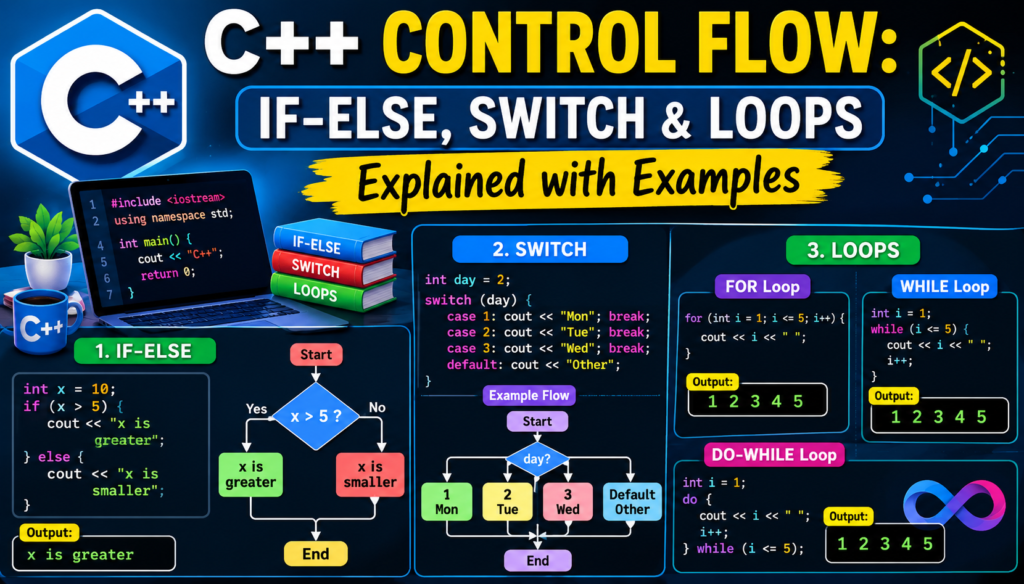
Every program you have ever used makes decisions. It repeats tasks. It skips certain steps based on conditions. All of that behavior is controlled by one fundamental concept: c++ control flow. Understanding c++ control flow is not optional for any serious programmer. It is the very engine that drives how your code thinks, chooses, and acts. Without control flow, every program would be a straight line from start to finish, incapable of responding to user input, handling errors, or repeating useful operations.
This guide covers everything you need to master c++ control flow. From the simplest if-else statement to nested loops and switch cases, every concept is explained with real, working code examples. Whether you are just getting started or looking to sharpen your existing skills, this article will give you a rock-solid understanding of how C++ makes decisions and controls execution paths.
What Is C++ Control Flow and Why Does It Matter
c++ control flow refers to the order in which individual statements, instructions, and function calls are executed inside a running program. By default, code runs sequentially, one line after another. Control flow structures break that default sequence and introduce logic, decision making, and repetition into your programs.
Without control flow, you could never write a login system that checks whether a password is correct. You could never build a game loop that keeps running until the player quits. You could never process every item in a list of data. Every meaningful program in existence depends on control flow to function.
C++ gives programmers a rich set of control structures: conditional statements like if, else, and switch, and iteration tools like for loops, while loops, and do-while loops. Each one serves a specific purpose, and knowing when to use which one separates a good programmer from a great one. For anyone who wants to learn more about C++ syntax basics before diving into control flow, building that foundation first will make everything covered here click into place much faster.
The If Statement: The Foundation of Decision Making
The if statement is the simplest and most fundamental piece of c++ control flow. It evaluates a boolean expression and executes a block of code only if that expression is true.
#include <iostream>
using namespace std;

int main() {
    int score = 75;

    if (score >= 50) {
        cout << "You passed the exam!" << endl;
    }

    return 0;
}
In this example, the program checks whether the score is greater than or equal to 50. If the boolean expression evaluates to true, the message is printed. If the score were 40, nothing would happen at all. This is the execution path logic that makes programs intelligent.
The condition inside the if statement uses relational operators such as greater than, less than, equal to, and not equal to. These operators compare values and return either true or false, which is all the if statement needs to make its decision.
If-Else and Else-If: Handling Multiple Conditions in C++ Control Flow
Real programs rarely have just one possible outcome. The else clause extends the if statement to handle the case where the condition is false. The else-if ladder allows you to test multiple conditions in sequence and steer the execution path in exactly the right direction.
#include <iostream>
using namespace std;

int main() {
    int score = 82;

    if (score >= 90) {
        cout << "Grade: A" << endl;
    } else if (score >= 80) {
        cout << "Grade: B" << endl;
    } else if (score >= 70) {
        cout << "Grade: C" << endl;
    } else {
        cout << "Grade: F" << endl;
    }

    return 0;
}
The program tests each condition from top to bottom. As soon as one condition is true, that block runs and the rest are skipped. This chaining of conditions is one of the most used patterns in all of c++ control flow. You will find it in everything from user authentication to game score systems to data validation.
Logical operators like AND (&&) and OR (||) allow you to combine multiple conditions inside a single if statement, making your decision making even more powerful and precise. A single if-else chain can handle surprisingly complex logic when these operators are used thoughtfully.
The Switch Statement: Clean Multi-Branch Control Flow
When you have a single variable that needs to be compared against many specific values, the switch statement is far cleaner than a long chain of else-if blocks. The switch statement evaluates one expression and jumps directly to the matching case, making your code dramatically easier to read and maintain.
#include <iostream>
using namespace std;

int main() {
    int day = 3;

    switch (day) {
        case 1:
            cout << "Monday" << endl;
            break;
        case 2:
            cout << "Tuesday" << endl;
            break;
        case 3:
            cout << "Wednesday" << endl;
            break;
        case 4:
            cout << "Thursday" << endl;
            break;
        case 5:
            cout << "Friday" << endl;
            break;
        default:
            cout << "Weekend" << endl;
    }

    return 0;
}
Each case represents a possible value of the variable. The break statement at the end of each case is critical. Without it, the program would continue executing into the next case regardless of whether it matched, a behavior called fall-through. The default case handles any value that does not match any of the listed cases, similar to the final else in an if-else chain.
Switch cases work with integers, characters, and enumerations. They are commonly used in menu systems, command parsers, and state machines. Understanding the switch statement is a core part of mastering c++ control flow and writing code that is clean and professional.
The For Loop: Precise and Powerful Iteration
Loops are what give programs the power to repeat operations without writing the same code over and over. The for loop is the most structured and commonly used loop in C++. It is perfect when you know in advance exactly how many times you want something to repeat.
cpp
#include <iostream>
using namespace std;

int main() {
    for (int i = 1; i <= 5; i++) {
        cout << "Iteration: " << i << endl;
    }

    return 0;
}
The for loop has three parts: initialization, loop condition, and increment. First, the variable i is set to 1. Then the condition i <= 5 is checked. If it is true, the loop body runs. Then i is incremented by 1. This cycle repeats until the condition becomes false and the loop exits cleanly.
For loops are ideal for iterating through arrays, processing lists of data, and running any operation a fixed number of times. They are a cornerstone of c++ control flow and appear in virtually every non-trivial C++ program ever written.
cpp
#include <iostream>
using namespace std;

int main() {
    int numbers[] = {10, 20, 30, 40, 50};

    for (int i = 0; i < 5; i++) {
        cout << numbers[i] << endl;
    }

    return 0;
}
Modern C++ also offers the range-based for loop, which makes iterating over collections even simpler and more readable. For developers studying C++ arrays, the for loop is the primary tool for accessing and manipulating every element efficiently and safely.
The While Loop: Condition-Driven Iteration
The while loop is the right tool when you do not know in advance how many times a loop needs to run. It keeps executing as long as a loop condition remains true, making it ideal for event-driven situations and input processing.
#include <iostream>
using namespace std;

int main() {
    int count = 1;

    while (count <= 5) {
        cout << "Count: " << count << endl;
        count++;
    }

    return 0;
}
The loop checks the condition before each iteration. If the condition is false from the very beginning, the loop body never runs at all. This makes while loops safe in situations where the initial state might already satisfy the exit condition.
A critical concept to understand here is the infinite loop. If the loop condition never becomes false, the program will run forever. This is sometimes intentional, as in a game loop or a server listener that must keep running, but accidental infinite loops are one of the most common bugs beginners encounter when learning c++ control flow. Always verify that your loop has a clear and reachable exit condition.
// Intentional infinite loop example
while (true) {
    // game engine logic here
    // exits via break when player quits
}
The break statement can exit a loop immediately, even if the loop condition is still true. The continue statement skips the rest of the current iteration and jumps straight back to the condition check. Both are powerful tools for fine-grained control inside any loop structure.
The Do-While Loop: Guaranteed First Execution
The do-while loop is a close cousin of the while loop with one critical difference. It always executes the loop body at least once before checking the condition. This makes it perfect for situations where the first execution must happen regardless of the initial state.
#include <iostream>
using namespace std;

int main() {
    int number;

    do {
        cout << "Enter a positive number: ";
        cin >> number;
    } while (number <= 0);

    cout << "You entered: " << number << endl;
    return 0;
}
This do-while loop asks the user for input and keeps asking until a positive number is provided. The prompt must appear at least once, which is exactly what the do-while loop guarantees. This pattern is extremely common in input validation, menu-driven programs, and any scenario where the program must act before it can know the result.
The do-while example above shows how c++ control flow responds dynamically to real-world user behavior. The program does not follow a fixed, predictable path. It adapts, waits, and responds, which is what makes software genuinely useful.
C++ Control Flow With Nested Loops
Nested loops in C++ means placing one loop inside another. This technique is essential for working with two-dimensional data structures, generating patterns, and solving problems that require multiple levels of iteration running simultaneously.
#include <iostream>
using namespace std;

int main() {
    for (int i = 1; i <= 3; i++) {
        for (int j = 1; j <= 3; j++) {
            cout << i << " x " << j << " = " << i * j << endl;
        }
    }

    return 0;
}
For every single iteration of the outer loop, the inner loop runs through its complete cycle. This nested behavior is what allows programs to process matrices, build grid-based layouts, compare every pair of elements in a dataset, and traverse multi-dimensional arrays. Nested loops are one of the most powerful and frequently misunderstood patterns in c++ control flow, and learning to use them well is a genuine programming skill.
Break and Continue: Surgical Precision Inside Loops
The break and continue statements give you precise, surgical control over loop execution. Break exits the loop entirely and moves on to the code that follows it. Continue skips the remainder of the current iteration and jumps directly to the next condition check.
#include <iostream>
using namespace std;

int main() {
    for (int i = 1; i <= 10; i++) {
        if (i == 6) break;
        if (i % 2 == 0) continue;
        cout << i << endl;
    }

    return 0;
}
This loop prints only odd numbers from 1 to 5. When i reaches 6, break stops the entire loop. When i is even, continue skips the print statement and moves to the next number. These two statements are indispensable for handling edge cases and building clean, efficient loop logic in production-quality code.
For developers also studying C++ functions, understanding how control flow interacts with function calls and return values is the natural next step after mastering loops and conditionals.
C++ Control Flow in Real-World Applications
c++ control flow is not just an academic exercise. It is the backbone of every serious application built with the language. In C++ in modern technology, control flow structures drive everything from the decision logic inside autonomous vehicle software to the rendering loops inside web browsers. Every time Chrome decides how to display a web page, every time a trading algorithm decides whether to execute a trade, every time a game engine checks whether a character has collided with a wall, c++ control flow is working silently and powerfully behind the scenes.
For developers exploring OOP in C++, control flow integrates deeply with class methods and object behavior. The decisions that objects make, how they respond to changing state and external input, are all governed by the same if statements, loops, and switch cases covered throughout this guide. Control flow is the language your objects use to think.
For those also interested in C++ pointers, loops and conditional statements are the primary tools for traversing pointer-based data structures like linked lists and trees, making control flow knowledge absolutely foundational to advanced C++ development.
Frequently Asked Questions
What Is the Difference Between While and Do-While in C++?
A while loop checks its loop condition before executing the body, so if the condition is false from the start, the body never runs. A do-while loop executes the body first and checks the condition afterward, guaranteeing at least one execution. Use do-while when the first run must happen regardless, such as displaying a menu or prompting for user input.
When Should You Use Switch Instead of If-Else in C++?
Use a switch statement when you are comparing a single variable against multiple specific fixed values. Switch is cleaner, faster to read, and often faster to execute than a long else-if chain. Use if-else when your conditions involve ranges, complex boolean expressions, or logical operators, since switch only supports direct equality checks.
What Causes an Infinite Loop in C++?
An infinite loop occurs when the loop condition never becomes false. This can happen if you forget to update the loop variable, if the condition logic contains a mistake, or if a break statement is never reached. Some infinite loops are intentional, such as game loops, but accidental infinite loops are a frequent bug for beginners learning c++ control flow.
Can You Use Break Inside a Switch Statement?
Yes, and in most cases you must. Without a break statement at the end of each case, the program falls through into the next case and executes that code even if the condition did not match. The break statement exits the switch block entirely and hands control back to the code that follows the switch.
What Are Nested Loops Used For in C++?
Nested loops are used when working with two-dimensional data or performing operations that require multiple levels of iteration. Common applications include traversing two-dimensional arrays, printing formatted patterns, comparing all pairs of elements in a collection, and implementing search algorithms in data structures.
Conclusion
Mastering c++ control flow is one of the most important milestones any programmer can reach. Every intelligent behavior your program demonstrates, every decision it makes, every loop it runs, every branch it takes through logic, all of it flows from these foundational control structures. The if-else statement teaches your program to choose wisely. The switch statement teaches it to navigate cleanly between many options. The for loop teaches it to repeat with precision. The while and do-while loops teach it to persist until a clear goal is reached.
c++ control flow is not just a topic to learn and check off a list. It is the living nervous system of every program you will ever write. When you genuinely understand how execution paths are created, directed, and terminated, you gain the ability to build software that responds intelligently to any situation. The code examples in this article are your starting points. The real mastery comes when you apply these tools to your own projects, combine them creatively, and begin to see the elegant solutions that experienced C++ developers have been constructing for decades.

