
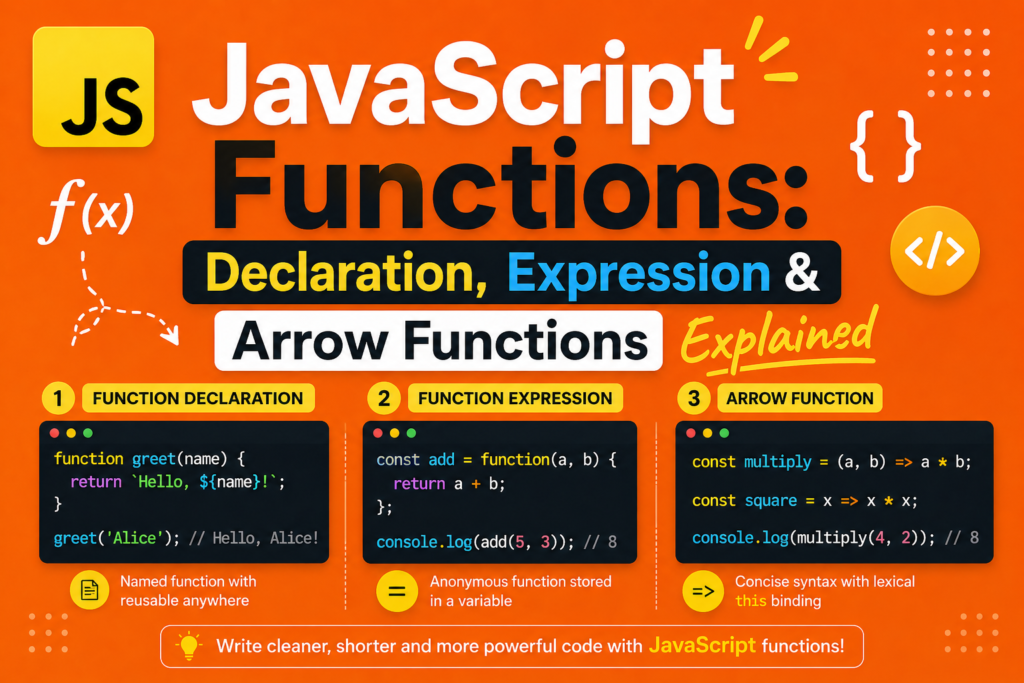
Functions are the heart of JavaScript. Without functions, your code would be a long, unreadable mess. You would repeat yourself constantly. You would have no way to organize logic. Functions solve all these problems. They let you group code into reusable blocks. They accept inputs and return outputs. They make reusable code blocks possible. This excellent guide covers javascript functions explained in full detail. You will learn function declarations, function expressions, arrow functions, parameters, return values, scope, closures, and the tricky this keyword. By the end, you will write clean, modular, efficient functions. The history of javascript started in 1995 when Brendan Eich created the language in just ten days. Functions were there from the beginning. Over time, JavaScript added new ways to create functions. javascript ES6 features introduced arrow functions in 2015. This guide covers all three types. Let me start with the most fundamental concept. A function is a reusable block of code that performs a specific task.
What Is a Function in JavaScript
Before diving into javascript functions explained , understand what a function actually is. A function is a reusable block of code that you can call by name. Think of a function like a recipe. A recipe has inputs (ingredients). It has steps (instructions). It produces an output (the finished dish). Similarly, a function has parameters (inputs). It has a body (code to execute). It returns a value (output). Functions help you follow the DRY principle (Don’t Repeat Yourself). Write the code once. Use it many times. Functions also help with code modularity . You break large problems into small, focused functions. Each function does one thing and does it well. This makes your code easier to read, test, and debug. Functional programming in JavaScript relies heavily on functions as first class citizens. Functions can be assigned to variables. They can be passed as arguments to other functions. They can be returned from functions. This flexibility is powerful.
Function Declaration The Traditional Way
The function declaration is the original way to create functions. It has been part of JavaScript since 1995. The syntax is simple. Use the function keyword, followed by the name, parentheses for parameters, and curly braces for the body.
function greet(name) {
return "Hello " + name;
}
let message = greet("Alice");
console.log(message); // "Hello Alice"
Function declarations are hoisted. This means JavaScript moves them to the top of their scope during compilation. You can call a function declaration before it appears in your code.
sayHello("Bob"); // Works even though function appears later
function sayHello(name) {
console.log("Hello " + name);
}
This hoisting behavior is unique to function declarations. Function expressions and arrow functions do not have this feature. Function declarations create named functions. The name appears in stack traces, making debugging easier. They are best for functions that will be called from many places. For javascript functions explained , function declarations are the most readable and beginner friendly option.
Function Expression Assigning Functions to Variables
A function expression creates a function and assigns it to a variable. The function may be named or anonymous. An anonymous function has no name between the function keyword and the parentheses.
const greet = function(name) {
return "Hello " + name;
};
console.log(greet("Alice")); // "Hello Alice"
Notice the semicolon after the closing curly brace. Function expressions are not hoisted. You cannot call them before they are defined.
// This causes an error
sayHi("Bob"); // ReferenceError
const sayHi = function(name) {
console.log("Hi " + name);
};
Function expressions are useful when you need to pass a function as an argument to another function. This is common with higher-order functions like map, filter, and reduce. Function expressions can be named, which helps with debugging.
const factorial = function fac(n) {
return n <= 1 ? 1 : n * fac(n - 1);
};
console.log(factorial(5)); // 120
The name fac is only usable inside the function itself. Outside, you use the variable name factorial. For javascript functions explained , function expressions give you flexibility in where and how you create functions.
Arrow Functions The Modern Way (ES6 2015)
Arrow functions were introduced in javascript ES6 features (2015). They provide a shorter syntax. They also behave differently with the this keyword. Arrow functions are always anonymous. You assign them to variables if you need a name.
const greet = (name) => {
return "Hello " + name;
};
console.log(greet("Alice")); // "Hello Alice"
If there is exactly one parameter, you can omit the parentheses.
const greet = name => {
return "Hello " + name;
};
If the function body is a single expression that returns a value, you can omit the curly braces and the return keyword. This is called an implicit return.
const greet = name => "Hello " + name;
const double = x => x * 2;
const add = (a, b) => a + b;
If the function has no parameters, use empty parentheses.
const sayHello = () => console.log("Hello");
const getRandom = () => Math.random();
The arrow function vs regular function distinction is important. Arrow functions do not have their own this binding. They inherit this from the surrounding scope. This makes them perfect for callbacks and event handlers. For javascript functions explained , arrow functions are now the preferred syntax for many situations, especially short functions and functions that need to preserve the outer this.
Function Parameters and Arguments
Functions accept inputs through parameters. When you call a function, you pass arguments. Parameters are the placeholders in the function definition. Arguments are the actual values passed.
function multiply(a, b) { // a and b are parameters
return a * b;
}
let result = multiply(5, 3); // 5 and 3 are arguments
JavaScript allows you to call a function with fewer or more arguments than parameters. Extra arguments are ignored. Missing parameters become undefined.
function showThree(a, b, c) {
console.log(a, b, c);
}
showThree(1); // 1 undefined undefined
showThree(1, 2); // 1 2 undefined
showThree(1, 2, 3, 4); // 1 2 3 (4 is ignored)
You can access all arguments using the arguments object inside regular functions. Arrow functions do not have their own arguments object.
function sumAll() {
let total = 0;
for (let i = 0; i < arguments.length; i++) {
total += arguments[i];
}
return total;
}
console.log(sumAll(1, 2, 3, 4)); // 10
Modern JavaScript uses rest parameters instead. Rest parameters collect remaining arguments into an array.
function sumAll(...numbers) {
return numbers.reduce((total, num) => total + num, 0);
}
console.log(sumAll(1, 2, 3, 4)); // 10
Default parameters let you specify default values for missing arguments.
function greet(name = "Guest") {
return "Hello " + name;
}
console.log(greet()); // "Hello Guest"
console.log(greet("Alice")); // "Hello Alice"
Understanding function parameters is essential for writing flexible, robust functions.
The Return Statement
The return statements control what value a function outputs. When JavaScript sees a return statement, it immediately exits the function. No code after the return runs.
function test() {
return 5;
console.log("This never runs");
}
console.log(test()); // 5
A function without a return statement returns undefined by default.
function doNothing() {
let x = 5;
}
console.log(doNothing()); // undefined
You can return any value. Numbers, strings, booleans, arrays, objects, even other functions.
function createPerson(name, age) {
return {
name: name,
age: age,
greet: function() {
return "Hi, I am " + this.name;
}
};
}
let person = createPerson("Alice", 25);
console.log(person.name); // "Alice"
console.log(person.greet()); // "Hi, I am Alice"
Early return is a common pattern. Instead of nested if statements, you check conditions and return early.
function processUser(user) {
if (!user) {
return "No user provided";
}
if (!user.isActive) {
return "User is inactive";
}
// Process active user
return "User processed";
}
This pattern makes your code more readable. For javascript functions explained , mastering return is fundamental.
Scope and Closure
Scope determines where variables are accessible. JavaScript has global scope, function scope, and block scope (with let and const). Variables declared inside a function are only accessible inside that function.
function outer() {
let message = "Inside outer";
function inner() {
console.log(message); // Accessible!
}
inner();
}
// console.log(message); // Error! Not accessible
A closure is a function that remembers its outer variables even after the outer function has finished executing. This is one of JavaScript’s most powerful features.
function createCounter() {
let count = 0;
return function() {
count++;
return count;
};
}
const counter = createCounter();
console.log(counter()); // 1
console.log(counter()); // 2
console.log(counter()); // 3
The inner function “closes over” the count variable. Even though createCounter has finished, the count variable persists. Closures enable data privacy, factory functions, and many functional programming patterns. For javascript functions explained , understanding closure is a major milestone.
The This Keyword in Functions
The this keyword is one of the most confusing parts of JavaScript. Its value depends on how the function is called. In a regular function (not an arrow function), this refers to the object that called the function.
const person = {
name: "Alice",
greet: function() {
console.log("Hello, I am " + this.name);
}
};
person.greet(); // "Hello, I am Alice"
If you call a regular function without an object, this refers to the global object (or undefined in strict mode). Arrow functions behave differently. They do not have their own this. They inherit this from the surrounding lexical this scope.
function Person(name) {
this.name = name;
this.greet = function() {
setTimeout(function() {
// This function has its ownthis(global or undefined)
console.log("Hello " + this.name); // Problem!
}, 1000);
};
}
const alice = new Person("Alice");
alice.greet(); // "Hello undefined"
The solution is an arrow function, which captures the outer this.
function Person(name) {
this.name = name;
this.greet = function() {
setTimeout(() => {
// Arrow function uses the outerthisfrom Person
console.log("Hello " + this.name); // Works!
}, 1000);
};
}
const alice = new Person("Alice");
alice.greet(); // "Hello Alice" after 1 second
For javascript functions explained , remember this rule. Use arrow functions when you need to preserve the outer this. Use regular functions when you need your own this binding.
Immediately Invoked Function Expression (IIFE)
An IIFE (Immediately Invoked Function Expression) is a function that runs as soon as it is defined. You wrap the function in parentheses and immediately call it.
(function() {
let privateVariable = "This is private";
console.log("IIFE ran!");
})();
IIFEs were popular before JavaScript had block scoping with let and const. They created a private scope. Variables inside an IIFE cannot be accessed from outside.
(function() {
let secret = "Secret message";
console.log(secret); // Works
})();
// console.log(secret); // Error! outside scope
With modern JavaScript, block scoping and modules have reduced the need for IIFEs. But you still see them in older codebases. Arrow functions can also be used in IIFEs.
(() => {
console.log("Arrow IIFE ran!");
})();
(async () => {
let data = await fetch("https://api.example.com");
console.log(data);
})();
For javascript functions explained , IIFEs are an important historical pattern to recognize.
Higher-Order Functions and Callbacks
Higher-order functions are functions that take other functions as arguments or return functions. Callbacks are functions passed as arguments. These concepts are central to JavaScript.
function processUser(user, callback) {
console.log("Processing " + user.name);
let result = callback(user);
console.log("Result:", result);
}
const user = { name: "Alice", age: 25 };
processUser(user, (u) => u.age * 2); // 50
processUser(user, (u) => u.name.toUpperCase()); // "ALICE"
The array methods map, filter, and reduce are higher-order functions.
const numbers = [1, 2, 3, 4, 5];
const doubled = numbers.map(n => n * 2); // [2, 4, 6, 8, 10]
const evens = numbers.filter(n => n % 2 === 0); // [2, 4]
const sum = numbers.reduce((acc, n) => acc + n, 0); // 15
Event handlers in the browser use callbacks.
button.addEventListener("click", function() {
console.log("Button clicked!");
});
For javascript functions explained , mastering higher-order functions and callbacks unlocks functional programming patterns. They are used constantly in modern JavaScript.
Function Methods Call, Apply, and Bind
Every function has three methods. call, apply, and bind. They control the value of this inside the function. call calls a function with a specific this value and arguments passed individually.
function greet(greeting, punctuation) {
console.log(greeting + ", " + this.name + punctuation);
}
const person = { name: "Alice" };
greet.call(person, "Hello", "!"); // "Hello, Alice!"
apply is similar but arguments are passed as an array.
greet.apply(person, ["Hi", "?"]); // "Hi, Alice?"
bind returns a new function with a bound this value. It does not call the original function.
const boundGreet = greet.bind(person);
boundGreet("Hey", "!!!"); // "Hey, Alice!!!"
bind is useful for event handlers where you want to preserve this.
class Button {
constructor(text) {
this.text = text;
this.handleClick = this.handleClick.bind(this);
}
handleClick() {
console.log("Button says: " + this.text);
}
}
For javascript functions explained , these methods give you fine grained control over function execution.
Frequently Asked Questions (FAQs)
Q1: What is the difference between function declaration and function expression in javascript functions explained?
Function declarations are hoisted and can be called before definition. Function expressions are not hoisted and must be defined before use.
Q2: When should I use arrow function vs regular function?
Use arrow functions for callbacks and when you need to preserve the outer this. Use regular functions for methods that need their own this binding.
Q3: What is a closure in JavaScript?
A closure is a function that remembers its outer variables even after the outer function has finished executing.
Q4: What is the difference between parameters and arguments?
Parameters are placeholders in function definitions. Arguments are actual values passed when calling a function.
Q5: What does the return statement do in a function?
It specifies the value to output from the function and immediately stops function execution.
Conclusion
You have mastered javascript functions explained completely. Function declarations are hoisted, named, and great for general use. Function expressions assign functions to variables and enable anonymous functions. Arrow functions provide concise syntax and lexical this binding. Parameters and arguments let you pass data into functions. Return statements control output. Scope and closure determine variable accessibility. The this keyword changes based on call context. IIFEs create private scopes. Higher order functions and callbacks enable functional programming patterns. Call, apply, and bind give you control over this. The history of javascript shows functions evolving from simple declarations to modern arrow functions. Brendan Eich built the foundation. The community built the ecosystem. The future of software engineering depends on writing clean, modular, testable code. Functions are the primary tool for that job. Go write functions. Build amazing things. Your code will thank you.

