
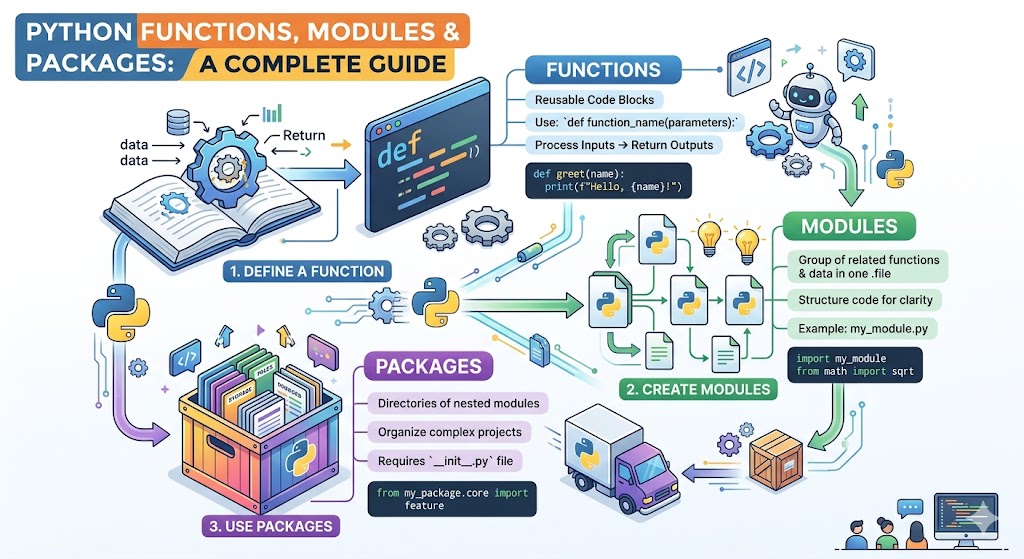
You have mastered variables, data types, and operators. You can write simple scripts that run from top to bottom. But as your programs grow larger, you will notice a problem. Code becomes repetitive. Files become too long. Logic becomes hard to follow. The solution is mastering python functions & modules. These tools transform messy scripts into organized, reusable, professional code. This excellent guide will take you from writing simple scripts to building modular programs that scale. You will learn how to define functions, import modules, and even create your own packages. The power you gain will change how you think about programming. Let me share a fascinating fact from history of python. When Guido van Rossum created the language in 1991, he emphasized code reusability from day one. He wanted developers to write once and use everywhere. That vision is exactly what python functions & modules deliver. Let us dive in.
Why Functions Matter More Than You Think
A function is a reusable block of code that performs a specific task. Instead of writing the same five lines twenty times, you write them once inside a function. Then you call that function whenever needed. This follows the DRY principle (Don’t Repeat Yourself) , one of the most important ideas in software development. Functions make your code shorter, easier to read, and simpler to debug. If something goes wrong, you fix it in one place. The change automatically applies everywhere the function is used. Functions also enable refactoring the process of restructuring code without changing its behavior. As you gain experience, you will naturally break large problems into small functions. Each function does one thing and does it well. This approach is called modular programming. Let me show you how to create your first function.
Defining Functions The Def Keyword
Creating a function in Python uses the defining functions (def) keyword. The syntax is simple. Write def, then the function name, then parentheses, then a colon. The function body is indented below. Here is a basic example:
def greet():
print("Hello World")
This function named greet takes no inputs. When called, it prints “Hello World”. To use the function, write its name followed by parentheses:
greet() # prints "Hello World"
Function names follow the same rules as variable names. Use lowercase letters with underscores between words. This style is called snake_case. Examples include calculate_total, get_user_name, and save_to_file. Most functions take inputs called parameters. Here is a function with a parameter:
def greet_person(name):
print(f"Hello {name}")
greet_person("Alice") # prints "Hello Alice"
greet_person("Bob") # prints "Hello Bob"
The parameter name acts like a variable inside the function. Each time you call the function, you pass a different value. This is the essence of code reusability.
Return Statement Sending Values Back
Many functions not only perform actions but also return values. The return statement sends a value back to the code that called the function. Without a return statement, a function returns None by default. Here is a function that returns a value:
def add(a, b):
result = a + b
return result
sum = add(5, 3)
print(sum) # prints 8
The return statement immediately exits the function. Any code after a return inside a function never runs. You can return any data type including numbers, strings, lists, dictionaries, or even other functions. Here is a more useful example that returns a formatted string:
def format_greeting(first_name, last_name):
return f"Welcome {first_name} {last_name}"
message = format_greeting("Alice", "Smith")
print(message) # prints "Welcome Alice Smith"
The return statement transforms functions from simple action performers into powerful data transformers. You can chain function calls together by using the return value of one as the input to another.
Function Arguments (args and kwargs)
Python offers flexible ways to pass arguments to functions. The simplest are positional arguments. Their order matters. In add(5, 3), 5 becomes a and 3 becomes b. Next are keyword arguments where you specify the parameter name:
def describe_person(name, age, city):
return f"{name} is {age} years old and lives in {city}"
# Positional arguments
print(describe_person("Alice", 25, "New York"))
# Keyword arguments (order doesn't matter)
print(describe_person(city="London", name="Bob", age=30))
Default parameters provide fallback values when the caller doesn’t supply an argument:
def greet_with_default(name="Guest"):
return f"Hello {name}"
print(greet_with_default()) # prints "Hello Guest"
print(greet_with_default("Alice")) # prints "Hello Alice"
For advanced cases, you can use function arguments (args, kwargs) . *args collects extra positional arguments as a tuple. **kwargs collects extra keyword arguments as a dictionary:
def flexible_function(*args, **kwargs):
print(f"Positional: {args}")
print(f"Keyword: {kwargs}")
flexible_function(1, 2, 3, name="Alice", age=25)
This flexibility makes functions adaptable to many situations. Understanding scoping rules is also critical. Variables defined inside a function are local. They only exist inside that function. Variables defined outside are global but can be accessed inside functions. Use the global keyword if you need to modify a global variable from inside a function, though this is rarely recommended.
Lambda Functions Small Anonymous Functions
Python supports a special kind of tiny function called a lambda function. Lambda functions are anonymous, meaning they have no name. They are written in a single line. The syntax is lambda arguments: expression. Lambda functions automatically return the expression result. Here is an example:
square = lambda x: x * x
print(square(5)) # prints 25
Lambda functions are most useful when you need a simple function temporarily. They are commonly used with built in functions like map(), filter(), and sorted(). For example:
numbers = [1, 2, 3, 4, 5]
squared = list(map(lambda x: x * x, numbers))
print(squared) # prints [1, 4, 9, 16, 25]
even_numbers = list(filter(lambda x: x % 2 == 0, numbers))
print(even_numbers) # prints [2, 4]
Lambda functions are not suitable for complex logic. Use regular def functions for anything longer than a single expression. The name “lambda” comes from lambda calculus, a formal system in mathematical logic. For python functions & modules, lambdas are a nice tool but not essential for beginners.
Docstrings Documenting Your Functions
Professional code includes documentation. A docstring is a string literal that appears as the first statement in a function. It explains what the function does, what parameters it takes, and what it returns. Python uses triple quotes for docstrings. Here is an example:
def calculate_area(length, width):
"""
Calculate the area of a rectangle.
Parameters:
length (float): The length of the rectangle
width (float): The width of the rectangle
Returns:
float: The area of the rectangle
"""
return length * width
You can access a function’s docstring using help(calculate_area) or print(calculate_area.__doc__). Good docstrings help other programmers (including future you) understand your code. The DRY principle (Don’t Repeat Yourself) applies to documentation too. Write clear docstrings once and anyone can understand your function without reading the implementation.
Built in Functions Python’s Ready to Use Tools
Python comes with dozens of built-in functions that are always available. You do not need to import anything. Here are the most useful ones:
print() displays outputlen() returns the length of a sequencetype() returns the data type of a valueint(), float(), str(), bool() convert typesinput() reads user input from the keyboardrange() generates a sequence of numberssum() adds all items in an iterablemax() returns the largest itemmin() returns the smallest itemabs() returns the absolute valueround() rounds a numbersorted() returns a sorted listenumerate() returns index and value pairszip() combines multiple iterables
Here are examples of built-in functions in action:
numbers = [3, 1, 4, 1, 5, 9]
print(len(numbers)) # 6
print(sum(numbers)) # 23
print(max(numbers)) # 9
print(sorted(numbers)) # [1, 1, 3, 4, 5, 9]
for index, value in enumerate(["a", "b", "c"]):
print(f"{index}: {value}")
Memorizing all built-in functions is impossible. Keep the Python documentation bookmarked. As you practice python functions & modules, you will naturally learn the most common built-ins. They save enormous time because you do not need to reinvent basic functionality.
Import Module Accessing External Code
No single program contains everything. Python’s power comes from its ecosystem. The import module statement brings external code into your program. Python has a rich standard library with modules for file handling, mathematics, dates, JSON, random numbers, and much more. Here is how to import and use the math module:
import math
print(math.pi) # 3.14159...
print(math.sqrt(16)) # 4.0
print(math.floor(3.7)) # 3
You can import specific functions from a module:
from math import sqrt, pi
print(sqrt(25)) # 5.0
print(pi) # 3.14159...
You can give a module a shorter alias using as:
import numpy as np
import pandas as pd
These aliases are conventions in the Python community. The import module system keeps your namespace organized. Namespace means the container of names (variables, functions, modules) in your program. By importing modules, you add their names to your namespace without cluttering it. You can also create your own modules, which is simply a .py file containing functions and variables. Save a file called mymodule.py with some functions, then import it from another file.
Creating Packages Organizing Multiple Modules
When your project grows beyond a few modules, you need creating a package. A package is a collection of modules in a directory. The directory must contain a special file called init.py file. This file can be empty. It signals to Python that this directory is a package. Here is the structure:
my_package/
__init__.py
module1.py
module2.py
sub_package/
__init__.py
module3.py
Inside module1.py you define functions. Inside module2.py you define more functions. To import from these modules:
from my_package import module1
from my_package.module1 import my_function
from my_package.sub_package import module3
The init.py file can contain initialization code or define __all__ which lists modules to import when someone writes from my_package import *. Creating packages is essential for large projects. Frameworks like Django and Flask are organized as packages. The distinction between library vs package is subtle. A library is a collection of code that provides specific functionality. A package is a technical way to organize modules. Many libraries are distributed as packages.
Installing Third Party Packages with Pip
The standard library is powerful but limited. For data science, web development, and automation, you need third-party packages. The pip install command installs packages from the Python Package Index (PyPI). Here are essential commands:
pip install numpy
pip install pandas
pip install requests
pip install flask
pip install django
To see installed packages:
pip list
To uninstall:
pip uninstall package_name
To install a specific version:
pip install numpy==1.26.0
To update a package:
pip install upgrade numpy
Always use virtual environments before installing packages. A virtual environment isolates dependencies for different projects. Create one with python -m venv myenv, activate it, then run pip commands. This practice prevents conflicts between projects. The python functions & modules ecosystem is vast. Over 400,000 packages are available on PyPI. You can publish your own packages too. The DRY principle (Don’t Repeat Yourself) applies globally. If you need functionality, someone has probably already built it.
Creating Your Own Module Step by Step
Let me walk through creating a real module. Create a file called string_utils.py. Add these functions:
def reverse_string(text):
"""Return the reversed version of a string"""
return text[::-1]
def count_vowels(text):
"""Count vowels in a string"""
vowels = "aeiouAEIOU"
count = 0
for char in text:
if char in vowels:
count += 1
return count
def is_palindrome(text):
"""Check if a string reads the same forwards and backwards"""
cleaned = text.replace(" ", "").lower()
return cleaned == cleaned[::-1]
Now create another file called main.py in the same directory:
import string_utils
text = "Hello World"
print(string_utils.reverse_string(text)) # dlroW olleH
print(string_utils.count_vowels(text)) # 3
print(string_utils.is_palindrome("race car")) # True
This is modular programming in action. The module string_utils contains reusable functions. The main.py uses them. If you need these functions elsewhere, just copy string_utils.py or install it as a package. The python functions & modules approach scales from small scripts to million line applications.
Import Techniques and Best Practices
Several import techniques exist. Each has appropriate use cases. Here they are ranked from most to least recommended:
Recommended Most of the Time:import module_namemodule_name.function() is explicit and avoids naming conflicts.
Okay for Specific Cases:from module_name import specific_function
Use when you call the function many times and the module name is long.
Use Sparingly:from module_name import *
This pollutes your namespace. It is unclear where functions come from. Avoid this in production code.
Best Practice for Aliases:import numpy as npimport pandas as pd
These conventions are well known. Use them for common libraries.
Keep all imports at the top of your file. Group them in this order. First standard library imports. Then third party package imports. Then your own module imports. Add a blank line between groups. Following these python functions & modules best practices makes your code readable to other Python developers.
Frequently Asked Questions (FAQs)
Q1: What is the difference between a module and a package in python functions & modules?
A module is a single .py file. A package is a directory containing multiple modules plus an __init__.py file.
Q2: How do I use function arguments (args, kwargs) correctly?
Use *args for variable positional arguments and **kwargs for variable keyword arguments. The names args and kwargs are conventions.
Q3: What is a docstring and why use it?
A docstring documents what a function does. It appears as the first string in a function. Access it with help().
Q4: How do I install a third party package?
Use pip install package_name in your terminal after activating your virtual environment.
Q5: What is the DRY principle (Don’t Repeat Yourself)?
A software development principle stating that every piece of knowledge should have a single representation. Functions help achieve this.
Conclusion
You have mastered python functions & modules. Functions enable code reusability through the defining functions (def) keyword, return statement, and flexible function arguments (args, kwargs) . Lambda functions provide concise single expression functions. Docstrings document your work. Python’s built-in functions handle common tasks. The import module system brings the standard library and third-party packages into your code. Creating a package with an init.py file organizes large projects. The pip install command unlocks over 400,000 packages. The journey from writing scripts to building modular programs is now complete. Every large Python application from web frameworks to AI systems relies on these same python functions & modules principles. You have the knowledge. Now go build something powerful. The Python community is ready for your contributions.

