
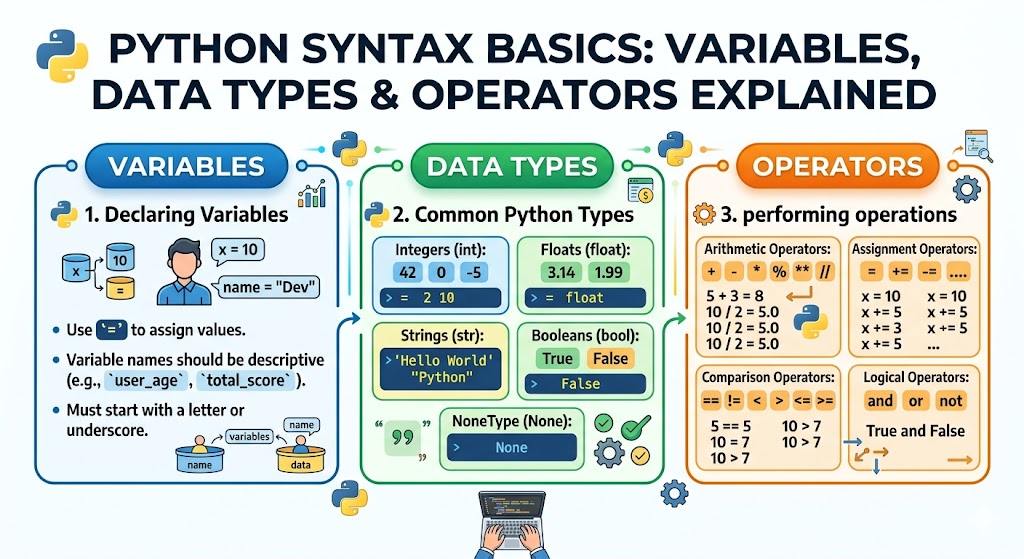
Welcome to the core of Python programming. You have installed Python. You have run your first “Hello World” script. Now it is time to understand the real building blocks. Every Python program, from simple calculators to artificial intelligence systems, relies on variables, data types, and operators. Mastering these python syntax basics will give you the confidence to write any program you can imagine. The excellent news is that Python makes these concepts remarkably easy to learn. Unlike other languages that drown beginners in confusing symbols, Python reads almost like plain English. This python syntax basics guide uses simple explanations and plenty of examples. No prior experience needed. Let me start with a fun fact from history of programming languages. Python was created in 1989 by Guido van Rossum and named after the British comedy show Monty Python. That playful spirit lives on in Python’s clean readable design. Now let us dive into the fundamentals.
What Makes Python Syntax Special (1991 – Present)
Python syntax was designed with one goal. Readability. When Guido van Rossum created Python in 1991, he wanted a language that looked like executable pseudocode. Other languages like C++ and Java use curly braces {} and semicolons ; everywhere. Python uses indentation and line breaks. This choice makes code readability dramatically better. You can look at a Python program and understand what it does even without knowing every detail. For python for beginners, this is a massive advantage. The learning curve is gentle. The whitespace and indentation rules are simple. Use four spaces for each indentation level. Do not mix tabs and spaces. Most code editors handle this automatically. Python also uses reserved keywords like if, else, for, while, def, and return. These words have special meanings and cannot be used as variable names. Throughout this python syntax basics guide, I will show you exactly how each piece works. Let us begin with the most fundamental concept. Variables.
Variables Storing Information
A variable is a named container that holds data. Think of it like a labeled box. You put something inside and give it a name. Later you can look inside the box or change what it holds. In Python, creating a variable is incredibly simple. Choose a name, add an equals sign, and provide a value. Here are examples:
name = "Alice"
age = 25
price = 19.99
is_student = True
Variable names must follow a few rules. They can contain letters, numbers, and underscores. They cannot start with a number. They are case sensitive so score and Score are different. Use descriptive names like user_age instead of single letters like x. This practice improves code readability dramatically. Python also uses dynamic typing. You do not need to declare that age is an integer. Python figures it out automatically from the value you assign. You can even change a variable’s type by assigning a different kind of value. This flexibility is one reason why python syntax basics feel so approachable.
Numbers Integers and Floats
Python handles two main types of numbers. Integers are whole numbers. Floats are decimal numbers. Here are examples of each:
count = 42 # integer
temperature = 98.6 # float
negative = -15 # integer
pi = 3.14159 # float
You can perform all standard math operations on numbers. Addition uses +. Subtraction uses -. Multiplication uses *. Division uses /. For integer and float operations, Python automatically converts integers to floats when needed. For example, 5 / 2 returns 2.5 not 2. If you want integer division that rounds down, use //. 5 // 2 returns 2. Exponents use ** so 2 ** 3 returns 8. The modulo operator % returns the remainder. 7 % 3 returns 1. These arithmetic operators work exactly as you learned in math class. Experiment with numbers in the Python shell. Type python in your terminal, then try 15 + 30 or 100 / 4. The immediate feedback helps solidify your understanding of python syntax basics.
Strings Working with Text
Strings are sequences of characters. They represent text. Create a string using single quotes or double quotes. Both work identically. Choose one style and stay consistent.
greeting = "Hello World"
name = 'Alice'
message = "It's a beautiful day"
The last example shows why double quotes are useful when your string contains an apostrophe. You can also use escape characters. A backslash \ gives special meaning to the next character. \n creates a new line. \t creates a tab. To include a backslash itself, use \\. String manipulation is one of Python’s strengths. You can combine strings with the + operator:
full_name = "Alice" + " " + "Smith"
You can repeat strings with the * operator:
laugh = "ha" * 3 # returns "hahaha"
You can access individual characters using square brackets and slicing and indexing. Remember that indexing starts at zero:
word = "Python"
first_letter = word[0] # returns "P"
last_letter = word[5] # returns "n"
slice_example = word[0:3] # returns "Pyt"
The len() function returns the length of a string. len("Hello") returns 5. Many python syntax basics guides spend extra time on strings because text handling is so common in real world programming.
Formatting Strings Creating Dynamic Text
Hardcoding text is boring. Real programs create dynamic messages that change based on data. Python offers several ways to formatting strings. The modern and recommended method uses f strings. The f before the string tells Python to look for variable names inside curly braces:
name = "Alice"
age = 25
message = f"My name is {name} and I am {age} years old"
print(message)
This code prints “My name is Alice and I am 25 years old.” The f string is readable and fast. The older methods include the format() method and the % operator, but you can ignore them and use f strings exclusively. For multi line strings, use triple quotes:
long_text = """This is line one
This is line two
This is line three"""
Formatting strings correctly is essential for creating user friendly output in everything from command line tools to web applications.
Booleans and Logical Flow
Booleans are the simplest data type. They represent only two values. True or False. Notice the capital T and capital F. These are not strings. They are boolean logic values that control program flow.
is_ready = True
has_error = False
Booleans typically come from comparison operators. These operators compare two values and return a Boolean result:
10 > 5 # returns True
10 < 5 # returns False
10 == 10 # returns True (equals)
10 != 5 # returns True (not equals)
10 >= 10 # returns True (greater than or equal)
5 <= 10 # returns True (less than or equal)
Notice the double equals == for comparison. A single equals = is for assignment. Confusing them is the most common beginner mistake. Booleans combine with logical flow using and, or, and not. For example:
x = 10
condition1 = x > 5 and x < 20 # True
condition2 = x > 50 or x < 100 # True
condition3 = not(x == 10) # False
These logical operators allow you to build complex conditions. They are the foundation of decision making in Python programs.
Lists Ordered Collections
A list is an ordered collection of items. Lists can hold any data type. They can even mix different types, though mixing is usually not recommended. Create a list using square brackets with commas between items:
colors = ["red", "green", "blue"]
numbers = [1, 2, 3, 4, 5]
mixed = [1, "hello", 3.14, True]
Access list items using slicing and indexing with square brackets. Indexing starts at zero:
colors[0] # returns "red"
colors[1] # returns "green"
colors[2] # returns "blue"
colors[1] # returns "green"
Lists are mutable. This means you can change items after creation:
colors[1] = "yellow" # colors becomes ["red", "yellow", "blue"]
Add items using append():
colors.append("purple") # adds to the end
Remove items using remove():
colors.remove("red")
The len() function works on lists too. len(colors) returns the number of items. The python list vs tuple comparison is important. Lists are mutable and use square brackets. Tuples are immutable and use parentheses. Once you create a tuple, you cannot change it. This immutable vs mutable distinction matters for performance and safety.
Dictionaries Key Value Pairs
A dictionary stores data in key value pairs. Think of it like a real dictionary. You look up a word (the key) to find its definition (the value). Create a dictionary using curly braces with colons between keys and values:
person = {
"name": "Alice",
"age": 25,
"city": "New York"
}
Access values using the key in square brackets:
person["name"] # returns "Alice"
person["age"] # returns 25
Add new key value pairs simply by assigning:
person["job"] = "engineer"
Change existing values the same way:
person["age"] = 26
Check if a key exists using in:
if "name" in person:
print("Name exists")
Dictionaries are incredibly useful for storing structured data. The dictionary and set are both defined with curly braces, but sets contain unique values without keys. A set looks like {1, 2, 3}. The data structures of lists, dictionaries, and sets form the backbone of most Python programs.
Operators Complete Reference
Operators are symbols that perform operations on values. This python syntax basics guide covers all the essential categories.
Arithmetic operators perform math:+ addition- subtraction* multiplication/ division (returns float)// floor division (returns integer)% modulo (remainder)** exponentiation
Comparison operators return Booleans:== equal to!= not equal to> greater than< less than>= greater than or equal to<= less than or equal to
Assignment operators assign values:= simple assignment+= add and assign: x += 5 means x = x + 5-= subtract and assign*= multiply and assign/= divide and assign
Logical operators combine Booleans:and returns True if both are Trueor returns True if either is Truenot returns the opposite
Operator precedence determines which operation happens first. Multiplication and division happen before addition and subtraction. Parentheses override normal precedence. For example:
result = 2 + 3 * 4 # returns 14, not 20
result = (2 + 3) * 4 # returns 20
When unsure, use parentheses. They make code readability better and prevent bugs.
Type Casting Converting Between Types
Sometimes you need to convert a value from one data type to another. This is called type casting. Python provides built in functions for this:
int() converts to integerfloat() converts to floatstr() converts to stringbool() converts to Boolean
Here are examples:
int("42") # returns 42 (string to integer)
float("3.14") # returns 3.14 (string to float)
str(100) # returns "100" (integer to string)
bool(0) # returns False
bool(1) # returns True
Type casting is essential when working with user input. The input() function always returns a string. If you need a number, convert it:
user_age = input("Enter your age: ")
age_number = int(user_age)
If the conversion fails, Python raises a ValueError. Always consider using try and except for safe conversion in production code. Understanding type casting helps you avoid mysterious errors in your programs.
Comments and Documentation
Comments are notes inside your code that Python ignores. They explain what your code does. Comments are essential for code readability and for other programmers who read your work. Use the # symbol for single line comments:
# This is a comment
x = 10 # This comment is on the same line
For multi line comments, use triple quotes. Technically these are strings that Python ignores when not assigned to a variable:
"""
This is a multi line comment
You can write several lines here
Useful for explaining complex logic
"""
The python comment syntax is simple. Comment anything that is not obvious. However, also use descriptive variable names so you need fewer comments. Good code explains itself. The official Python style guide called PEP 8 recommends using comments to explain why you wrote code a certain way, not what the code does. The what should be obvious from reading.
Whitespace and Indentation Rules
Unlike most programming languages, Python uses whitespace and indentation to define code blocks. Other languages use curly braces {}. Python uses spaces. This forces clean, readable code. Here is the rule. Every block of code inside an if, else, for, while, or def must be indented with four spaces. Here is an example:
temperature = 30
if temperature > 25:
print("It is hot")
print("Drink water")
else:
print("It is cool")
print("Enjoy the day")
Notice the colons after if and else. Notice the indentation inside each block. The indentation shows which lines belong to which block. Inconsistent indentation causes an IndentationError. Most code editors automatically insert proper indentation. Never mix tabs and spaces. Configure your editor to insert spaces when you press the Tab key. This whitespace and indentation system might feel strange at first. Within a week, you will appreciate how clean your code looks.
Putting It All Together
Let us combine everything into a small working program. This example uses variables, data types, operators, and control flow:
# Simple temperature converter
celsius = float(input("Enter temperature in Celsius: "))
fahrenheit = (celsius * 9/5) + 32
print(f"{celsius}°C is equal to {fahrenheit}°F")
if fahrenheit > 100:
print("That is very hot!")
elif fahrenheit < 32:
print("That is freezing!")
else:
print("That is a moderate temperature.")
This program demonstrates python syntax basics in action. It gets user input, converts it to a number, performs arithmetic, prints formatted output, and makes decisions. Every concept you learned in this guide appears here. Run this program yourself. Change the formula. Add more conditions. Experimentation is how you truly learn.
Frequently Asked Questions (FAQs)
Q1: What is the difference between Python list vs tuple?
Lists are mutable and use square brackets. Tuples are immutable and use parentheses.
Q2: Do I need to declare variable types in Python?
No. Python uses dynamic typing. Just assign a value and Python figures out the type.
Q3: Why do I get an IndentationError?
You mixed tabs and spaces or did not indent code blocks consistently. Use four spaces.
Q4: What is operator precedence?
The order Python evaluates operators. Multiplication happens before addition. Use parentheses to control order.
Q5: How do I convert a string to a number?
Use int() for whole numbers or float() for decimal numbers.
Conclusion
You have mastered the essential python syntax basics. Variables store data. Data types include integers, floats, strings, booleans, lists, and dictionaries. Operators perform calculations and comparisons. Type casting converts between types. Comments document your logic. Indentation defines code blocks. These fundamentals will appear in every Python program you ever write. Practice each concept until it feels automatic. Open the Python shell. Create variables. Build lists. Write small programs. The history of programming languages shows that syntax mastery is the first real milestone. You have reached it. Now go build something amazing. The world needs your code.

