
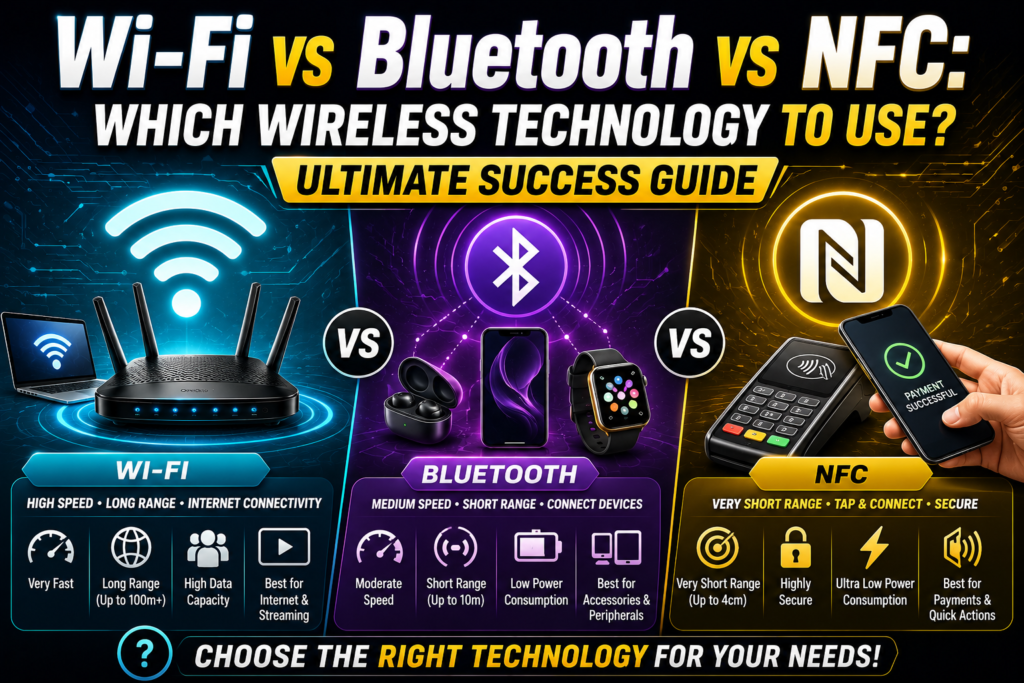
The contemporary consumer tech landscape thrives on continuous untethered data transmission, pushing the massive wi-fi vs bluetooth vs nfc debate to the forefront of engineering and deployment choices. Whether you are transferring high-definition media assets, syncing personal wearable devices, or completing a swift contactless payment at a local merchant checkout, choosing the correct transmission medium dictates your operational safety and speed. This short-range wireless comparison is not merely a matter of convenience; it directly influences battery longevity, pairing convenience, and device data protection.
Many consumers assume that wireless technologies are interchangeable as long as devices connect successfully. However, looking closely at wi-fi vs bluetooth vs nfc architectures reveals that each protocol was engineered from the ground up to solve completely different computing problems. Deploying the wrong tech can result in severe battery drain, crawling data rates, or open security gaps. By understanding the core physical design behind these wireless data sharing technologies, you can unlock an elite, optimized digital workspace tailored for flawless daily execution.
The Core Technical Profiles
To understand why these platforms behave so differently, we must examine their basic physical boundaries, operating ranges, and baseline target functions.
Underlying Architectural Visions
- Wi-Fi Technology: Designed as a robust, high-bandwidth local area network solution to replace physical network lines, allowing multiple client systems to access the global internet concurrently.
- Bluetooth Technology: Engineered specifically as a low-power wireless PAN (Personal Area Network) alternative to physical cables, creating a clean bridge between main computers and local peripheral accessories.
- NFC Technology: Built specifically as an ultra-short-range secure data transmission method based on legacy RFID frameworks, triggering instantaneous localized coverage the moment two physical items touch.
The Historical Race of Radio Wave Protocols (1994 – 2026)
Tracking the evolution of consumer wireless formats between 1994 and 2026 highlights a continuous balancing act between pure transmission speed, battery consumption, and physical proximity constraints.
The earliest building blocks of modern peripheral pairing began in the mid-nineties when engineers sought a way to connect mobile accessories without creating physical desk clutter. Over the decades leading up to 2026, these initial protocols split into separate specialized branches. While one engineering group focused entirely on stretching the limits of data transfer rate metrics over vast spaces, other teams prioritized reducing Bluetooth vs Wi-Fi power consumption curves to preserve cell phone batteries. This evolutionary divergence explains why a modern wi-fi vs bluetooth vs nfc analysis remains critical; no single wireless chip can handle every aspect of modern communication perfectly.
Speed, Throughput, and Data Transfer Limits
When evaluating which protocol to use, raw information processing speed is the first major sorting factor to consider.
+-------------------------------------------------------------+
|             MAXIMUM SPEED AND THROUGHPUT GRID               |
+----------------------+--------------------------------------+
| WIRELESS TECHNOLOGY  | MAXIMUM DATA TRANSFER RATE           |
+----------------------+--------------------------------------+
| NFC Link             | 424 Kbps (Tiny data tags only)       |
| Bluetooth 5.4+       | 2 Mbps to 3 Mbps (Audio & Syncing)   |
| Modern Wi-Fi 7       | Up to 46 Gbps (Massive file backups) |
+----------------------+--------------------------------------+
The difference between Wi-Fi and Bluetooth speeds becomes highly obvious when moving large multimedia archives. A modern high-performance router can push gigabits of data per second, making it the only acceptable vehicle for handling continuous high-definition video streaming or backing up multi-gigabyte folder directories.
Bluetooth functions within a much smaller lane, topping out at a few megabits per second. This narrower pipeline is more than adequate for transporting continuous high-quality audio streams or updating fitness tracker statistics, but it will choke immediately if forced to handle an operating system update file. NFC sits at the very bottom of the throughput ladder, moving data at a tiny fraction of a megabit per second. This minuscule capacity is engineered strictly for sending small strings of encrypted text, like banking card numbers or security tokens.
Power Consumption and Battery Longevity Realities
High data speeds require significant electrical power, creating a direct engineering trade-off when configuring mobile consumer electronics.
When assessing Bluetooth vs Wi-Fi power consumption metrics, Bluetooth is the undisputed winner for wearable gadgets. Its low-energy profiles allow wireless earbuds, smartwatches, and computer mice to operate continuously for days or weeks on a single tiny charge.
A standard internet transceiver requires a massive, steady flow of electricity to keep its wide channels open and amplify its signal path over long distances. If you leave a laptop continuously downloading files over an airwave connection, the battery drains rapidly.
NFC operates on a completely unique energy model. The reading device generates a localized electromagnetic field that actually provides passive wireless power to the target tag. This allows passive NFC labels stuck onto smart posters or clothing items to transmit their stored data without containing any physical battery inside their casing.
Physical Range and Proximity Boundaries
The distance a signal can travel safely before suffering severe path loss completely shapes how you integrate these tools into your daily routine.
[NFC Range: 0 - 4 Centimeters] -> Requires direct physical touch.
[Bluetooth Range: 10 - 100 Meters] -> Covers an average room or office floor.
[Wi-Fi Range: 50 - 100+ Meters] -> Broad footprint extending across a whole property.
An comparison of wi-fi vs bluetooth vs nfc footprints shows that proximity plays a vital role in preventing accidental cross-talk. A home router projects a wide wireless signal radius that effortlessly cuts through interior walls, providing a massive coverage footprint across your entire house. To learn how to manage this extensive reach correctly, checking out our guide on wi-fi range explained shows how to eliminate dead spots by placing your nodes strategically.
Bluetooth covers a smaller room-sized area, maintaining a steady link over moderate distances before its radio signal drops beneath the background noise floor. NFC operates strictly within an ultra-short-range window of a few centimeters, making accidental connections physically impossible.
Connection Setup and Peer-to-Peer Pairing Mechanics
The step-by-step user experience required to link two electronic hardware components together varies wildly across these three platforms.
Connecting to an internet access point requires a manual onboarding sequence. The client hardware must scan the airwaves for a specific broadcast name, verify network parameters, and clear security check keys. Taking the time to understand how wi-fi works at this connection layer helps you see why the configuration phase takes more effort than simple device pairing. If you ever run into a roadblock during this setup phase, analyzing a manual on how to fix wi-fi problems will help you clear up address conflicts and get back online smoothly.
Bluetooth relies on an explicit pairing process to build a secure peer-to-peer connection. Users must manually change their accessory into discovery mode, wait for it to show up on their phone screen, and confirm a matching passcode to complete the link.
NFC completely eliminates these manual menus. Because it relies on extreme physical proximity, establishing a link requires nothing more than tapping two compatible devices together. The hardware identifies the incoming field automatically and transfers the secure tokens in less than a tenth of a second, providing the ultimate zero-click user experience.
Analyzing Security, Interception, and Hacking Vulnerabilities
Protecting your private personal files from unwanted open-air monitoring is a critical requirement when choosing among smart home connectivity options.
Because high-power router signals radiate outward past the exterior walls of your property, they are consistently exposed to outside attackers. Mitigating this network vulnerability requires maintaining a secure router setup backed by modern WPA3 encryption tools. If your security settings are weak, an attacker sitting in a nearby vehicle can capture your data packets or use brute-force dictionary utilities to guess your master password. For users interested in locking down their home networks against these threats, reviewing a detailed breakdown on wi-fi security explained provides the necessary steps to secure your settings.
Python
def evaluate_wireless_security(tech_type, distance_cm):
    # Analyzing wireless security risks based on interception distance
    if tech_type == "Wi-Fi" and distance_cm > 1000:
        return "MODERATE RISK: Signal bleeds through walls. Strong WPA3 encryption is mandatory."
    elif tech_type == "Bluetooth" and distance_cm <= 1000:
        return "LOW RISK: Small room-scale broadcast area minimizes remote sniffing exploits."
    elif tech_type == "NFC" and distance_cm < 4:
        return "SECURE BY DESIGN: Physical proximity prevents remote over-the-air interception."
    else:
        return "UNKNOWN: Verify local hardware configuration parameters."

# Simulating an on-site corporate security architecture review
print(evaluate_wireless_security("NFC", 2))
Bluetooth uses a smart defensive technology called frequency hopping to protect its local streams. It continuously shifts its data transmission across seventy-nine separate radio channels thousands of times per second, making it very difficult for basic scanning tools to lock onto and record your audio or files.
NFC is inherently secure by design due to its physical distance limits. Because a bad actor must place an antenna within four centimeters of your personal phone to capture the signal, execution of a stealthy remote attack is practically impossible. This makes it the premier choice for processing bank cards and identity verification tokens safely.
When to Deploy Wi-Fi Networking
Internet-routing chips are the ideal choice for stationary consumer electronics that process heavy data loads across large spaces. Desktop workstations, cloud-linked gaming systems, smart home surveillance cameras, and home streaming televisions should always lean on this high-bandwidth option.
                       [ Broadband Modem ]
                                |
                                v
                    [ High-Power Wi-Fi Hub ]
                   /           |            \
          (Wide Range)   (Wide Range)     (Wide Range)
                 /             |              \
                v              v               v
       [Smart TV Stream]  [Work Laptop]  [Security Cameras]
If you are setting up a brand-new workspace layout, learning how to set up a wi-fi router correctly ensures your equipment has the bandwidth capacity needed to handle multi-device households smoothly. This infrastructure provides the broad digital foundation required to connect your home to the open web, allowing you to run massive cloud backups and stream media without a single drop in speed.
When to Connect via Bluetooth Peripherals
Bluetooth is the ultimate choice when your primary goal is connecting small, battery-powered accessories directly to a personal computer or smartphone. Wireless audio headphones, car stereo integration links, external keyboards, computer mice, and smart fitness bands thrive on a Bluetooth footprint.
By handling these smaller connections over a localized PAN, you save an immense amount of battery power on your mobile hardware while keeping your main internet channels clean and free of unnecessary clutter. It completely removes the need to carry bulky cords in your travel bag, creating a clean, seamless personal workspace wherever you choose to set up your laptop.
When to Use NFC Technology
NFC is the unmatched king for secure, single-action actions that require absolute speed and zero manual setup menus. Contactless payment tech like Apple Pay and Google Wallet rely entirely on this protocol to pass encrypted banking data safely to payment terminals.
[ User Smartphone ] ===( Tap within 4cm )===> [ Merchant Point-of-Sale Terminal ]
     |                                                      |
(Generates Token)                                   (Processes Payment)
Beyond consumer retail lanes, you should use NFC when deploying fast physical access keys for security doors, programming automated custom shortcut tags on your nightstand, or pairing accessories instantly via a simple physical tap. It is engineered specifically for hyper-localized, instant tasks where opening a manual settings menu would slow down your day.
Building an Elite Hybrid Wireless Ecosystem
You never have to limit your smart home to just one specific wireless technology. The most intelligent digital ecosystems combine all three platforms, matching each task to the specific protocol designed to handle it best.
Imagine a premium home layout where a high-end router distributes high-bandwidth internet access across your entire property. At the exact same moment, your smartphone communicates smoothly with your smartwatch and wireless headphones using low-energy Bluetooth channels without causing any cross-talk interference. When you return home from work, you can tap your phone against an entry pad to unlock your front door instantly via an encrypted NFC token. Embracing this layered approach allows you to enjoy the ultimate mix of convenience, speed, and safety across all your devices.
Frequently Asked Questions (FAQs)
Is it safe to leave Bluetooth and NFC turned on continuously on my smartphone?
Yes, it is entirely safe. Modern mobile operating systems are built with advanced security protocols that keep your wireless chips in a secure standby state when they aren’t actively in use. Furthermore, modern chips are highly optimized to ensure that leaving them on causes practically zero noticeable battery drain throughout your day.
Can a Bluetooth connection interfere with my home wireless internet speed?
Both Bluetooth and older wireless routers share the exact same 2.4 GHz radio frequency spectrum. If your router is locked to an older channel, you may notice minor audio stuttering or brief drops in data speed when multiple devices run at once. Shifting your critical computers over to the clearer 5 GHz or 6 GHz bands completely avoids this local channel congestion.
Why can’t I use NFC to transfer large photo albums between two mobile phones?
NFC simply does not possess the data transfer rate capacity required to move large media files, and attempting a transfer would cause the connection to stall. Modern smartphones use NFC exclusively to handle the initial handshake, and then automatically switch the actual file transfer over to a fast, peer-to-peer wireless link to complete the job instantly.
Conclusion: Mastering Your Tech Choices for Long-Term Success
Taking the time to review a detailed wi-fi vs bluetooth vs nfc comparison gives you the practical knowledge needed to pick the absolute best wireless tool for every scenario. By matching your daily data workflows against the unique strengths of each protocol, you can easily maximize your device battery life, secure your banking tokens, and ensure your high-bandwidth tasks receive the blazing-fast speeds they require. Keep your router firmware updated, leverage low-power peripheral links when working on the go, and build a smart, safe, and fully connected digital ecosystem that makes your life easier every single day.

