
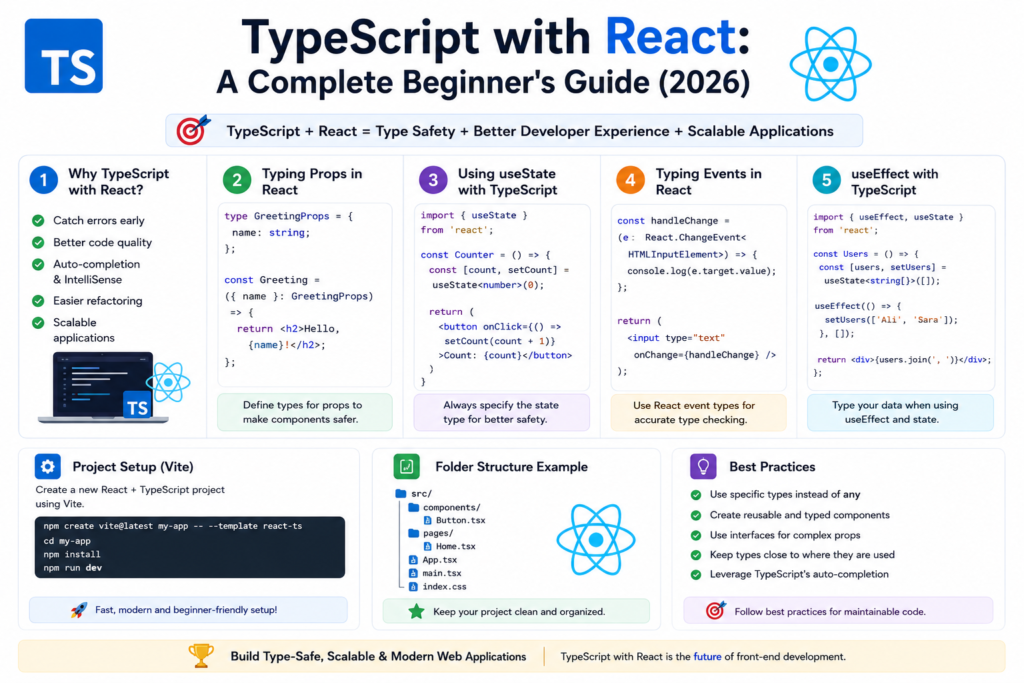
Learning typescript with react is one of the smartest decisions for modern front end developers in 2026. React already dominates the world of component based UI development, and TypeScript adds powerful type safety that improves code quality, maintainability, and developer experience. Together, they create a reliable environment for building scalable web interfaces.
For beginners, understanding typescript with react may feel challenging at first because it combines two powerful technologies. However, once you learn the basics, you will realize how much easier it becomes to manage props, state, hooks, and reusable components. Modern companies now prefer developers who can confidently work with typescript with react because it reduces bugs and improves long term project stability.
This guide will explain everything you need to know about typescript with react, including setup, TSX syntax, typed hooks, props, state management, and best practices with practical code examples.
Evolution of React and TypeScript (2012 – 2026)
React was introduced by Facebook in 2013 and quickly became one of the most popular front end libraries. Developers loved its reusable component structure and virtual DOM performance. Around the same time, TypeScript was introduced in 2012 by Anders Hejlsberg.
The typescript history shows how TypeScript evolved from a simple JavaScript superset into a dominant development tool. As React applications became larger and more complex, developers began adopting TypeScript for better scalability and maintainability.
Today, typescript with react is considered one of the best combinations for modern web development because it offers both flexibility and type safety.
What Is TypeScript with React?
At its core, typescript with react means using React together with TypeScript instead of plain JavaScript. React files written with TypeScript usually use the .tsx extension, which supports JSX syntax and type annotations.
If you are wondering what is typescript?, it is a strongly typed version of JavaScript that catches errors during development instead of runtime.
By combining React and TypeScript, developers can create safer and more predictable applications. This improves state management, component communication, and reusable UI logic.
Setting Up React with TypeScript
The first step in learning typescript with react is creating a React TypeScript project.
You can use Vite or Next.js for setup. Here is a simple Vite command:
npm create vite@latest my-app -- --template react-tsIf you prefer Next.js:
npx create-next-app@latest my-app --typescriptThese commands automatically configure TypeScript support, TSX files, and development tools.
Learning how to install typescript correctly is important because TypeScript powers the entire setup.
Understanding TSX Syntax
TSX is a syntax extension used in typescript with react. It allows developers to write HTML like structures inside TypeScript files.
Example:
function App() {
  return <h1>Hello TypeScript with React</h1>;
}

export default App;
TSX combines JSX syntax with TypeScript type checking, creating a more reliable development environment.
This syntax improves developer experience and makes component based UI development easier.
Typing React Components
Typing components is one of the most important concepts in typescript with react. TypeScript ensures that components receive the correct data.
Example:
type GreetingProps = {
  name: string;
};

function Greeting({ name }: GreetingProps) {
  return <h2>Hello, {name}</h2>;
}
In this example, the component only accepts a string as the name prop. This prevents invalid data from causing errors.
Understanding typescript types is essential for typing React components effectively.
Typing Props and State
Props and state management become much safer with typescript with react.
Example using state:
import { useState } from "react";

function Counter() {
  const [count, setCount] = useState<number>(0);

  return (
    <button onClick={() => setCount(count + 1)}>
      Count: {count}
    </button>
  );
}
The useState<number> syntax ensures that the state always remains a number.
Typed state management improves reliability and reduces runtime bugs.
React Hooks with TypeScript
Hooks are widely used in typescript with react applications. TypeScript improves hooks by enforcing strict typing.
Example with useEffect:
import { useEffect, useState } from "react";

function Users() {
  const [users, setUsers] = useState<string[]>([]);

  useEffect(() => {
    setUsers(["Ali", "Sara"]);
  }, []);

  return (
    <ul>
      {users.map((user) => (
        <li key={user}>{user}</li>
      ))}
    </ul>
  );
}
Type safe hooks improve code readability and help developers avoid mistakes.
Hooks are central to modern React applications and are heavily used in typescript with react development.
React Event Types Explained
Handling events correctly is another important topic in typescript with react.
Example:
function Form() {
  const handleChange = (
    event: React.ChangeEvent<HTMLInputElement>
  ) => {
    console.log(event.target.value);
  };

  return <input type="text" onChange={handleChange} />;
}
TypeScript ensures that event objects are properly typed, improving type safety and code reliability.
Functional Components with TypeScript
Modern React development primarily uses functional components. TypeScript enhances them with strict typing.
Example:
type ButtonProps = {
  label: string;
};

const Button = ({ label }: ButtonProps) => {
  return <button>{label}</button>;
};
Functional components are simple, reusable, and ideal for scalable front end development.
React Context with Types
React Context is commonly used to avoid prop drilling in large applications. TypeScript makes context safer and easier to manage.
Example:
import { createContext } from "react";

type ThemeContextType = {
  theme: string;
};

export const ThemeContext = createContext<ThemeContextType>({
  theme: "light",
});
Typed context improves consistency and prevents invalid data usage.
React Server Components and Next.js
Modern frameworks like Next.js now support React Server Components. This feature improves performance and scalability.
Example setup with TypeScript:
export default function Home() {
  return <h1>Next.js with TypeScript</h1>;
}
Developers working with typescript with nodejs often use Next.js for full stack applications.
This combination improves developer productivity and modern web development workflows.
TypeScript Generics in React
Generics are extremely useful in typescript with react for reusable components and hooks.
Example:
type ListProps<T> = {
  items: T[];
};

function List<T>({ items }: ListProps<T>) {
  return (
    <ul>
      {items.map((item, index) => (
        <li key={index}>{String(item)}</li>
      ))}
    </ul>
  );
}
Understanding typescript generics helps developers build flexible and scalable React components.
React Best Practices with TypeScript
When working with typescript with react, following best practices is essential.
Important practices include:
- Use strict typing for props and state
- Avoid using
anyunnecessarily - Keep components reusable
- Use typed hooks
- Organize project structure clearly
These practices improve maintainability and scalability in real world projects.
TypeScript vs JavaScript in React
When comparing typescript vs javascript, TypeScript offers several advantages for React development.
JavaScript provides flexibility but lacks compile time type checking. TypeScript catches errors early and improves code readability.
This makes typescript with react more suitable for professional and enterprise applications.
Real World Benefits of TypeScript with React
Large companies use typescript with react because it improves collaboration, scalability, and long term maintenance.
Benefits include:
- Better developer experience
- Improved code quality
- Type safe APIs
- Easier debugging
- More reliable state management
These advantages make TypeScript and React one of the strongest combinations in modern development.
Future of React and TypeScript
The future of typescript looks extremely promising, especially in the React ecosystem. More frameworks and libraries now provide built in TypeScript support.
React and TypeScript together will continue shaping the future of software engineering by enabling developers to build scalable and reliable applications faster.
Mastering typescript with react today will prepare developers for the future of front end engineering.
FAQs About TypeScript with React
What is TypeScript with React?
It is the combination of React and TypeScript for building type safe front end applications.
Why should developers use TypeScript with React?
It improves type safety, scalability, and code maintainability.
What is TSX in React?
TSX is a syntax extension that combines TypeScript with JSX syntax.
Is TypeScript difficult for React beginners?
It may feel complex initially, but practice makes it much easier.
Is TypeScript required for React?
No, but it is highly recommended for larger applications.
Conclusion
Learning typescript with react is one of the best investments for modern developers. It combines React’s powerful UI system with TypeScript’s strict type safety, creating a reliable environment for scalable applications.
From typed props and hooks to advanced generics and server components, typescript with react provides everything developers need for professional front end development. As technology continues to evolve, mastering this combination will open new opportunities and improve long term coding skills.
Start building projects today and explore the full power of React and TypeScript together.

