
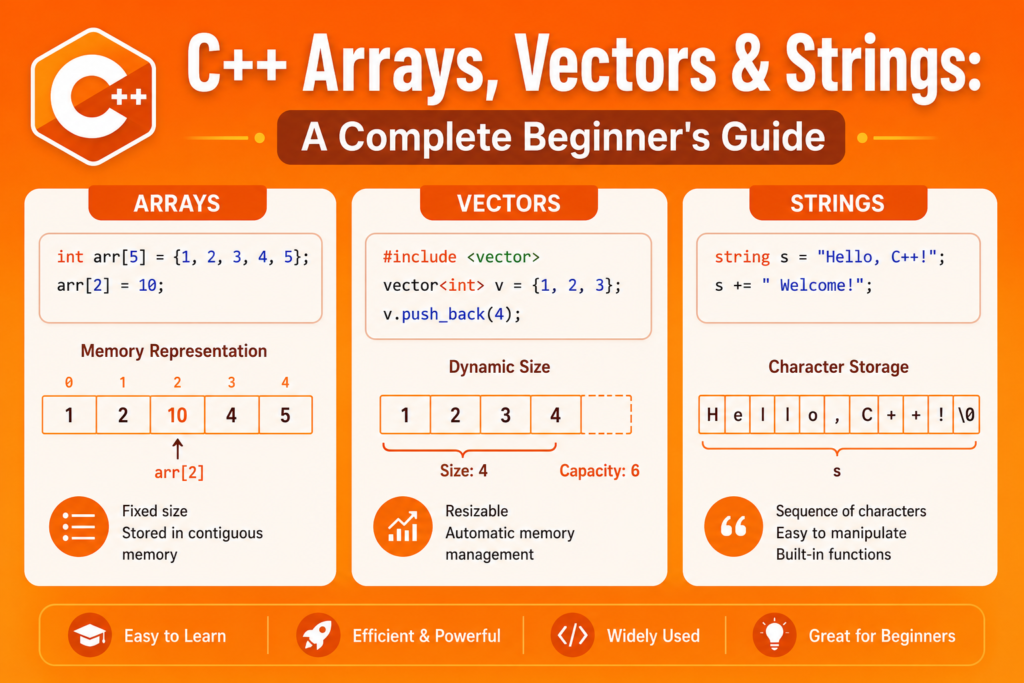
When you first start writing programs that handle real data, a single variable is simply not enough. You need to store lists of numbers, collections of names, sequences of characters, and groups of values that belong together. That is exactly where c++ arrays come in. c++ arrays are one of the most fundamental and widely used data structures in the entire language, and understanding them deeply is a skill that pays dividends at every level of programming.
But c++ arrays are just the beginning. C++ also gives you vectors, which are dynamic and flexible versions of arrays, and strings, which handle text with surprising power and convenience. Together, these three tools cover the vast majority of data storage and manipulation tasks you will encounter as a C++ developer. This guide explains all three clearly, with working code examples at every step, so you finish with a complete, confident understanding of how to store and work with collections of data in C++.
What Are C++ Arrays and How Do They Work
A c++ array is a collection of elements of the same data type stored in continuous memory locations. Instead of declaring ten separate integer variables, you declare one array that holds all ten integers in a neat, ordered sequence. Each element lives at a consecutive byte address in memory, which makes arrays extremely fast to access and traverse.
Arrays in C++ are zero-indexed, meaning the first element sits at index 0, the second at index 1, and so on. This is a convention that trips up many beginners but becomes completely natural with practice.
#include <iostream>
using namespace std;

int main() {
    // Array declaration and initialization
    int scores[5] = {85, 92, 78, 96, 88};

    // Accessing elements
    cout << "First score: " << scores[0] << endl;
    cout << "Third score: " << scores[2] << endl;
    cout << "Last score: " << scores[4] << endl;

    // Modifying an element
    scores[1] = 95;
    cout << "Updated second score: " << scores[1] << endl;

    return 0;
}
In this example, scores is an array of five integers. Element access uses the bracket notation with the index number inside. The array occupies a single block of continuous memory, which is why element access is so fast. The computer calculates the exact byte address of any element instantly using the base address plus the index multiplied by the size of the data type.
For developers building on a solid foundation by studying C++ syntax basics, arrays are one of the first compound data structures you will encounter and one of the most important to master early.
Array Initialization and Declaration Styles
C++ gives you several ways to declare and initialize c++ arrays, each useful in different situations.
#include <iostream>
using namespace std;

int main() {
    // Method 1: Declare with size, initialize later
    int temperatures[7];
    temperatures[0] = 22;
    temperatures[1] = 25;
    temperatures[2] = 19;

    // Method 2: Declare and initialize together
    double prices[4] = {9.99, 14.50, 3.75, 22.00};

    // Method 3: Let compiler count the size
    string days[] = {"Monday", "Tuesday", "Wednesday", "Thursday", "Friday"};

    // Method 4: Zero-initialize all elements
    int counters[10] = {};

    cout << "Day 1: " << days[0] << endl;
    cout << "Day 3: " << days[2] << endl;
    cout << "Price 2: " << prices[1] << endl;
    cout << "Counter 5: " << counters[4] << endl;

    return 0;
}
When you declare an array without initializing it, the elements contain garbage values left over from whatever was previously in that memory. Always initialize your arrays. The zero-initialization syntax using empty braces sets every element to zero, which is a safe and clean starting state for numeric arrays.
Traversing C++ Arrays With Loops
The real power of c++ arrays emerges when you combine them with loops. Instead of accessing each element individually, you can process every element in an array with just a few lines of code.
#include <iostream>
using namespace std;

int main() {
    int numbers[] = {12, 45, 7, 89, 34, 56, 23, 91, 8, 67};
    int size = 10;

    // Find the sum and maximum
    int sum = 0;
    int maxValue = numbers[0];

    for (int i = 0; i < size; i++) {
        sum += numbers[i];
        if (numbers[i] > maxValue) {
            maxValue = numbers[i];
        }
    }

    double average = static_cast<double>(sum) / size;

    cout << "Sum: " << sum << endl;
    cout << "Average: " << average << endl;
    cout << "Maximum: " << maxValue << endl;

    // Modern range-based for loop
    cout << "All elements: ";
    for (int num : numbers) {
        cout << num << " ";
    }
    cout << endl;

    return 0;
}
The traditional for loop gives you full control over the index, which is useful when you need to know the position of each element. The modern range-based for loop is cleaner when you only need the values. Both approaches are standard practice in professional C++ code.
Multi-Dimensional Arrays in C++
c++ arrays can have more than one dimension. A two-dimensional array is essentially a grid, like a table with rows and columns. Multi-dimensional arrays are used for matrices, game boards, image data, and any data that has a natural two-dimensional structure.
#include <iostream>
using namespace std;

int main() {
    // 3x3 multiplication table
    int table[3][3];

    // Fill the array
    for (int i = 0; i < 3; i++) {
        for (int j = 0; j < 3; j++) {
            table[i][j] = (i + 1) * (j + 1);
        }
    }

    // Display the grid
    cout << "Multiplication Table:" << endl;
    for (int i = 0; i < 3; i++) {
        for (int j = 0; j < 3; j++) {
            cout << table[i][j] << "\t";
        }
        cout << endl;
    }

    return 0;
}
Multi-dimensional arrays are still stored in continuous memory. A 3×3 array occupies 9 consecutive memory slots. The indexing system table[row][column] gives you a clean, intuitive way to access any cell in the grid. Nested loops are the natural tool for traversing multi-dimensional arrays, with the outer loop handling rows and the inner loop handling columns.
The Limitations of Raw C++ Arrays
Despite their speed and simplicity, raw c++ arrays have some serious limitations that every developer needs to understand. The size of a raw array must be known at compile time and cannot change during program execution. There is no built-in buffer overflow protection. If you write to index 10 of a 5-element array, C++ will not stop you. It will silently write into memory beyond the array, causing undefined behavior, crashes, or security vulnerabilities.
Raw arrays also do not know their own size. You must track the size separately, which is an extra responsibility that leads to bugs when the size variable gets out of sync with the actual array. These limitations are exactly why C++ provides vectors as a safer, more powerful alternative for most use cases.
For developers also exploring C++ pointers, it is important to know that the name of an array in C++ is essentially a pointer to its first element. This deep connection between arrays and pointers explains many of the behaviors that raw arrays exhibit.
C++ Vectors: Dynamic Arrays That Grow With You
A vector is a sequence container from the C++ Standard Library that works like an array but with dynamic size. Unlike raw c++ arrays, a vector can grow and shrink at runtime as elements are added or removed. It manages its own memory automatically, tracks its own size, provides bounds checking in debug mode, and gives you a rich set of built-in methods for common operations.
#include <iostream>
#include <vector>
using namespace std;

int main() {
    // Create an empty vector
    vector<int> scores;

    // Add elements with push_back
    scores.push_back(85);
    scores.push_back(92);
    scores.push_back(78);
    scores.push_back(96);
    scores.push_back(88);

    // Access elements
    cout << "First score: " << scores[0] << endl;
    cout << "Last score: " << scores.back() << endl;

    // Check size
    cout << "Number of scores: " << scores.size() << endl;

    // Traverse with range-based loop
    cout << "All scores: ";
    for (int score : scores) {
        cout << score << " ";
    }
    cout << endl;

    // Remove last element
    scores.pop_back();
    cout << "After removal, size: " << scores.size() << endl;

    return 0;
}
The .push_back() method adds a new element to the end of the vector, automatically expanding its internal storage if needed. The .size() method returns the current number of elements. These two features alone solve the most painful limitations of raw arrays. You never need to know the size in advance, and you never need to track it manually.
C++ Arrays vs Vectors: When to Use Which
The choice between raw c++ arrays and vectors comes down to context. Raw arrays are appropriate when the size is fixed at compile time, performance is absolutely critical at the microsecond level, or you are working with embedded systems or legacy code that expects raw arrays.
#include <iostream>
#include <vector>
using namespace std;

int main() {
    // Raw array - fixed size, good for known small collections
    int daysInMonth[12] = {31, 28, 31, 30, 31, 30, 31, 31, 30, 31, 30, 31};

    // Vector - dynamic, good for unknown or changing sizes
    vector<string> userNames;

    string name;
    cout << "Enter names (type 'done' to stop):" << endl;

    while (true) {
        cin >> name;
        if (name == "done") break;
        userNames.push_back(name);
    }

    cout << "Collected " << userNames.size() << " names:" << endl;
    for (const string& n : userNames) {
        cout << n << endl;
    }

    return 0;
}
For most modern C++ development, vectors are the right default choice. They are safer, more flexible, and nearly as fast as raw arrays for most workloads. The standard library headers required are minimal, just include vector, and the interface is clean and intuitive. Use raw arrays only when you have a compelling specific reason.
Vector Methods and Advanced Operations
Vectors come packed with powerful methods that make working with dynamic arrays c++ a genuine pleasure compared to managing raw arrays manually.
#include <iostream>
#include <vector>
#include <algorithm>
using namespace std;

int main() {
    vector<int> numbers = {64, 25, 12, 92, 37, 8, 71, 45};

    // Sort the vector
    sort(numbers.begin(), numbers.end());

    cout << "Sorted: ";
    for (int n : numbers) cout << n << " ";
    cout << endl;

    // Insert at specific position
    numbers.insert(numbers.begin() + 3, 30);
    cout << "After insert: ";
    for (int n : numbers) cout << n << " ";
    cout << endl;

    // Erase an element
    numbers.erase(numbers.begin() + 5);
    cout << "After erase: ";
    for (int n : numbers) cout << n << " ";
    cout << endl;

    // Check if empty
    cout << "Is empty: " << (numbers.empty() ? "Yes" : "No") << endl;

    // Clear all elements
    numbers.clear();
    cout << "After clear, size: " << numbers.size() << endl;

    return 0;
}
The combination of vectors with the standard library algorithms like sort, find, and count gives you an extraordinarily powerful toolkit for data manipulation. This integration between vectors and algorithms is one of the things that makes the C++ Standard Library so compelling, and for anyone reading a C++ STL guide, vectors are typically the very first container covered because they are so universally useful.
C++ Strings: Powerful Text Handling Made Simple
A string in C++ is a sequence of characters. The std::string class from the standard library provides a rich, safe, and intuitive way to work with text, far superior to the old C-style character arrays that required manual memory management and careful null termination.
#include <iostream>
#include <string>
using namespace std;

int main() {
    // String declaration and initialization
    string firstName = "John";
    string lastName = "Smith";

    // String concatenation
    string fullName = firstName + " " + lastName;
    cout << "Full name: " << fullName << endl;

    // String length
    cout << "Length: " << fullName.length() << endl;

    // Access individual characters
    cout << "First character: " << fullName[0] << endl;

    // Substring extraction
    string first = fullName.substr(0, 4);
    cout << "Substring: " << first << endl;

    // Find within a string
    int pos = fullName.find("Smith");
    if (pos != string::npos) {
        cout << "Found 'Smith' at position: " << pos << endl;
    }

    // Convert to uppercase manually
    for (char& c : fullName) {
        if (c >= 'a' && c <= 'z') c -= 32;
    }
    cout << "Uppercase: " << fullName << endl;

    return 0;
}
The std::string guide for modern C++ is essentially an introduction to a complete text processing toolkit. String concatenation using the plus operator is intuitive and clean. The find method searches for substrings and returns the position or string::npos if not found. The substr method extracts a portion of the string. These operations handle the vast majority of real-world string manipulation tasks.
String Input, Comparison, and Conversion
Working with user input and comparing strings are two of the most common tasks in real applications. The std::string class handles both elegantly.
#include <iostream>
#include <string>
#include <sstream>
using namespace std;

int main() {
    // Reading a full line of input
    string userInput;
    cout << "Enter your full name: ";
    getline(cin, userInput);
    cout << "Hello, " << userInput << "!" << endl;

    // String comparison
    string password = "secure123";
    string attempt;
    cout << "Enter password: ";
    cin >> attempt;

    if (attempt == password) {
        cout << "Access granted!" << endl;
    } else {
        cout << "Access denied." << endl;
    }

    // Convert number to string
    int score = 95;
    string scoreText = "Your score is: " + to_string(score);
    cout << scoreText << endl;

    // Convert string to number
    string numStr = "42";
    int num = stoi(numStr);
    cout << "Converted number plus 10: " << num + 10 << endl;

    return 0;
}
The getline function reads an entire line including spaces, unlike cin which stops at whitespace. String comparison using == works exactly as you would expect, comparing the actual text content rather than memory addresses. The to_string and stoi functions convert between numeric types and strings, handling a conversion task that comes up constantly in real applications.
C++ Arrays and Strings in Real-World Applications
c++ arrays, vectors, and strings are not academic exercises. They power some of the most critical software in the world. In C++ in modern technology, these data structures handle everything from network packet buffers and audio sample storage in digital audio workstations to pixel data in image processing pipelines and game state management in real-time engines.
For developers working in C++ game development, arrays and vectors are absolutely everywhere. A game might store all active enemies in a vector, all tile types in a two-dimensional array, and all player dialogue in string collections. The ability to add and remove enemies dynamically as gameplay progresses makes vectors the natural container for any game entity that appears and disappears during play.
For those studying OOP in C++, vectors of objects are one of the most powerful and commonly used patterns in object-oriented C++ code. Storing a vector of Player objects, Enemy objects, or Item objects gives you a dynamic, manageable collection that you can iterate, sort, search, and modify with the full power of both vectors and object-oriented design.
For anyone looking toward advanced C++ concepts, understanding c++ arrays and vectors deeply is a prerequisite for working with the full range of standard library containers, including deques, lists, sets, and maps. Vectors are the gateway container that makes all the others easier to understand.
Frequently Asked Questions
What Is the Difference Between C++ Arrays and Vectors?
A raw c++ array has a fixed size that must be known at compile time and cannot change during program execution. It does not track its own size and provides no built-in protection against out-of-bounds access. A vector is a dynamic array from the standard library that can grow and shrink at runtime, knows its own size through the .size() method, and manages its own memory automatically. For most modern C++ development, vectors are the preferred choice over raw arrays due to their safety and flexibility.
Why Are C++ Arrays Zero-Indexed?
C++ arrays start at index 0 because the index represents an offset from the base memory address of the array. The first element is zero positions away from the start, so it has index 0. The second element is one position away, so it has index 1. This direct correspondence between index and memory offset makes array access calculations fast and consistent. It is a design inherited from C and is used by most programming languages today.
How Do You Avoid Buffer Overflow With C++ Arrays?
Buffer overflow occurs when you write to an index beyond the bounds of an array. Raw arrays in C++ do not check bounds, so exceeding the array size causes undefined behavior and potential security vulnerabilities. To avoid this, always track the array size carefully, never access indices beyond size minus one, or better yet, use vectors which provide at() method for bounds-checked access and automatically prevent overflow when using push_back to add elements.
When Should You Use Strings vs Character Arrays in C++?
In modern C++, you should almost always use std::string instead of C-style character arrays. std::string manages its own memory, supports intuitive operations like concatenation with the plus operator and comparison with double equals, provides a rich set of methods for searching and manipulation, and eliminates the risk of buffer overflows that come with fixed-size character arrays. C-style char arrays are still used when interfacing with C libraries or hardware APIs that require them, but for general text handling, std::string is clearly superior.
How Do You Pass Arrays and Vectors to Functions in C++?
Raw arrays decay to pointers when passed to functions, so you also need to pass the size separately. Vectors are best passed by reference or const reference to avoid copying all the elements. Passing by const reference is appropriate when the function only needs to read the vector. Passing by non-const reference is appropriate when the function needs to modify the vector. This difference in how arrays and vectors are passed to functions is one more practical reason why vectors are often more convenient in real code.
Conclusion
c++ arrays are one of the most foundational concepts in C++ programming, and building a solid understanding of them unlocks everything that follows. Raw arrays give you speed and direct memory control. Vectors give you flexibility, safety, and a rich feature set. Strings give you clean, powerful text manipulation without the dangers of manual character buffer management.
c++ arrays, vectors, and strings each have their place, and knowing when to use which one is part of becoming a genuinely capable C++ developer. The examples in this guide cover the core patterns that appear again and again in real-world code. Study them, run them, modify them, and build things with them. The best way to make these tools feel natural is to use them constantly on real problems.
As your C++ journey continues into data structures, algorithms, and advanced library features, everything you have learned here about collections and sequences will serve as the bedrock of your understanding. Every great C++ program you build will have c++ arrays or vectors somewhere at its core.

