
Learning how to pair bluetooth devices is one of the most useful technology skills today. Bluetooth pairing allows smartphones, laptops, headphones, speakers, cars, smartwatches, keyboards, and many other devices to connect wirelessly within seconds.
Modern Bluetooth technology makes device sync simple and convenient, but many users still experience confusion during the pairing process. Sometimes devices do not appear in Bluetooth settings, pairing codes fail, or connections suddenly stop working.
The good news is that understanding how to pair bluetooth devices is actually very easy once you learn the basic steps.
Bluetooth pairing works by creating a secure wireless connection between two discoverable devices using radio signals. Once paired, devices can reconnect automatically whenever Bluetooth is enabled.
This complete beginner-friendly guide explains how to pair bluetooth devices on all major platforms, including Android, iPhone, Windows, Mac, smart TVs, cars, headphones, gaming accessories, and smart home devices.
What Is Bluetooth Pairing? (1994 – Today)
Before learning how to pair bluetooth devices, it is important to understand what Bluetooth pairing actually means.
Bluetooth pairing is the process of creating a trusted wireless connection between two devices.
When devices pair successfully:
- They recognize each other
- They exchange security information
- They communicate wirelessly
- They reconnect automatically later
Bluetooth pairing is essential for:
- Wireless headphones
- Smartwatches
- Speakers
- Keyboards
- Car audio systems
- Fitness trackers
- Gaming controllers
Without pairing, Bluetooth devices cannot communicate securely.
If you are new to Bluetooth technology, learning what is bluetooth helps explain how wireless communication works overall.
How Bluetooth Works During Pairing
Understanding how to pair bluetooth devices becomes easier when you understand the connection process.
Bluetooth devices communicate using radio signals within the 2.4 GHz frequency range.
The pairing process generally follows these steps:
- Bluetooth turns on
- Devices become discoverable
- Devices search for nearby signals
- A connection request appears
- Security verification occurs
- Pairing completes successfully
Many devices use pairing codes or passkeys to improve wireless security.
Modern systems usually complete this entire process automatically within seconds.
If you want deeper technical details, learning how bluetooth works explains the wireless communication system behind pairing.
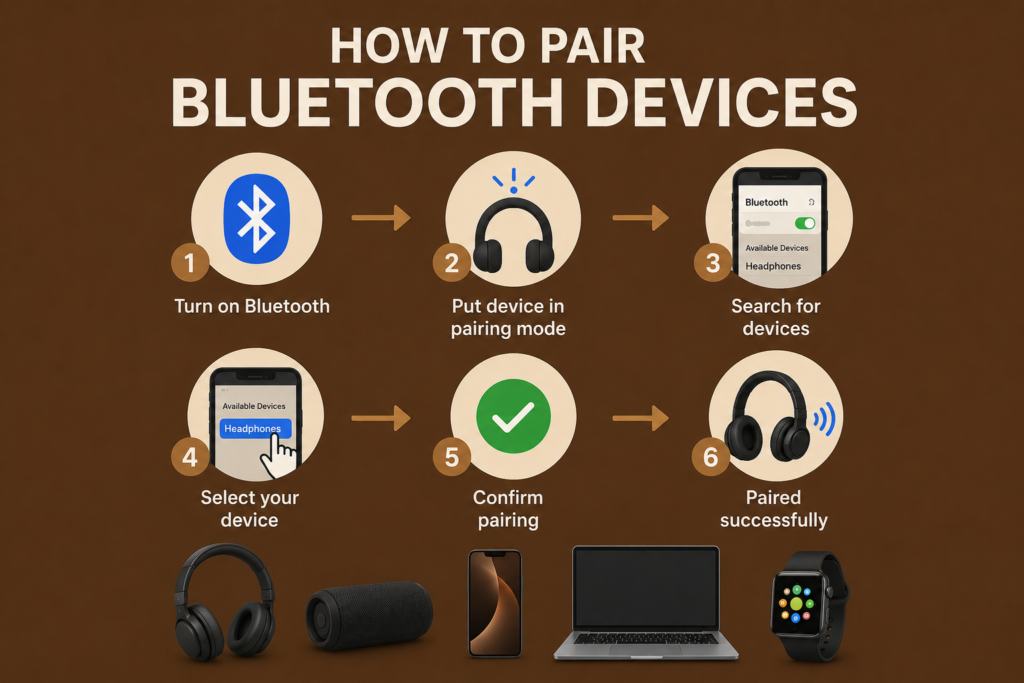
Step by Step Bluetooth Pairing Process
The basic process for how to pair bluetooth devices is very similar across most electronics.
Step 1: Turn Bluetooth On
Open Bluetooth settings on both devices.
Enable Bluetooth communication.
Step 2: Activate Pairing Mode
Most Bluetooth accessories require Bluetooth pairing mode before connection.
For example:
- Hold the power button on headphones
- Press the pairing button on speakers
- Enable discoverable mode on smart devices
The device usually flashes a light while waiting for pairing.
Step 3: Search for Discoverable Devices
Your phone, laptop, or tablet will search for nearby discoverable devices automatically.
Available devices will appear on the screen.
Step 4: Select the Device
Tap or click the device name from the list.
Step 5: Confirm Pairing
Some devices require:
- Pairing code
- Passkey confirmation
- Permission request
Confirm the connection.
Step 6: Pairing Complete
Once connected, the device usually displays:
- Connected
- Paired successfully
- Connection status active
Your Bluetooth device is now ready to use.
How to Pair Bluetooth Headphones
Many users search how to pair bluetooth devices because they want to connect wireless headphones.
Android Headphones Pairing
- Open Bluetooth settings
- Enable Bluetooth
- Turn headphones into pairing mode
- Select the headphone name
- Confirm pairing
iPhone Headphones Pairing
- Open Settings
- Tap Bluetooth
- Enable Bluetooth
- Activate headphone pairing mode
- Tap device name
Modern wireless earbuds often pair automatically after opening the charging case.
If you want better wireless audio experiences, exploring best bluetooth headphones helps identify quality devices.
How to Pair Bluetooth Devices on Android
Android devices make Bluetooth pairing very simple.
Android Pairing Instructions
- Open Settings
- Tap Connected Devices
- Select Bluetooth
- Enable Bluetooth
- Wait for nearby devices
- Tap the device name
- Confirm connection
Android systems usually save paired devices automatically for future connections.
Modern Android Bluetooth managers also support multi-device pairing for multiple accessories simultaneously.
How to Pair Bluetooth Devices on iPhone
Apple devices also use simple Bluetooth pairing systems.
iPhone Pairing Guide
- Open Settings
- Tap Bluetooth
- Turn Bluetooth on
- Enable pairing mode on accessory
- Select device from available list
- Confirm connection request
Apple devices often reconnect paired accessories automatically.
Bluetooth pairing on iPhone is especially smooth for Apple ecosystem products like AirPods.
How to Pair Bluetooth Devices on Windows
Windows computers support Bluetooth pairing for keyboards, mice, headphones, controllers, and speakers.
Windows Bluetooth Pairing
- Open Settings
- Select Bluetooth & Devices
- Turn Bluetooth on
- Click Add Device
- Select Bluetooth
- Choose discoverable device
- Confirm pairing
Windows Bluetooth managers also allow users to remove, reconnect, or troubleshoot devices easily.
How to Pair Bluetooth Devices on Mac
Mac computers also provide easy wireless setup.
Mac Bluetooth Pairing
- Open System Settings
- Select Bluetooth
- Turn Bluetooth on
- Wait for nearby devices
- Click Connect beside the device name
Mac systems automatically save previously paired devices for future use.
Connecting Bluetooth to Car Systems
One of the most common searches involving how to pair bluetooth devices is car pairing.
Bluetooth allows:
- Hands-free calling
- Wireless music streaming
- Voice assistant access
- Smartphone integration
Connecting Bluetooth to Car
- Enable Bluetooth on phone
- Open car Bluetooth settings
- Activate pairing mode in car
- Search for discoverable devices
- Select vehicle name
- Confirm pairing code
Most vehicles remember paired phones automatically.
Multi Device Pairing Explained
Modern Bluetooth systems support multi-device pairing.
This allows one device to connect with multiple accessories simultaneously.
Examples include:
- Phone + smartwatch + earbuds
- Laptop + keyboard + mouse
- Smart TV + speaker + controller
Newer bluetooth versions improved multi-device pairing significantly.
Bluetooth 5.x systems especially handle multiple wireless connections efficiently.
Troubleshooting Pairing Problems
Sometimes Bluetooth pairing does not work correctly.
Common pairing issues include:
- Device not appearing
- Pairing failure
- Weak connection
- Incorrect passkey
- Connection drops
Troubleshooting Pairing Tips
- Restart both devices
- Turn Bluetooth off and on
- Recharge low batteries
- Move devices closer together
- Remove old paired devices
- Update firmware updates
Many users also search ways to fix bluetooth problems when connections fail repeatedly.
Most Bluetooth issues can be solved quickly with simple troubleshooting.
Unpairing Devices
Sometimes users need to remove old connections.
Why Unpair Devices?
- Connection conflicts
- Switching accessories
- Selling devices
- Security reasons
- Pairing reset
How to Unpair Devices
- Open Bluetooth settings
- Select paired device
- Choose Forget Device or Remove Device
- Confirm removal
After unpairing, devices must complete the pairing process again before reconnecting.
Bluetooth Security During Pairing
Modern bluetooth security systems help protect wireless communication during pairing.
Security features include:
- Encryption
- Authentication
- Passkeys
- Secure pairing systems
Bluetooth pairing creates trusted relationships between devices while protecting user data.
Security systems improved dramatically in newer Bluetooth generations.
Avoid pairing with unknown public devices whenever possible.
Bluetooth Range and Connection Stability
Bluetooth range affects pairing success and wireless performance.
If devices are too far apart, pairing may fail.
Modern bluetooth range improvements allow stronger wireless coverage than earlier Bluetooth systems.
However, walls, interference, and obstacles may weaken signals.
For best results:
- Keep devices nearby during setup
- Avoid crowded wireless environments
- Minimize physical barriers
Stable signal strength improves pairing reliability significantly.
Bluetooth Classic vs BLE Pairing
The pairing process differs slightly between traditional Bluetooth and BLE systems.
Bluetooth Classic
- Continuous connection
- Audio accessories
- Speakers and headphones
BLE
- Low power devices
- Smartwatches
- Sensors and fitness trackers
If you want deeper comparisons, learning about bluetooth classic vs ble explains how the technologies differ.
BLE devices often pair more quickly while consuming less energy.
Bluetooth Pairing in Smart Homes
Smart home systems increasingly rely on Bluetooth pairing.
Examples include:
- Smart bulbs
- Smart locks
- Thermostats
- Sensors
- Home automation hubs
Bluetooth makes smart device installation faster and easier for beginners.
Wireless configuration systems continue improving every year.
The Future of Bluetooth Pairing
The future of bluetooth pairing looks extremely advanced.
Future systems will likely offer:
- Instant automatic pairing
- Smarter device discovery
- AI-assisted wireless management
- Improved security
- Faster synchronization
The growth of connected ecosystems also connects closely with the future of software engineering, where intelligent automation and wireless communication are becoming increasingly important.
Bluetooth pairing will likely become even simpler in future generations.
Why Bluetooth Pairing Became So Important
Bluetooth pairing transformed how people use technology.
Before Bluetooth, users relied heavily on:
- Wires
- Physical connectors
- Complex installations
Bluetooth created easier wireless communication for everyone.
Today, billions of wireless connections occur daily through Bluetooth pairing systems.
Its convenience helped Bluetooth become one of the world’s most important wireless technologies.
Frequently Asked Questions (FAQs)
How do I put a Bluetooth device into pairing mode?
Most devices enter pairing mode by holding the power or Bluetooth button until a flashing light appears.
Why is my Bluetooth device not showing up?
The device may not be in pairing mode, may be out of range, or Bluetooth may be disabled.
What is a Bluetooth pairing code?
A pairing code or passkey helps verify secure wireless communication between devices.
Can Bluetooth connect to multiple devices?
Yes. Many modern Bluetooth systems support multi-device pairing simultaneously.
How do I remove paired Bluetooth devices?
Open Bluetooth settings, select the device, and choose Forget Device or Remove Device.
Why does Bluetooth pairing fail?
Pairing may fail because of low battery, signal interference, outdated firmware, or devices being too far apart.
Conclusion
Learning how to pair bluetooth devices is an essential technology skill in the modern wireless world.
Bluetooth pairing allows smartphones, laptops, headphones, speakers, smartwatches, gaming systems, and cars to communicate wirelessly using secure connections. The pairing process involves discoverable devices, Bluetooth settings, connection verification, and secure communication systems.
Modern Bluetooth technology made wireless communication simple, fast, and convenient for billions of users worldwide.
As Bluetooth technology continues evolving, pairing systems will become even smarter, faster, and more reliable for future connected ecosystems.

