
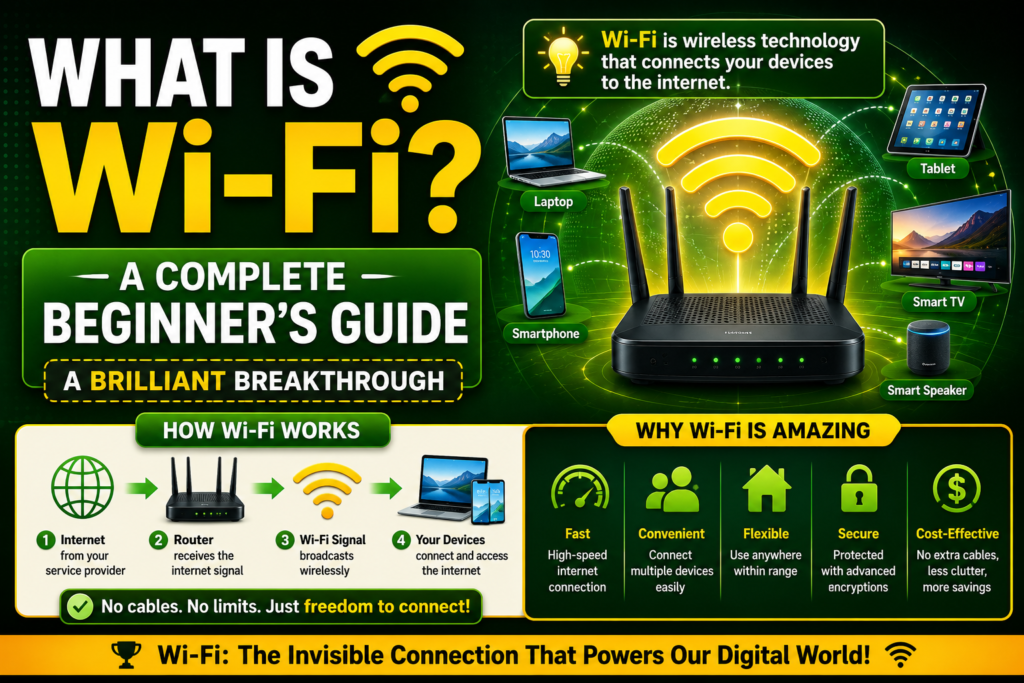
We live in an era where internet connectivity is just as vital to our daily survival as running water, electricity, or heating. We use our smartphones to check morning headlines, work from laptop computers in cozy neighborhood cafes, and control smart home security appliances from miles away. This effortless digital lifestyle is entirely powered by an invisible, silent network that floats all around us.
Yet, if you ask the average person on the street to define it, they will likely hesitate. Having what is wi-fi explained in plain language removes the frustrating technical confusion from this essential tool. It changes how you view your home networking hardware forever.
At its core, this technology is a brilliant system that lets your electronic devices talk to the internet without a single physical wire holding you back. This comprehensive guide serves as an introduction to Wi-Fi, explaining the foundational science, the necessary equipment, and how to stay perfectly safe in a completely untethered digital landscape.
The Absolute Basics: Wi-Fi Definition for Beginners
To start on the right foot, let us establish a clean, practical Wi-Fi definition for beginners. If you look past the dense manuals filled with computer science jargon, this technology is essentially a two way radio network.
Think about how a standard car stereo works. A commercial radio station broadcasts music from a giant metal tower through the air. Your car antenna catches that invisible signal, translates it, and plays the music through your speakers.
[Global Internet Data] ──► [Your Router] ──► (Radio Waves) ──► [Your Phone]
[Global Internet Data] ◄── [Your Router] ◄── (Radio Waves) ◄── [Your Phone]
This technology follows a nearly identical process. However, instead of a giant tower broadcasting music to a car, your home router broadcasts digital computer data to your personal laptop. Furthermore, unlike a car stereo which can only listen, this system allows your phone to talk back to the router, creating a hyper fast, ongoing digital conversation. It provides unmatched mobility, allowing you to walk from room to room without dropping your connection to the world wide web.
The Historical Origin of the Naming System (1995 – 2000)
Many everyday consumers hold a deep, persistent belief that this name is a literal acronym representing a hidden scientific phrase. Specifically, people assume it stands for “wireless fidelity.” However, this assumption is completely wrong.
If you want to know the true story, exploring why is it called wi-fi reveals that the word was invented by a commercial branding agency in 1999. The engineering committee responsible for designing the technology had created a highly reliable standard, but its official title was “IEEE 802.11b Direct Sequence.”
Recognizing that this cold string of numbers would confuse regular shoppers and stall consumer awareness, the alliance hired marketing professionals to craft a clean, approachable, and catchy trademark. The team designed the word because it sounded memorable and rolled off the tongue gracefully. The name stuck instantly, completely transforming the marketing of wireless networking and accelerating global adoption.
What Do You Need for Wi-Fi? The Core Equipment
A common point of confusion for beginners is the difference between wireless hardware and the actual internet service running through a house. You cannot simply buy a router at an electronics store, plug it into a bedroom wall, and expect to browse websites instantly. To build a functioning home wireless environment, you need three separate components working in unison.
1. The Internet Service Provider (ISP)
This is the external utility company that you pay a monthly fee to for data access. They lay physical infrastructure, such as fiber optic or copper cables, directly into your neighborhood, acting as your main pipeline to the global internet.
2. The Modem
The modem acts as a universal translator. The data running through your provider’s external cables arrives in a highly specialized format. The modem takes this external signal and translates it into a standardized digital language that residential consumer computers can easily understand.
3. The Wireless Access Point (The Router)
The router connects directly to your modem using physical cables. Its core job is to take that clean digital data stream from the modem and convert it into invisible radio waves that fill your home. It acts like a digital traffic cop, ensuring that a photo sent to your personal smartphone doesn’t accidentally show up on your sister’s tablet screen.
How Data Travels Through Thin Air
To truly appreciate the brilliance of this technology, it helps to understand how a digital file transforms into an invisible wave. Computer networks operate exclusively on binary code, which is a continuous stream of ones and zeros.
To help visualize how modern network chipsets process this data path, engineers write software protocols to handle incoming traffic. Below is a simple Python simulation demonstrating how a device breaks down an incoming data payload and reads the signature to confirm it is a safe, validated wireless transmission:
Python
def process_wireless_packet(packet_payload, encryption_status):
    """Simulates how a wireless chipset receives and decodes data packets."""
    print(f"Receiving Data Packet: Size {len(packet_payload)} bytes...")

    if not encryption_status:
        return "Packet Rejected: Security warning, unencrypted broadcast detected."

    # Decoding simulation process
    decoded_message = "".join([char for char in packet_payload if char.isalnum() or char in " _"])
    return f"Success: Data packets decoded smoothly. Payload: '{decoded_message}'"

# Simulating an incoming data stream on a home network
sample_stream = "###DATA_PACKET_WI_FI_SECURE_1997###"
is_secured = True
decoding_result = process_wireless_packet(sample_stream, is_secured)
print(f"System Output: {decoding_result}")
This fundamental step of processing data packets Wi-Fi hardware executes every microsecond shows exactly how wi-fi works underneath the branding. Your device takes the raw binary numbers, wraps them into neat digital envelopes, and uses an internal transmitter to modulate them onto high frequency radio waves, sending them flying through the room safely.
Navigating the Airwaves: Frequencies and Standards
When you dive into the settings menu of a modern smartphone or computer, you will often notice different options for network connections. These options are defined by specific radio lanes and international engineering rules.
The Radio Highway: Frequencies Explained
The invisible signals travel along specific blocks of the electromagnetic spectrum, usually split into distinct lanes called gigahertz bands. To learn how to pick the correct lane for your device, reading a dedicated wi-fi frequencies explained resource is highly beneficial.
The 2.4 GHz lane operates like a large, slow delivery truck; it travels very far and passes through solid walls easily, but it offers lower peak speeds. The 5 GHz lane operates like a high speed sports car; it delivers data incredibly fast but struggles to pass through doors and drops off quickly over short distances.
The Rulebook: Standards Explained
Because hundreds of different hardware manufacturers build laptops and smart televisions, the global tech sector relies on a strict set of rules to keep the airwaves organized. Reviewing a comprehensive wi-fi standards explained timeline shows that these rules are constantly being updated by international committees.
[Legacy Era: 802.11b] (1999) ──► [Mid Era: 802.11n] (2009) ──► [Modern Era: Wi-Fi 7] (2024)
The industry moved from older legacy formats like 802.11b up to modern variations like Wi-Fi 6 and Wi-Fi 7. These numbers simply let consumers know how fast and efficient a specific piece of equipment is.
Guarding Your Digital Doorway: Security Basics
Because radio waves are broadcast out in every direction at once, they do not stop at your front door. Your wireless signal spills out into your driveway, your backyard, and your neighbor’s living room. Without proper protection, anyone sitting in a car outside your house could intercept your personal data.
This vulnerability is why understanding wi-fi security explained is the single most important step for any beginner. When you set up your network, you must always choose WPA2 or WPA3 encryption in your settings menu and create a strong, unique password.
This security framework acts like an advanced scrambler. The moment data leaves your laptop, the router encrypts it into a chaotic puzzle. Even if a stranger intercepts the radio signal out of the air, they will only see a meaningless wall of garbled text, keeping your bank accounts, personal emails, and passwords completely safe from prying eyes.
Exploring Alternative Options: The Wireless Ecosystem
Wireless internet is the undisputed king of home connectivity, but it is not the only option available in our modern tech evolution. To understand where this technology excels, it helps to compare it to alternative connection types.
If you read a detailed wi-fi vs ethernet compared analysis, you will see that ethernet uses a physical copper cable plugged directly from your computer into the router. While cables lack mobility, they provide completely stable, lag free speeds because they are entirely immune to the environmental radio interference that can slow down airwaves.
Furthermore, consumers often confuse this tech with other nearby wireless options. A quick wi-fi vs bluetooth vs nfc comparison reveals that while our main network handles heavy broadband data like streaming 4K video across an entire house, Bluetooth is designed for low power, short distance links like connecting wireless headphones to a phone. Meanwhile, NFC (Near Field Communication) only works across a distance of a few centimeters, powering contactless mobile payments at grocery store checkout registers.
Setting Up and Optimizing Your Home Network
Bringing a new wireless network online for the first time does not have to be an intimidating chore. By approaching the task step by step, you can secure a clean signal across your entire living space.
First, unpack your hardware and connect your modem to your internet provider’s wall outlet. Next, run an ethernet cable from the modem’s output port directly into the WAN port on your new router. Power both boxes on and wait a few minutes for the status lights to stop blinking.
Open a web browser on a laptop connected to the unit and follow the step-by-step setup wizard to customize your network name (SSID) and set a secure password. For a complete, deep walkthrough on this process, checking an in depth guide on how to set up a wi-fi router will ensure you don’t miss critical security checkboxes during the initial configuration.
Once your network is running, placement is key. Do not hide your router inside a closed wooden cabinet or place it on the floor behind a heavy metal couch. To maximize your coverage area, place the access point on a high shelf in a central room of your house. This simple adjustment ensures that the invisible radio signals can radiate outward evenly, giving you maximum performance on all your devices.
Frequently Asked Questions (FAQs)
What is the true difference between Wi-Fi and the internet?
The internet is the massive global network that contains all the world’s websites, cloud videos, and digital data banks. Wi-Fi is simply the invisible radio bridge that connects your personal device to that global network. Think of the internet as the water flowing through city pipes, while your router acts like the wireless faucet inside your kitchen.
Can someone steal my personal information if I connect to a public network?
Yes, using open public networks in places like coffee shops or public transit carries real risks. Because these networks lack strict password security, sophisticated hackers can sometimes intercept the data packets traveling through the air. To stay safe, never access your mobile banking apps or enter credit card information while connected to an open public hotspot.
Why does my wireless connection drop when I turn on the microwave?
Many older home routers operate on the 2.4 GHz frequency band. This is the exact same frequency that standard kitchen microwaves use to heat food. If your microwave has slight shielding leaks, running it can create immense radio noise that completely drowns out your router’s signal, causing temporary drops in connection.
How many devices can I connect to a single home router?
For standard consumer routers, you can typically connect anywhere from 30 to 50 devices simultaneously before noticing speed issues. However, modern Wi-Fi 6 and Wi-Fi 7 units are specifically engineered to handle the high density of modern smart homes, managing over 100 smart devices smoothly by utilizing advanced channel splitting algorithms.
Conclusion: Emancipating the Digital World
When you trace the complete journey of this technology, it becomes clear that having what is wi-fi explained highlights one of the greatest collaborative triumphs in the history of science. It took world class radio astronomers, creative marketing minds, and international engineering committees to build the seamless framework we enjoy today.
By turning complex, messy electronic data streams into beautifully organized radio waves, this breakthrough completely unchained humanity from physical desks. It created the modern mobile economy. The next time you effortlessly open a web browser from your bed, take a quick moment to appreciate the invisible dance of ones and zeros vibrating all around you, silently keeping you connected to the vast repository of human knowledge.

